If you want to restore this functionality in version 2.82: under Edit -> Preferences… there is an add-on called Paint Palettes. This adds a new tool to your N menu (top right of your main view) called ‘Paint’.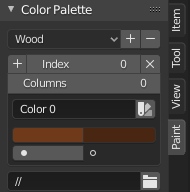
To add a new palette, click the ‘+’ next to Index. To save the palette you’ve created, click the ‘+’ next to where the word ‘Wood’ is in the above screenshot. It works pretty much identically to shown in the video, except you have to eyedropper it into your current palette..

