
Reply To: UE4 Support, naming convention for Assets etc.
Forum Archive › UE4 Support, naming convention for Assets etc. › Reply To: UE4 Support, naming convention for Assets etc.

@bango My experience baking high poly assets down to low poly assets in Substance Painter is limited. I’ve done it a handful of times, but I don’t remember having multiple materials for high and low poly assets. Maybe we’re talking about different things. When I want to bake onto a low poly asset, I just import that asset into Substance Painter. From there I click on the Bake Mesh Maps option:
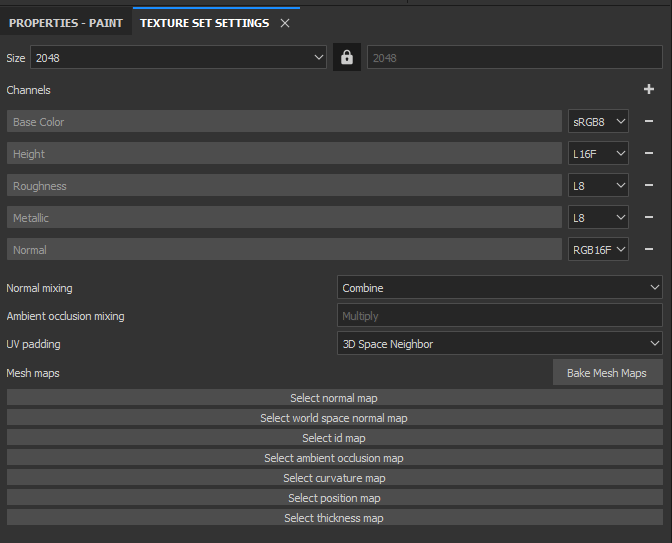
From there I provide a high poly mesh to bake within those settings here:
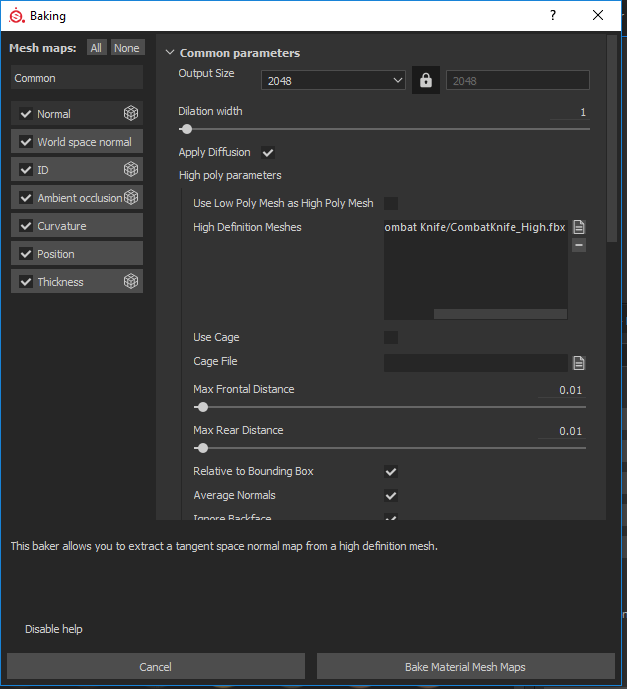
Where it says “High Definition Meshes”, that’s where I provide the file for the high poly model. As far as I know this doesn’t import any additional materials. Along with that, I don’t see why you’d need two sets of materials. The high poly mesh is essentially just used to capture details from it which are baked onto the low poly mesh. Only one set of textures and materials would be exported. You don’t even need to add _low or _high to the meshes. These could be in separate folders altogether if it helps you.
I think you’re over analyzing the naming structure, just find what you feel works best for you. For the folder hierarchy you will more than likely always have your main folders and child folders within them. For example a common setup for a larger project for me would be:
Animations
-Character
-Enemy
-General
Audio
-Music
-Sound FX
Scripts
-Player
-Enemy
-Utility
You can create folders how you posted, but the problem starts when you have multiple assets. If you have 10 different assets you then have ten separate folders. The problem then becomes finding a specific file if you forget what it’s attached to. For example if you have a unique script you used for health and you have it within one folder but you forget where, you then need to search for it.
It’s much easier to find something based off a general category. In this case you know you’re looking for a script, so you’d find it within a scripts folder. Think of it as an upside down pyramid. If you know the general category you can then refine your search until you find what you want. If you have everything in specific folders, you have to start off with that refined search first. In either case it really comes down to personal preference.
I would recommend looking at multiple projects on say Github to get a better idea of how people organize their projects and go from there. Also don’t forget to check out Epic’s own naming convention here: https://wiki.unrealengine.com/Assets_Naming_Convention