The empty white looking cube is usually a game object. Sometimes you can create an empty prefab and it’ll appear that way as well.
The blue cube with a file icon is a model prefab as you mentioned. Anytime you import any 3d meshes it’ll have this icon. It’s technically a prefab, but you can’t modify the original within Unity.
The solid blue cube is an icon for a prefab. Prefab variants are slightly different, and I believe it has a “V” icon in the middle with the blue cube behind it.
The plus icons denote a change made to a prefab. So if you added a component to a prefab, it’ll let you know that you’ve made that specific addition to the prefab. So as an example, this prefab has not been touched:

If I add a box collider to it, it now has a plus icon next to the component icon:
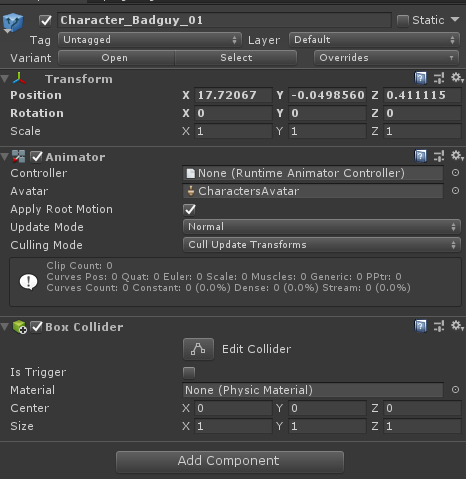
If you click Overrides in the top right in the inspector panel. It’ll allow you to make changes to that prefab and displays a list of changes made (with the plus icon as well):

As far as the gear icon, this always appears when you create a script called GameManager. It’s something that has been in Unity for quite a while. It doesn’t really do anything as it’s just a visual icon. I believe it originates from something Unity built in the back end that has a similar name and they used that icon for it.

