
Displacement bake issues (Again)
Forum Archive › Displacement bake issues (Again)
- This topic has 11 replies, 4 voices, and was last updated 3 months, 2 weeks ago by
Dwayne Savage.
-
AuthorPosts
-
May 14, 2026 at 1:08 pm #21576
hi i tried to make the bake for the displacement map in the human course but it made a grey texture with no detail from the level 6 at all. i tried everything that you suggested to others but had no luck and honestly i think i wont ever use blender for baking so i’m about to take the free trial for subtance and bake the height map there and bring it to blender so i can continue the course. why is that happening and also why it keeps happening even with blenders base meshes which should behave flawlessly by default?
May 15, 2026 at 12:33 am #100301Hi Savvas @savvas ,
Hard (read: impossible) to tell from your description alone. Could you provide your .blend file (File > External Data > Pack Resources), please?
Also, it’s not unlikely, that Baking it in other Software, like in Substance, won’t make a difference. (You’d even add an extra layer, Import/Export, where things can go wrong.)
May 15, 2026 at 6:13 am #100302As always i spent the whole night figuring this out. For some reason the texture from the displacement bake (while in the solid tab with the texture setting enabled in the viewport shading) is shown completely different from the material preview tab. i figured this out when i continued the lesson and baked the next map from the level 2 to level 6 in the multires. As shown in the lesson i connected a color ramp node and there it was, all my detail captured in 4k. then i tested the first bake and again the texture was shown as expected.
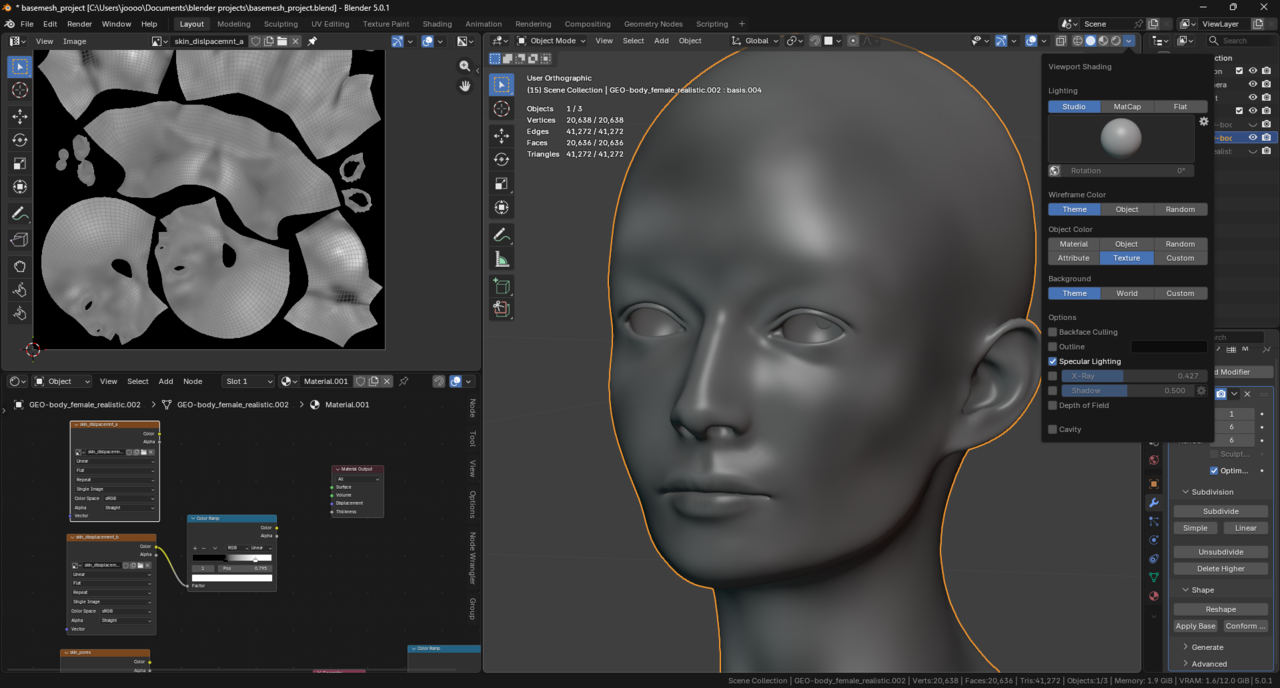
This is the first bake in shown in the solid tab. looks very different than the one shown in the lesson.
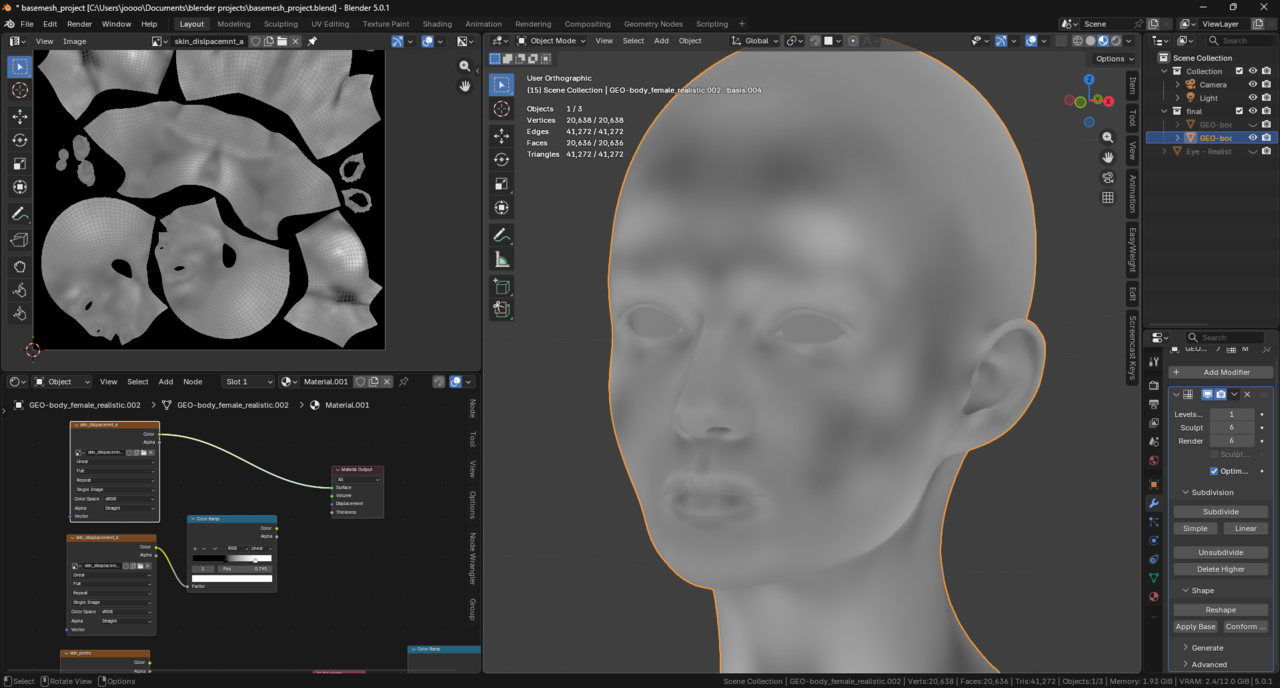
Same bake in the Material preview tab. looks fine, i didn’t have much pore depth to be shown in the first map.
Ok now the level 2 map in Solid tab, looks like no detail was even captured
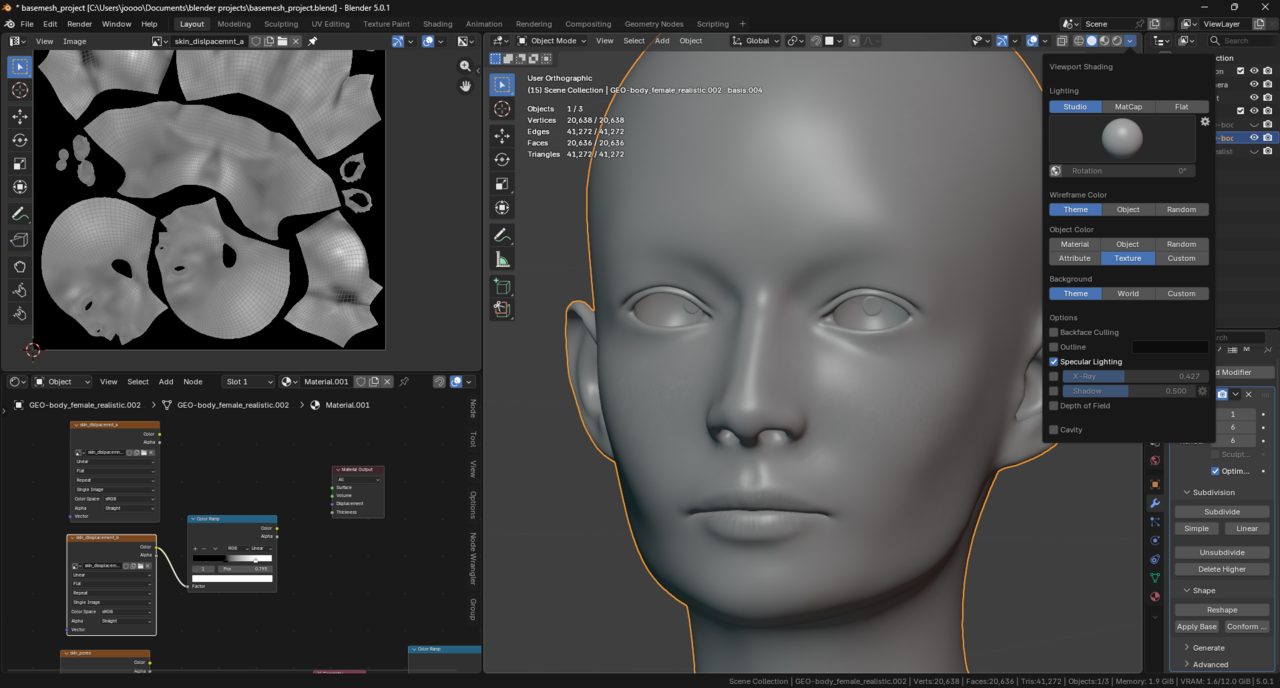
And in the Material preview all my detail i shown just fine. and that’s why i thought that the bakes are falling.
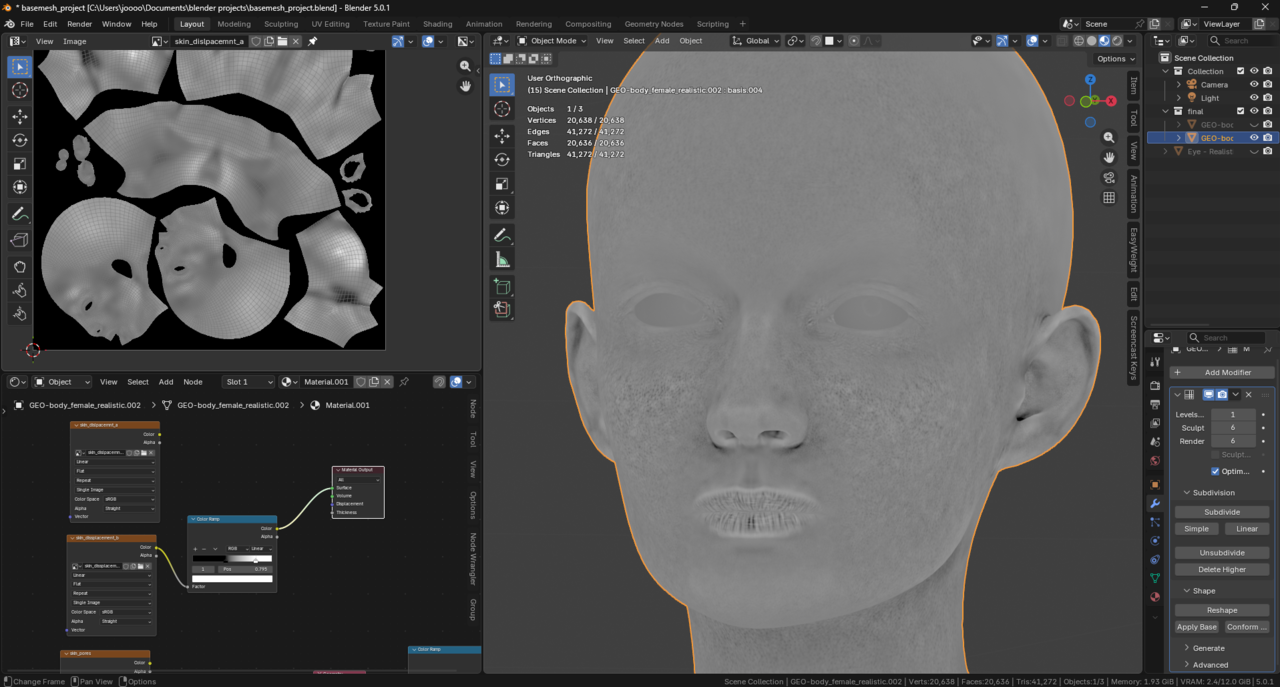
Now i have a really bad time figuring out how to bake the pointiness map. my pc has a 4070 with a i5 13600kf and 32gb ddr5 ram and blender crushed every time. i don’t know what to do it drives me crazy.
May 15, 2026 at 8:03 am #100303Hi Savvas,
Glad you figured that out. Texture in Solid Mode just shows what Texture is used, not how it’s Mapped exactly.
For the Pointiness Map, you may need to switch to CPU for that…(Blender crashing makes me think that you ran out of VRAM)
May 15, 2026 at 11:12 am #100304Ok I have 12gb of vram and maybe thats the case. Working with 40mill triangles is too heavy. Will that be enough in substance for baking? From what I saw substance has superior baker and supposed to be more efficient so thats where I’ll focus going forward. I did bake the pointiness map with level 5 on the multiress and I think it will get the job done but I still lose the detail of level 6. No way I upgrade my pc even more in this market.
May 15, 2026 at 1:53 pm #100305Like I said, try Baking with the CPU. If the VRAM is the problem, that should work.
May 15, 2026 at 2:10 pm #100306And just in case, BAKE can help you troubleshoot all your baking problems.
https://cgcookie.com/courses/bake-texture-baking-with-blender
May 16, 2026 at 10:28 am #100307no baking with cpu is even slower. I tried to connect the geometry node from pointiness to color ramp and then to emission shader and connect all that in the surface and then go to render tab as shown in the course but when it was at the point where it said “updating light” in the top left corner it just said after a while “out of memory”. and indeed my pc run out or ram even at 32gb. When i switched it back to level 5 and triangles went from 40mil to 20mil then it was possible to render the mesh and bake it. I suppose i hit the limitations of both my pc and blender.
Can you please explain to me the true limitations of blender. I’ve seen people say that its nowhere near to zbrush in terms of polycount and i suppose that’s true. Can you tell me at least what expectations i should have from the program because as many people here i cant afford zbrush at all. Thanks for helping btw
May 16, 2026 at 2:39 pm #100308Of course Baking with CPU is slower, but it’s also better, if it prevents Blender from crashing. Not sure what you mean by the next part, when you’re “going to the Render Tab as shown in the Course”.
One of the strengths of Blender is that it can do ‘everything’, so you don’t have to switch between Software. It also runs at relatively old hardware.
Specialised Software like ZBrush, often outperforms Blender, but can only do one, or just a few things.
Most of the limitations of Blender (like Polycount), depend on your Hardware (as does all Software).
May 16, 2026 at 8:25 pm #100309Blender is a good competitor to Maya 100% but to zbrush not even close. The fact that I could barely decimate a 20mil quads mesh while having 32gb of ram sounds crazy to me ngl. Buying zbrush for a year is cheaper than buying 32bg of ram right now.
May 17, 2026 at 12:44 am #100310Blender beats ZBrush in Gigging, Animating, PostProcessing, Video Editing, 2D and many more.
But ZBrush is definitely better at Sculpting.
It is possible, that ZBrush handles larger Meshes, because it uses the power of a modern GPU. While Blender tries to be compatible with 10 year old Hardware.
It is also possible, that your Windows uses up quite a bit of your Systems Power and Memory (especially if your using Windows 11).
But whatever the reason(s), ZBrush handles large Meshes better.
Wow, I just looked at RAM prices😱
May 17, 2026 at 7:39 am #100311Look @savvas, there are areas where Blender doesn’t compare to Maya. There are areas where Blender excel. Blender is constantly improving. So much so that they changed how Meshes are stored in blend files and breaking compatibility to allow for higher poly count. All these software are just tools. The techniques and principles apply regardless of the software. Ton wanted to inspire and allow artist to create their own art. That is why Blender is free and will always be free. That’s why you can download any version of Blender. That’s why Blender is a Swiss Army Knife. For people who can’t afford a subscription or a new computer there’s Blender. I mean even in Blender 1.8, TAB for edit mode, G for grab/move, R for rotate, S for scale, and E for extrude are all still there. Any serious studio is going to use multiple programs and yes Blender is one of them now. I mean if I had to put in a hundred screws would I prefer a drill will a screwdriver tip over a screwdriver? Yes I would, but if I can’t afford a drill the screwdriver will get the job done.
-
AuthorPosts


- The topic ‘Displacement bake issues (Again)’ is closed to new replies.