Pixar-style topology

Forum Archive Pixar-style topology

Viewing 5 posts - 1 through 5 (of 5 total)
  • Author
    Posts
  • #21325
    Sid Edwards
    Participant

      I’d like to practice developing cartoon characters with simple but effective, industry standard pixar-like topology for torsos, limbs, extremities, the face, etc of non-human characters.

      Is there a video series that goes over this?

      #99443
      Charles
      Participant
        #99444
        Omar Domenech
        Participant

          If it’s Industry standard, it probably isn’t simple. Those guys make a lot of complicated stuff. And since raytracers are design to simulate reality, I find it’s harder to make cartoon stuff in them, it’s like you have to hack them. Luckily people have already figured it out. 

          #99445
          coyo
          Participant

            There are at least a couple of approaches to topology that could be considered “industry standard”. Pixar is often working with fairly dense meshes which seems to let them “get away with” using more grid-based topology. Their characters are also often done in a certain style and so their topology is probably dialed in so the animators can get what they want out of the models.

            More commonly one sees topology with loops around areas that will see significant deformation. Eyes, mouth, joints, etc. This can be a lot more flexible in the long run, especially if you aren’t sure of what the animation requirements will be for the model. Specifically, loops can allow one to add or remove geometry where and as needed without necessarily increasing the density of large portions of the model.

            Ultimately, whatever gets the look and required behavior out of the model is the “right” technique. Every studio is going to have their own internal best practices (which we rarely get to see/hear about) and every model is likely to have its own required behavior. As a student one needs to consider the bigger picture – while working through projects it’s not necessarily the specific tools and techniques that are most important, it’s the concepts. If you know Blender but move to Maya or another similar tool you’ll likely be able to pick it up quickly because you know the concepts of 3D modeling. If you typically use one approach to retopology but a studio prefers another you’ll know the concepts and be able to transition without issue. From experience, if someone has an impressive portfolio it won’t matter to a studio if their exact method is represented – they’ll have a more senior artist train a new hire.

            #99446
            Dwayne Savage
            Participant

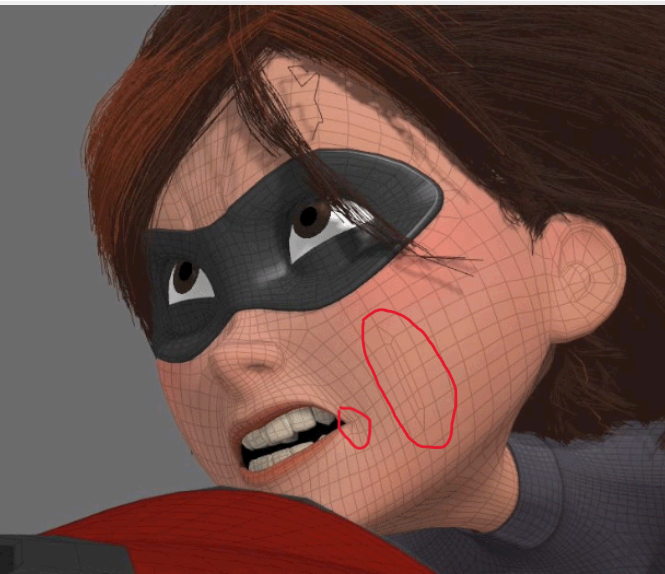
              Pixar uses the same principles of topology as everyone else. As @coyohti said: “Ultimately, whatever gets the look and required behavior out of the model is the ‘right’ technique.” For example: Elastigirl from the movie The Incredibles breaks face loops in the cheek and has a triangles in the corner of her mouth. The triangles make for better mouth shapes when stretched out. The break in the face loop on the cheek is used to create dimples and to make smoother transitions when her cheeks are blow out. Then there’s the forehead and browse area. The list can go on and on. It all boils down to experience, and the best way to get experience is to play around with it. I refer to something Wayne said that changed things for me. I’m paraphrasing: “If you’re not failing, you’re not learning”

              EGirl.png

            Viewing 5 posts - 1 through 5 (of 5 total)
            • The topic ‘Pixar-style topology’ is closed to new replies.