Blender quits/crashes during Emission Bake for pore texture (Realistic Character Course)

Forum Archive Blender quits/crashes during Emission Bake for pore texture (Realistic Character Course)

Viewing 15 posts - 1 through 15 (of 19 total)
  • Author
    Posts
  • #21042
    Aashish Patel
    Participant

      Hi everyone,

      I’m following a CG course for creating a realistic human character. Everything was going fine, but I’m stuck at the emission baking step used for baking pore details onto the face.

      The instructor’s settings and my settings are exactly the same, but whenever I click Bake, Blender runs for a while and then completely quits/crashes without showing any error message.

      What I’m doing:
      Baking Emission Map for face pores

      Following the exact node setup from the course

      Texture size: 4K

      Margin: 10px

      Cycles → GPU Compute

      What I’ve tried:

      Restarted Blender

      Reduced bake resolution (same issue)

      Disabled addons

      Tried CPU bake and GPU bake

      Tried a fresh .blend file and appended objects

      Increased undo steps + memory settings

      Issue:

      Blender closes suddenly in the middle of the baking process with no crash report.

      My System Specs (New PC):

      Processor: Intel Core i9-14900KS

      Motherboard: Gigabyte Z790 UD AC

      GPU: Gigabyte RTX 5070 Windforce 12GB GDDR7

      RAM: Corsair Vengeance 64GB (32×2) DDR5 5200MHz

      Storage: NVMe SSD

      OS: Windows 11

      What I need help with:

      Why is Blender crashing during emission bake?

      Is it a GPU/VRAM memory spike issue?

      Any recommended bake settings for high-detail pore maps?

      How can I check proper crash logs?

      Thanks in advance for any help!

      #98119
      Martin Bergwerf
      Participant

        Hi Aashish @aashishpatel ,

        Have a look at this: https://docs.blender.org/manual/en/latest/troubleshooting/crash.html 

        Or a similar page for the Blender Version you are using.

        If you want, you can upload your .blend file (Pack all Resources!) to Google drive, Dropbox, or so and post a link here, so we can test it on our hardware..

        Please, also tell us what Blender Version you are using.

        #98120
        Omar Domenech
        Participant

          What I usually do is just render or bake on other different Blender versions. Chances are whatever rogue 0 or 1 that is causing the crash, isn’t there in other Blender version. What I also do is import or copy paste all my stuff into a brand new .blend file and usually if it’s a bug on my file, it wont be there on a brand new one. 

          #98121
          Aashish Patel
          Participant
            #98122
            Martin Bergwerf
            Participant

              Hi Aashish,

              Sorry, but that doesn’t provide me with any new information (apart from the Blender Version).

              #98123
              Aashish Patel
              Participant
                #98124
                Martin Bergwerf
                Participant

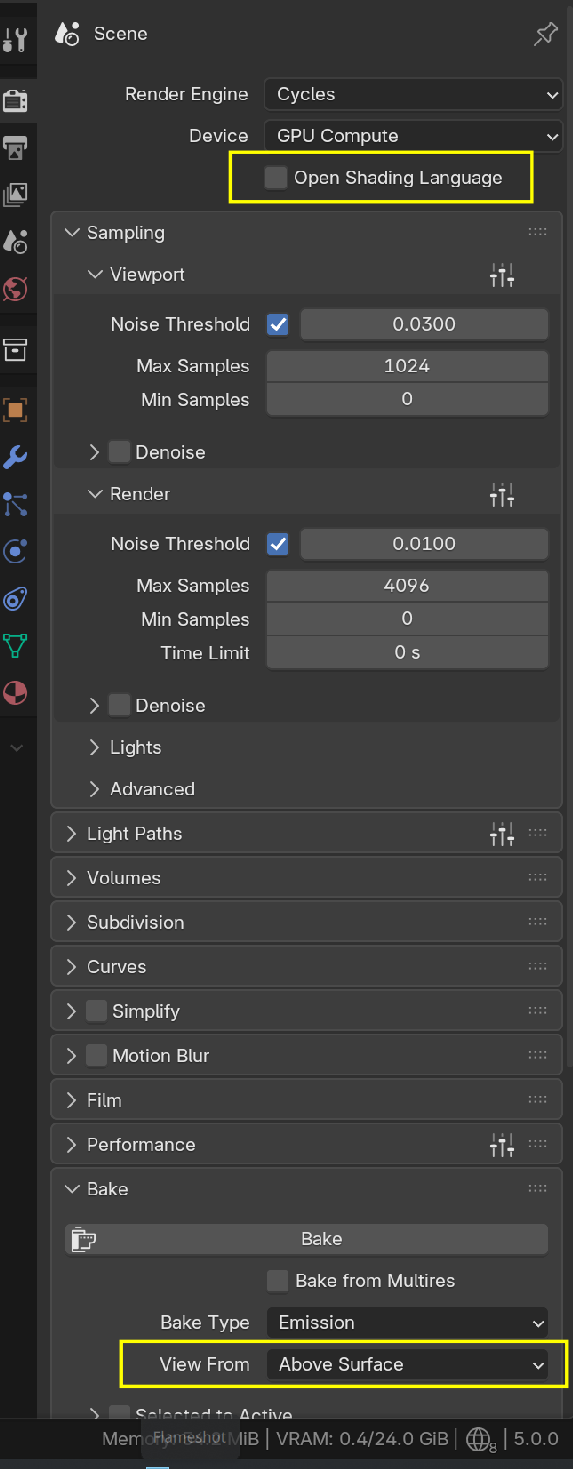
                  What I do notice, is that you don’t have an OSL checkbox and your ABove Surface is greyed out:

                  Bake_01.png

                  So maybe it’s an Addon you’re using?

                  #98125
                  Martin Bergwerf
                  Participant

                    I’ll have a look at your .blend now

                    #98126
                    Aashish Patel
                    Participant

                      That OSL option is only available when using OptiX. I am using CUDA, and I don’t use any addon. And that above surface option only available when you have camera in your scene, so right now i do not have any camera so it is disable.


                      #98127
                      Martin Bergwerf
                      Participant

                        Okay, 

                        So it Bakes fine on my PC.

                        That Above Surface is greyed out  for me as well, so we can ignore that.

                        Might be an Addon, like I already mentioned (this is not unlikely).

                        Or you need to update your Drivers.

                        Or it’s something else…???

                        #98128
                        Martin Bergwerf
                        Participant

                          Sorry, I didn’t refresh the Page before answering…you already answered most.

                          #98129
                          Aashish Patel
                          Participant

                            In my blender there is only one addon is there right now which is blender kit, and also i have updated drivers.

                            #98130
                            Martin Bergwerf
                            Participant

                              Maybe…it’s a Windows thing? 

                              I heard someone complaining of 5.0 (Release Candidate) crashing on a Windows machine…

                              #98131
                              Martin Bergwerf
                              Participant

                                Have you tried disabling Blenderkit?

                                #98132
                                Aashish Patel
                                Participant

                                  Ok so let me try on the another version of the blender, after that I will update here what happen.  

                                Viewing 15 posts - 1 through 15 (of 19 total)
                                • The topic ‘Blender quits/crashes during Emission Bake for pore texture (Realistic Character Course)’ is closed to new replies.