Blender 4.2 LTS and our script are not freinds

Forum Archive Blender 4.2 LTS and our script are not freinds

Viewing 7 posts - 1 through 7 (of 7 total)
  • Author
    Posts
  • #20530
    Aviv Yanowski
    Participant

      Hi,

      I’m really enjoying the course and wish to ask if there is any walk around the titled issue.
      After all, 4.2 seems like its here to stay 🙂

      Thanks,
      Aviv

      #96098
      Martin Bergwerf
      Participant

        Hi Aviv, yes, there is a workaround: use Blender 3.0.

        It might be a matter of a few lines, that nedd changing, but the Blender API has changes between each Blender Version and from 3.0 to 4.2 (and why not 4.5, the latest LTS ?) is quite a stretch.

        Someone else here might know what exactly to change, to make the 3.0 Script work in 4.2.

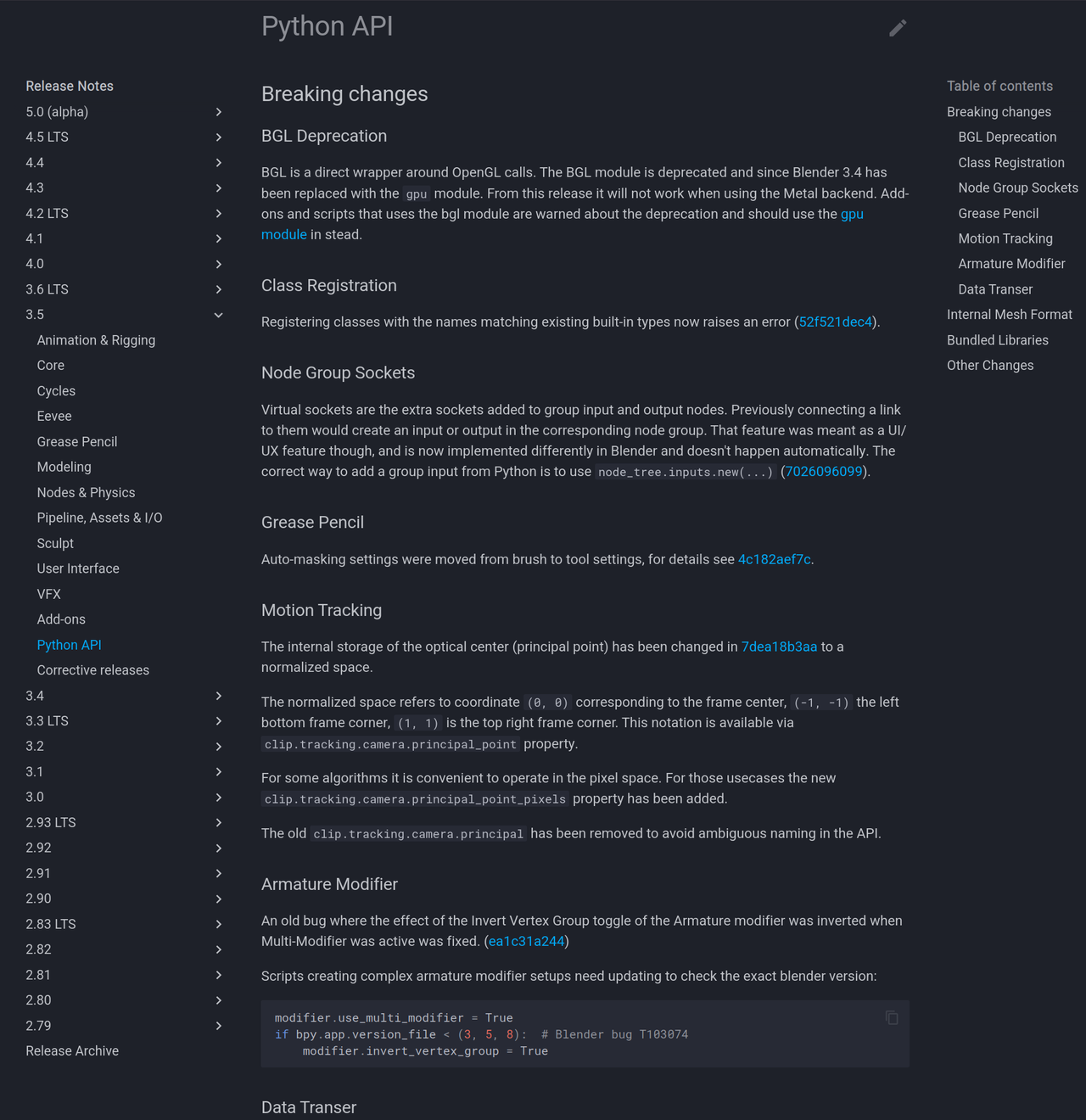
        And if you go to: https://developer.blender.org/docs/release_notes/ 

        You can see what has changed in each Version, so also in the  Python API:

        er Release Notes.png

        #96099
        Steven Goodman
        Participant

          The scripts in that video is for bone layers.
          Bone layers were replaced with Bone Collections in 4.0+

          Script would need to be rewritten from scratch.

          #96100
          Dwayne Savage
          Participant

            Bone layers have been replaced with bone collections. I believe Wayne has a 4.x script for this. If not I can do it when I get home from work in about 4 hours. 

            #96101
            Wayne Dixon
            Participant

              Hi Aviv,

              Here’s how you can fix this.  Why am I making you fix this??  
              So you can learn more.
              You know what they say, “teach a man to fish…..and he’ll become a vegan”
              or something like that.

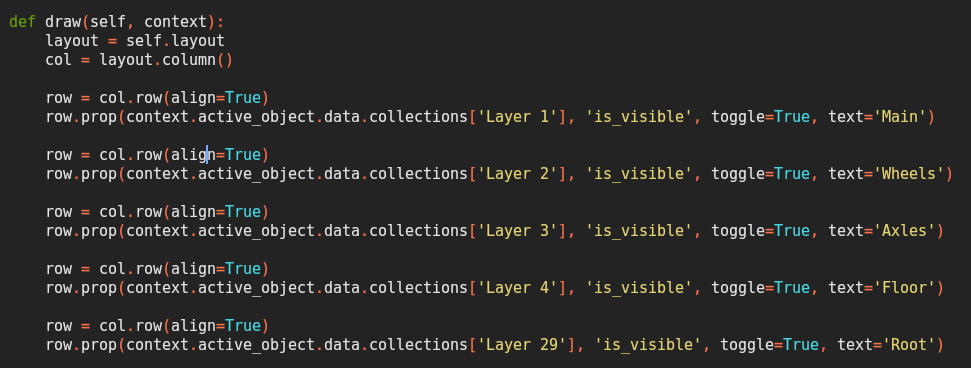
              Ok in the text editor find the section underneath where it says “def draw(self, context):”   on line 21.

              That is the old api.

              Nowadays it should look like this…

              (bear in mind the ‘Layer 1’ should match the name of the collection you have in your file, and the text value can be whatever you want)

              #96102
              Dwayne Savage
              Participant

                The following link is an updated Tidy script. It’s not done efficiently. You will need to be in pose mode when you run it. Also It leaves the bones in any bone collection that they are already assigned to. It took me longer than I thought to figure out how to assign a bone to a bone collection. I see Wayne already covered the UI script.
                https://drive.google.com/file/d/1UHChZ-j1SrMxkqeqnqyLW3hiAunTT5nf/view?usp=sharing

                #96103
                Dwayne Savage
                Participant

                  I’ve updated the Tidy script so it will switch to pose mode and actually move the bones instead of just assigning it to the collection. I’ve also made it more efficient(I hope). It is the rig_tidey_bone_layers4.0.py.
                  https://drive.google.com/drive/folders/1vVy5_HLU6bodWIKrSod6nbtKbnS4vRcf?usp=drive_link

                  For those who just want to see the code without having to download:

                  import bpy
                  # Get active object
                  rig = bpy.context.active_object
                  #Check to make sure it's an armature.
                  if rig and rig.type == "ARMATURE":
                      #Switch to pose mode
                      bpy.ops.object.mode_set(mode='POSE')
                      #Set array for Collection name and Bone name search
                      Type = ["DEF","MCH"]
                      #Loop thru Type. First is DEF then MCH.
                      for TName in Type:
                          if TName == "DEF":
                              Deform = True
                          else:
                              Deform = False
                          #Get collection
                          tcol = rig.data.collections.get(TName)
                          #If collection doesn't exist then create it
                          if not tcol:
                              tcol = rig.data.collections.new(TName)
                          #Add dash to the Type for searching. 
                          TN = TName+"-"
                          #loop thru all bones
                          for bone in rig.pose.bones:
                              #Make sure bone isn't selected
                              bone.bone.select = False
                              #Check if bone name contains the search type. DEF- or MCH-
                              if bone.name.startswith(TN):
                                  bone.bone.select = True
                                  bone.bone.use_deform = Deform
                                  bone.lock_location = [True, True, True]
                                  bone.lock_scale = [True, True, True]
                                  bone.lock_rotation = [True, True, True]
                                  if bone.rotation_mode in ['AXIS_ANGLE','QUATERNION']:
                                      bone.lock_rotation_w = True
                          #Moves all selected bones in pose mode to the collection.
                          bpy.ops.armature.move_to_collection(collection_index=tcol.index)

                Viewing 7 posts - 1 through 7 (of 7 total)
                • The topic ‘Blender 4.2 LTS and our script are not freinds’ is closed to new replies.