Z fighting in grease pencil by angle

Forum Archive Z fighting in grease pencil by angle

Viewing 12 posts - 1 through 12 (of 12 total)
  • Author
    Posts
  • #20523
    Try
    Participant

      I’m looking for a way to fix the Z-fighting in Greek Pencil caused by the fill causing the stroke or line to become damaged.

      Does anyone know how to fix this once and for all? I want to finish something I’m working on, and I can only finish it if I achieve this.

      #96057
      Dwayne Savage
      Participant

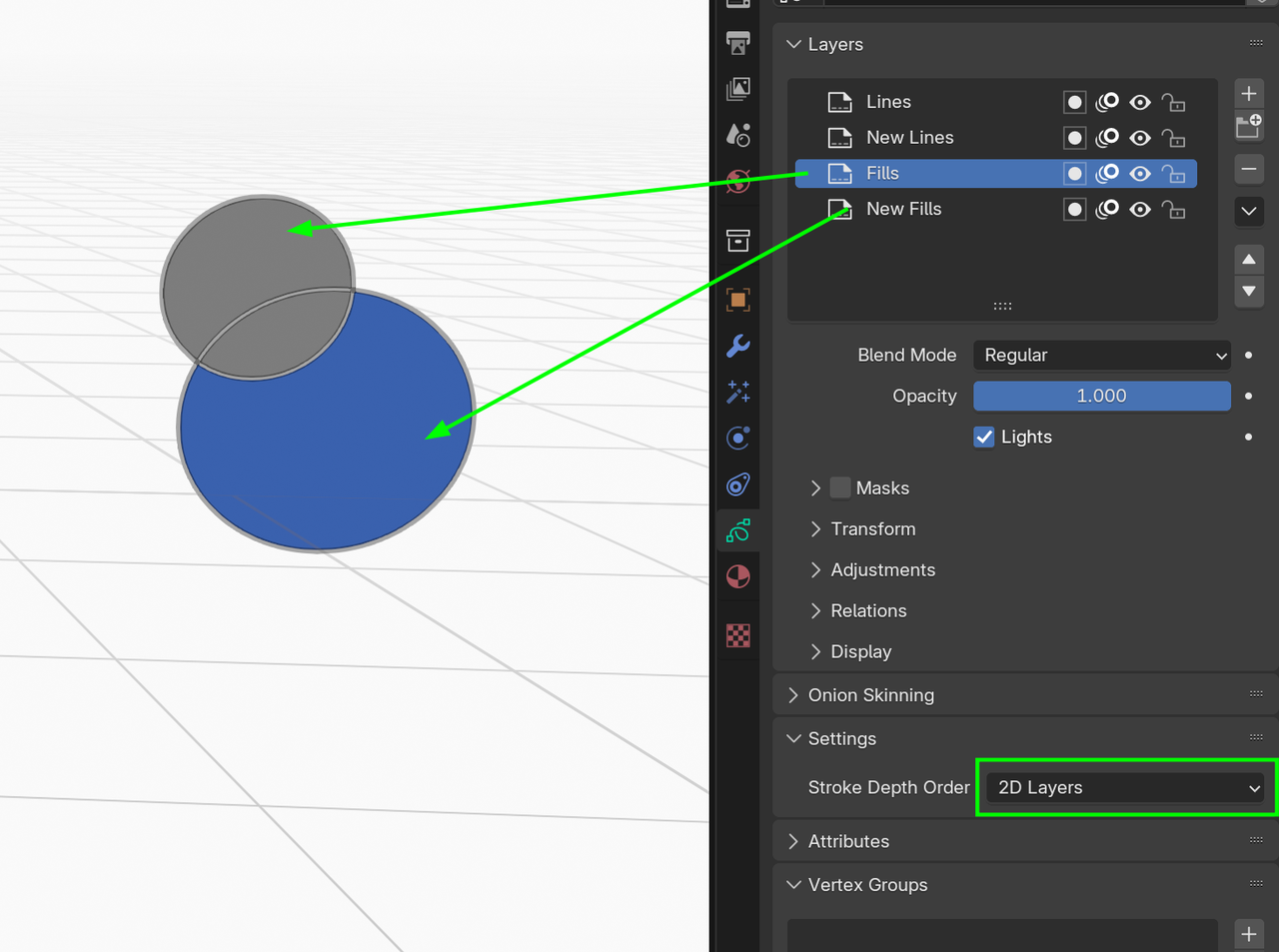
        You don’t really have z-fighting in grease pencil unless you are using multiple GP objects. I would separate the fills from the lines in a separate layer. So since I don’t know your setup I’m going to give some general guidance. If they are multiple object then just move the objects slightly in the 3D space. For example: select the object you want to move and press G->The axis you want to move->type something like 0.002 or -0.002. If they are separate layers then reorder the layer. Goto the layers panel and select layer and press up or down button on the right. This panel can be found in the top of the header or the properties editor->Data/Grease Pencil tab. If they are in the same layer then you can select the GP and press tab to enter edit mode. Select the fill or line(Select a control point/vertex and press L or switch to stroke selection by pressing 2 on top row.) Then you can move the order by using Ctrl+arrow up/down or you can move to a new/different layer by pressing M. 

        #96058
        Try
        Participant

          If it is because of Z Fighting, because what it causes is the fill of the object and both the fill and the line are on different layers.

          _20250726_093247.png_20250726_093258.png_20250726_093315.png

          #96059
          Martin Bergwerf
          Participant

            Hi @Xeinky ,

            You might need to give more context to what exactly you mean. 

            Also, please mention the Blender Version you are using, because Grease Pencil is in very active development and the differences between Blender Versions and how to solve certain problems, especially from 4.0 onward are substantial.

            #96060
            Martin Bergwerf
            Participant

              Okay, forget the first part of my ‘answer’, You already answered that; just mention the Blender Version.

              #96061
              Try
              Participant

                This is the latest version of Blender, Blender 4.4025-07-26 122455.png

                #96062
                Martin Bergwerf
                Participant

                  Thanks! That will be helpful to know.

                  (Btw. 4.5 LTS is the latest 😉)

                  #96063
                  Try
                  Participant

                    Oh, I didn’t know, well maybe I’ll update it later.

                    For now, I want to know how to fix the Z fighting the fill with the line. Just knowing is more than enough for me for now.

                    #96064
                    Dwayne Savage
                    Participant

                      You will need go into edit mode select the fills or the strokes. Then Press shift+Ctrl+ either up arrow key or down arrow key. Depending on which you selected. You can also access thru the menu Stroke->Arrange-> and then either Send to back or Bring to front. You will also want the stroke depth order set to 2D layers. I haven’t used the 3D Location setting so I’m not familiar with it. I had to look up what the default setting is and it’s 2D Layers.

                      #96065
                      Try
                      Participant

                        I’ve tried that, but it doesn’t work for what I’m trying to do.

                        Moving a line forward or backward with Shift + Control plus the arrow works if the fill and the line are on the same layer, but it still doesn’t fix the lines.

                        025-07-26 173908.png

                        #96066
                        Dwayne Savage
                        Participant

                          The only other option I can think of is to move the pieces in the 3D space, which can be done in edit mode.

                          #96067
                          Martin Bergwerf
                          Participant

                            GP_Layers.png

                          Viewing 12 posts - 1 through 12 (of 12 total)
                          • The topic ‘Z fighting in grease pencil by angle’ is closed to new replies.