Fixing the link of a collection

Forum Archive Fixing the link of a collection

Viewing 4 posts - 1 through 4 (of 4 total)
  • Author
    Posts
  • #19977
    Hakan Karaduman
    Participant

      Hi, I was working on my laptop with a linked rig, but then I wanted to move to my desktop. When I emailed the files since the user directory is different, I cannot see the contents of the linked collection, in my main blend file.

      Is there a way to relink or update the path for that collection, without losing the animations etc.

      I selected the animation category because there is no general/core category, sorry if it is wrong.

      #94157
      Leo
      Participant

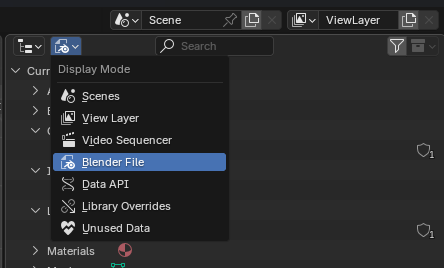
        You can probably display the contents of your file in the outliner at the top. To the right of the search field. (see picture). Then you should have a term “Libraries” and your file/collection should be there. You can then right-click -> relocate.

        I can’t test it now but this could help under certain circumstances

        #94158
        Hakan Karaduman
        Participant

          I did not know about the display mode, that solution worked perfectly. Thank you

          #94159
          Dwayne Savage
          Participant

            You can also use file->external files->find missing files. 

          Viewing 4 posts - 1 through 4 (of 4 total)
          • The topic ‘Fixing the link of a collection’ is closed to new replies.