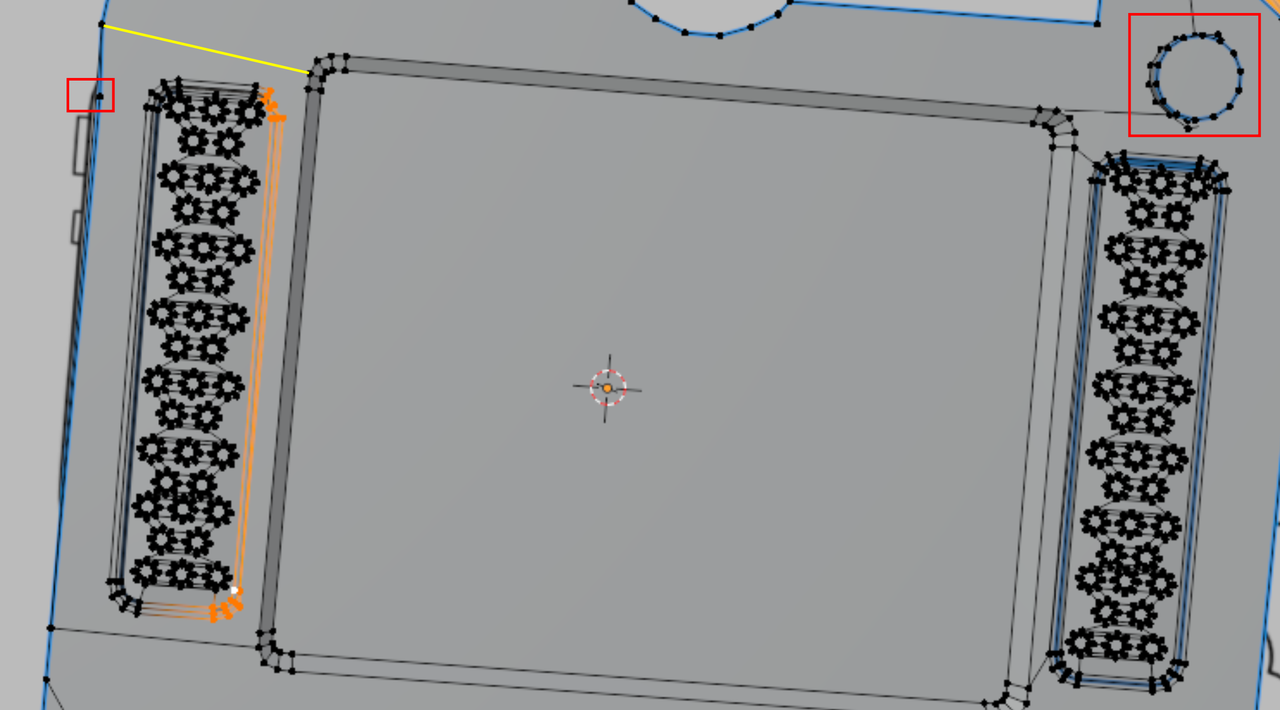
Accidentally messed up the geometry on one speaker. Can I fix it somehow? I already can’t undo it.

Forum Archive Accidentally messed up the geometry on one speaker. Can I fix it somehow? I already can’t undo it.

Viewing 5 posts - 1 through 5 (of 5 total)
  • Author
    Posts
  • #19845

    I’m not sure what I’ve done to it… I noticed too late

    #93693
    Martin Bergwerf
    Participant

      Hi Valentine @ValentineSokil ,

      It looks like there is more wrong with your model, so it’s really best to start over (believe me, it’s counterintuitive, but absolutely worth it!).

      Speaker_01.png

      But what you can do for the speaker, is make a connection (yellow line) between two Vertices with CTRL+J and then Delete all Vertices of the left Speaker nad Duplicate the right Speaker and move it in place and Fill the hole with two Faces, similar to the right side.

      #93694

      Thanks! Can you tell me what’s wrong with it so I can watch out for it?

      #93695
      Omar Domenech
      Participant

        Yeah doubling agreeing. Starting over is great and you can always Shift + D to duplicate a selection. Things always have fixes, but as you model more and more and you waste too much time trying to fix something, you’ll see it’s quicker and better to start over.

        #93696

        UPD: I managed to restore it by duplicating and rejoining the good one… I definitely need to try another game console, but for now just wanna be done.

      Viewing 5 posts - 1 through 5 (of 5 total)
      • The topic ‘Accidentally messed up the geometry on one speaker. Can I fix it somehow? I already can’t undo it.’ is closed to new replies.