
How to shorten length on all axes
Forum Archive › How to shorten length on all axes
- This topic has 16 replies, 4 voices, and was last updated 1 year, 8 months ago by
Martin Bergwerf.
-
AuthorPosts
-
December 19, 2024 at 9:47 am #19404
Hello, I am new here and want some help please,
The lengths of the parts are longer than required, and now I want to shorten them as shown in the image for each side while keeping the object intact but making it slightly shorter on each side. Is there a way to do this? Without resorting to scaling along one of the axes every time by selecting two opposite faces, pressing S, and then selecting one of the axes. I hope the image explains what I meanThanks,

 ” target=”_blank”>December 19, 2024 at 10:27 am #92065
Hi @Blendash ,
The way you describe it, by Scaling each Axis , one at a time, is the best I can think of.
There are other ways, but they are neither faster, nor easier. And let’s be fair 3 Scale operations isn’t really that much work, right?
One of those alternatives, would be, to Select all those end Faces, CTRL+B to Bevel and in the ‘re-do panel’ (F9, or bottom left of the 3D View), enable Clamp Overlap (if it isn’t already). Then M > Merge > By Distance. Select those End Vertices and X > Dissolve Vertices. Chances are, those new Faces don’t end up exactly where you wanted them to in this way.
December 19, 2024 at 10:33 am #92066Oh wait…
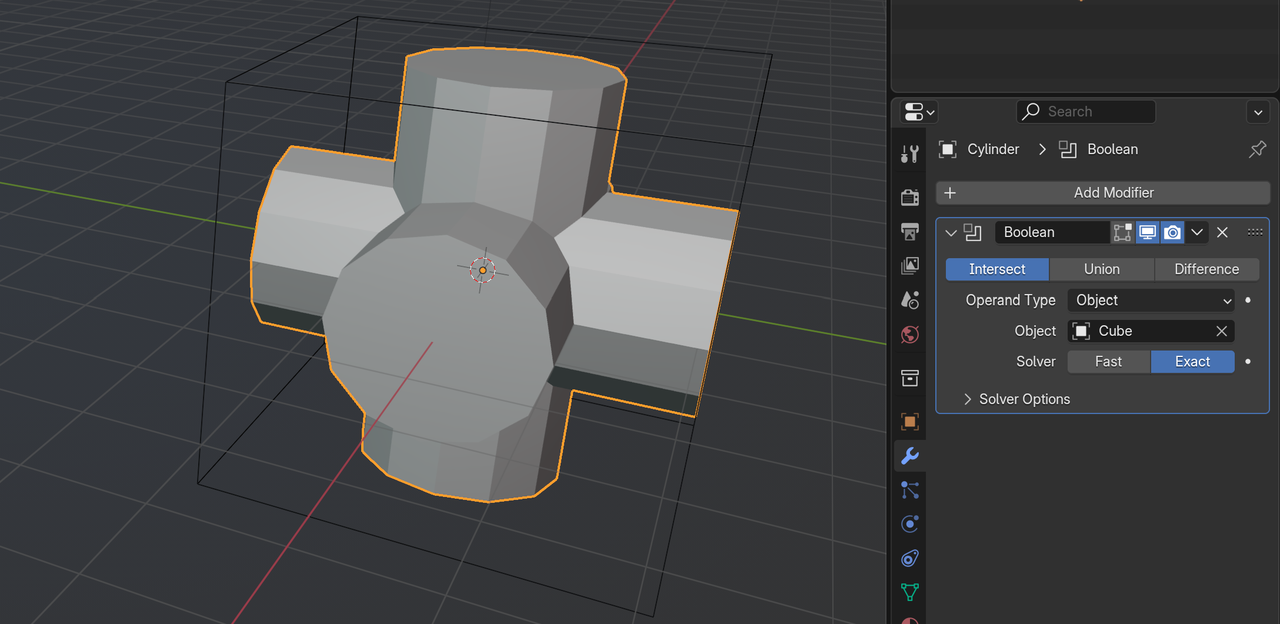
What you could also do, is to Add a Cube (in Object Mode) and Scale that Cube to the correct Size and use a Boolean to cut off what is too much.
December 19, 2024 at 10:39 am #92067Well, I guess the problem would go away with a mirror modifier, you’d just have to adjust one and all will follow. Any reason for not having a modifier maybe?
December 19, 2024 at 10:41 am #92068I mean something like this:
 December 19, 2024 at 11:18 am #92069
Couldn’t you just select the faces and then use shrink/fatten tool. I think the hotkey is alt+s.
December 19, 2024 at 11:20 am #92070Thanks you guys for your help,
Omar your way is exselent, I didnt think of it.
December 19, 2024 at 12:27 pm #92071Well Dwayne @dillenbata3 ,
That’s what you’d think, but ALT+S ‘shrinks’ the Vertices along their (Vertex) Normals, so that wouldn’t work in this case.
And @Blendash , I thought that Omar’s suggestion to use Mirror Modifier was a great idea as well… at first….but when you try to model that piece, so that it Mirrors in a way, that you can use here, so that you’d only have to Move 1 Face and they others would follow, is quite challenging (if at all possible) and definitely more trouble than it’s worth, I’d say.
December 19, 2024 at 12:32 pm #92072I will try all your suggestions tomorrow when I charge my laptop again, there is no electricity here in Gaza.
December 19, 2024 at 3:40 pm #92073Thanks @spikeyxxx. I wasn’t sure if shrink/fatten was select mode sensitive. I don’t really use it that much.
December 19, 2024 at 4:49 pm #92074Oh man, you’re right Dwayne!
In Face Select Mode that works🥳
I didn’t think of trying that. Thanks a lot, that’ll make my and @Blendash life easier👍🏼
December 20, 2024 at 2:44 am #92075Hi guys, Just want to till you, non of your suggestion works after try them, I think my way was the easy one. Thanks for your help.
December 20, 2024 at 3:48 am #92076Dwayne’s method (ALT+S in Face Select Mode) is the fastest and easiest.
Most of the other methods (apart from the Mirror Modifier, maybe) work as well, if performed correctly, but are less efficient.
(I have tested all methods, so I know they work.)
But like I said, your method is perfectly fine 👍🏼
December 20, 2024 at 6:06 am #92077Hi Guys, Thank you so much for all your help,
I really tried all of the methoud you gives, But it not efficient as I was looking to.
The method (ALT+S in Face Select Mode) is not gives what I need, unless I did it the wrong way!!
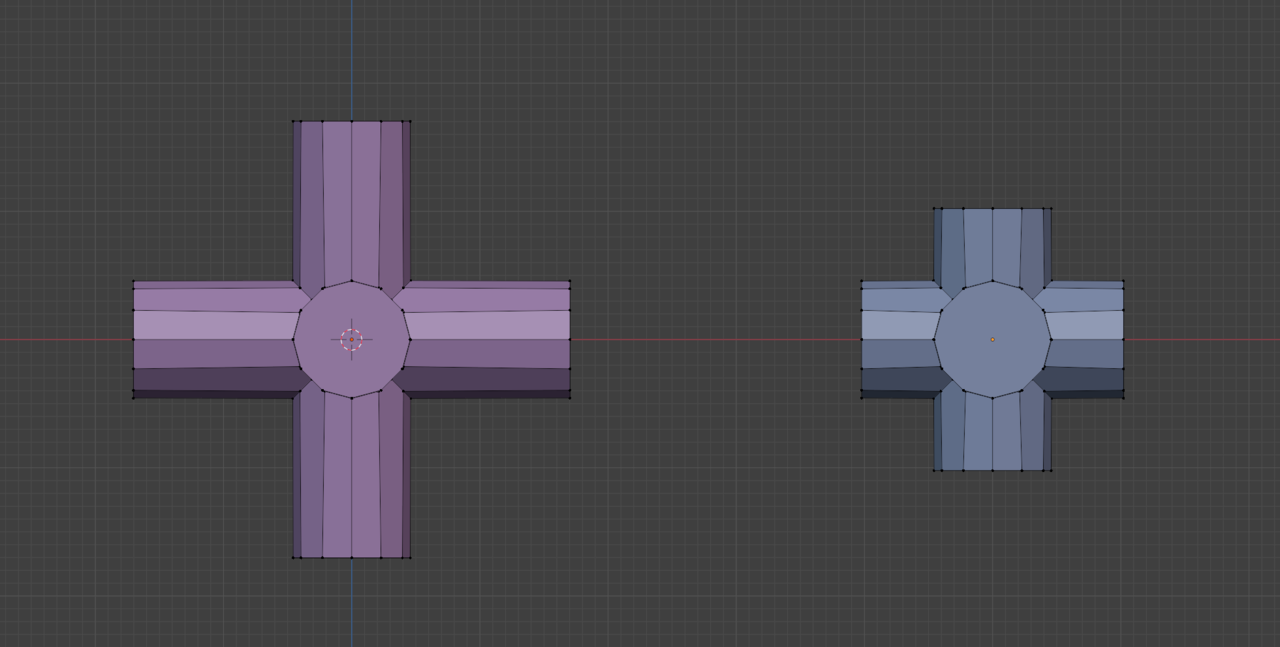
Anyway, Here is what I was looking to have the object to be short in edges lenght on all 3 axies. If you have any other idea let me know so i can try it.
Thank you so much,
 December 20, 2024 at 6:45 am #92078
“The method (ALT+S in Face Select Mode) is not gives what I need, unless I did it the wrong way!!”
You need to be in Face Select Mode (I say this again, because your screenshot is in Vertex Select Mode) and Select (only) the outer Faces and then use ALT+S (together, not first ALT and then S). You also should not have ‘Emulate 3 Button Mouse’ enabled, because that messes up your ALT Shortcuts. Further more, make sure your Normals are consistent (SHIFT+N, with everything Selected) and you don’t have ‘double Vertices’ (M > Merge > By Distance, with everything Selected).
Those are the things I can think of now, that could mess things up.
And yes, it was perfectly clear what you were trying to do 😉
The Boolean Cube method works fine as well (with great control and flexibility), but is more work to set up, then the ALT+S method.
-
AuthorPosts


- The topic ‘How to shorten length on all axes’ is closed to new replies.