Right Click select but accidentally moving a bone

Forum Archive Right Click select but accidentally moving a bone

Viewing 4 posts - 1 through 4 (of 4 total)
  • Author
    Posts
  • #19300
    Harris Clook
    Participant

      I enabled right click to select after Wayne’s suggestion, and I absolutely love it. Don’t think I can see myself going back.

      That being said though, is it possible to set it up to have it only select something? EG: a bone. Currently, when I select a bone, I on occasion move it the slightest amount, usually without even realising I have done so until I run into bigger problems later.

      I’m looking at the preferences and there’s two options I can see: “Select & Tweak”, and “Selection Tool”. Unfortunately neither solve the issue.

      Anyone have any ideas?

      #91595
      Dwayne Savage
      Participant

        I not 100% sure, but I’m pretty sure you have to disable the keymapping to stop it from doing that. If you want to do it just goto preferences->keymapping->Then at the top click key binding then in the search type: Right

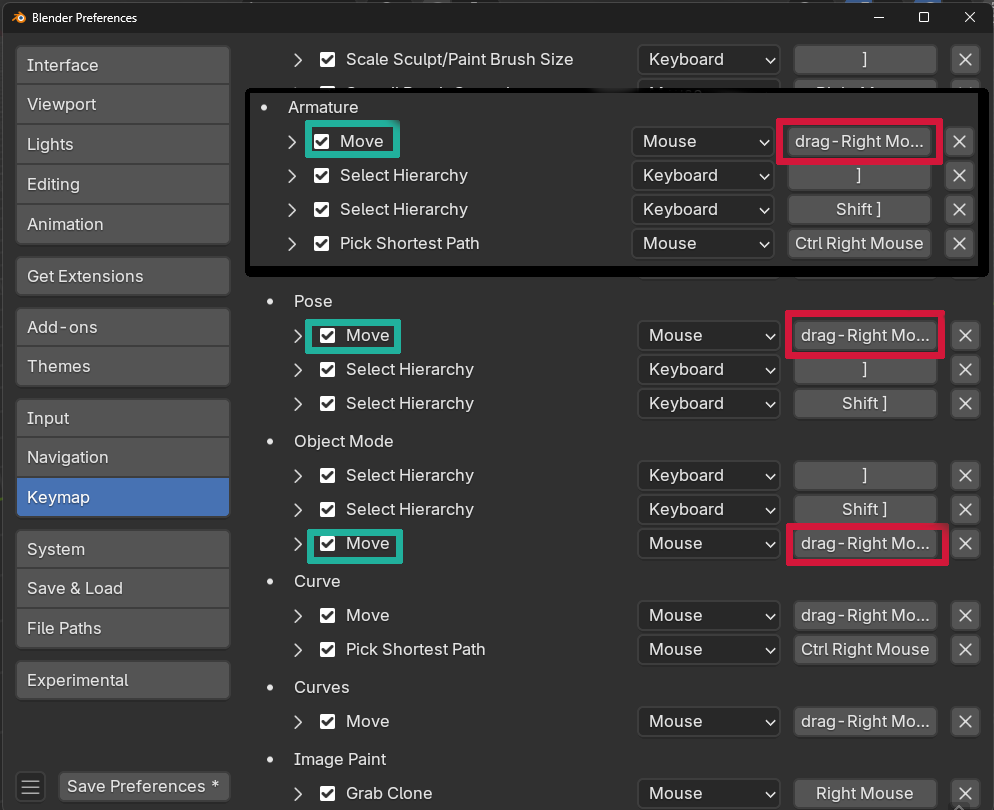
        Scroll down until you see drag-Right Mouse on the right hand side.(Red) The ones that say Move to the left of that will be the ones you want to disable. To disable uncheck the box to the left of where it says Move.(Cyan/Blue) For objects in object mode it will be the one under Object Mode. For bones when you’re in edit mode it will be the one under Armature. For the Bones in pose mode it will be under Pose. For other things in edit mode will be under their heading like Mesh, Curve, and Grease Pencil Edit Mode for example. 

        024-12-05 183015.png

        #91596
        Martin Bergwerf
        Participant

          As a side-note: Meshes are already covered if you set the Right Mouse Select Action to Selection Tool. (And I think GP Edit Mode as well…)

          #91597
          Harris Clook
          Participant

            That’s perfect, cheers!

          Viewing 4 posts - 1 through 4 (of 4 total)
          • The topic ‘Right Click select but accidentally moving a bone’ is closed to new replies.