My weight paint is not working for some reason

Forum Archive My weight paint is not working for some reason

Viewing 8 posts - 1 through 8 (of 8 total)
  • Author
    Posts
  • #19055
    Sakhia Kwemo
    Participant

      hey everyone, I had a quick question. For some reason I am unable to add weightpaint to my selected region

      https://www.youtube.com/watch?v=WxzI96TKfmo&ab_channel=DJKwemo

      #90713
      Dwayne Savage
      Participant

        First, I’d switch to solid view instead of render view. Second, I’d recommend using the draw brush instead of the add brush. Also make sure there is actual geometry where you are trying to paint. 

        #90714
        Martin Bergwerf
        Participant

          And there is a Modifier on your Mesh: Weight Paint works on the Mesh before the Modifier (at least with a Subdivision Surface Modifier), so you might only have the 4 corner Vertices to Paint on.

          This is covered by what Dwayne says: “make sure there is actual Geometry where you are trying to paint.”

          #90715
          Omar Domenech
          Participant

            Yeah I second all of that. If you can share a video being in solid view so we can see the actual blue and red values it’d be easier to diagnose. Also entering edit mode to see how much geometry you have.

            #90716
            Sakhia Kwemo
            Participant

              Thank you Dwayne, Martin and Omar for the quick responses, I changed the viewing mode from rendering to solid, and I went into edit mode to check out the geometry of the landscape, that being said for some reason I also changed the brush to “draw” instead of “add”, but for some reason I am still not able to paint.

              https://www.youtube.com/watch?v=RX9eSzVjcaU&ab_channel=DJKwemo

              #90717
              Martin Bergwerf
              Participant

                Sorry, can’t hear you talking, the volume is too low, but it looks to me, like you only have 4 Edges for that Plane.

                I might be wrong, because you are in X-Ray Mode and have overlapping Faces (Z-fighting), but that would explain that you can’t Weight Paint (at least not in the ‘middle’).

                #90718
                Omar Domenech
                Participant

                  I agree with Martin. You seem to only have 4 corner vertices in that mesh, you need a lot more geometry to do weight painting. What i don’t understand is how you were able to have mounts spawn there with weights if you don’t have any. But you can maybe start by subdividing your plane a lot. 

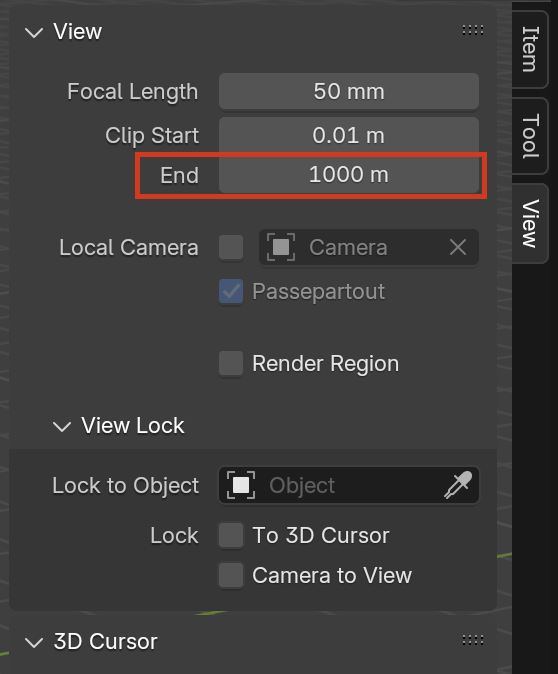
                  Also to avid the error in the view, that is the clipping setting that is making it be visualized that way. To save on resources, Blender clips the view so it doesn’t have to show what is far away. You can change the value and make it bigger so the viewport encompass more space:

                  Clip.png

                  #90719
                  Sakhia Kwemo
                  Participant

                    hey Omar and Martin thank you so much for the feedback. I was able to fix my first problem. I was using a displacement modifier which was only being seen in the Cycles View. I changed my method and instead created a large plane which i subdivided a lot, and then i added a noise transformer, which i scaled to make it look like mountains, thank you so much for that

                  Viewing 8 posts - 1 through 8 (of 8 total)
                  • The topic ‘My weight paint is not working for some reason’ is closed to new replies.