UI Script Missing

Forum Archive UI Script Missing

Viewing 4 posts - 1 through 4 (of 4 total)
  • Author
    Posts
  • #18990
    Pascal Schovanez
    Participant

      Unfortunately there is no Demo project file, so the script is not accessible either, everything else can be recreated from the screen, and placeholder meshes can be used as well.
      But the same cant be said for the UI Script.
      Please post it so that we can follow along with the video!

      #90472
      Dwayne Savage
      Participant

        The UI script is in both Blend files. You won’t see anything in the Start one, because you have to setup the bone collection and setup the custom property of rig_id on the armature tab. it needs to be set to ball_rig and yes it is case sensitive. You can go to the text editor(Shift+F11) and then click the text drop down(To the left of the new button) and select ball_ui.py 

        #90473
        Wayne Dixon
        Participant

          Hi Pascal,
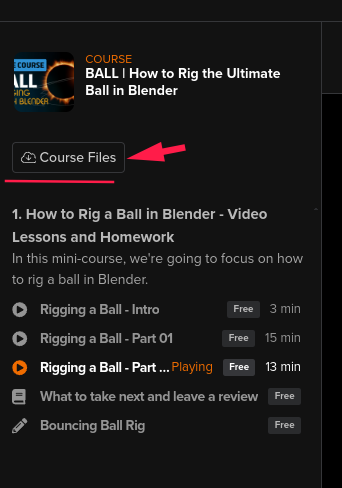
          All the files are located in the course file downloads.
          a_20241020144201.png

          #90474
          Pascal Schovanez
          Participant

            Hey, thanks for pointing that out, turns out I was just blind and didnt notice that this is where I was supposed to get the files form.
            I only checked beneath the video as there were links in the first one.

            At least that let me explore partially writing it myself up until now.

            Though this may go beyond the scope of this free course, I couldnt figure out how you added the IntProperty to the UI, doing it the way as given doesnt work for me.
            I had to work around it by putting it into the scene context.

          Viewing 4 posts - 1 through 4 (of 4 total)
          • The topic ‘UI Script Missing’ is closed to new replies.