
Baking with displacement? With no UVs?
Forum Archive › Baking with displacement? With no UVs?
- This topic has 9 replies, 5 voices, and was last updated 1 year, 10 months ago by
Nathi Tappan.
-
AuthorPosts
-
October 15, 2024 at 8:57 am #18959
Hey there!
This might be a couple of silly questions, but here we are.
First: if I want to bake a texture that was made procedurally, so I didn’t even even unwrap the model into UVs and plugged the object socket from the texture coordinates, is there anything I must do? Would that still work the same way? It’s a sculpt that was not retopologized, so the goal here is to speed up the rendering and keep the high poly sculpted details, maybe even decimate the model after baking?
Second question: If my procedural material used displacement, can that also be baked somehow?
Hopefully that makes sense.
Thank you for any insight!
October 15, 2024 at 11:47 am #90347I don’t know on the second question, but on the first, blender automatically creates a UV map.(Unless you delete the default UV map active space under mesh data in the UV Map panel) I’m also about 90% sure you need a UV map to bake too. At least in blender.
October 15, 2024 at 1:39 pm #90348Hi Nathi,
Good questions!
Simple answer is, that you’ll probably need a UV Map, because you’ll Bake to an Image Texture, that is 2 dimensional.
You can also Bake some things to Vertex Colors……but,
Let’s get to know our trusted default Cube:
It has 8 Vertices, 12 Edges, 6 Faces and each Face has 4 corners, making a total of 24 Face Corners. Each Face Corner has a Number (Index) assigned to it, starting with 0.
When you Unwrap the Cube (or any Mesh Object), each Face Corner gets a position on a 2D grid, going from 0 to 1, but because each Face Corner has an Index, even without a UV Map, they are uniquely identifiable…something like this is happening:
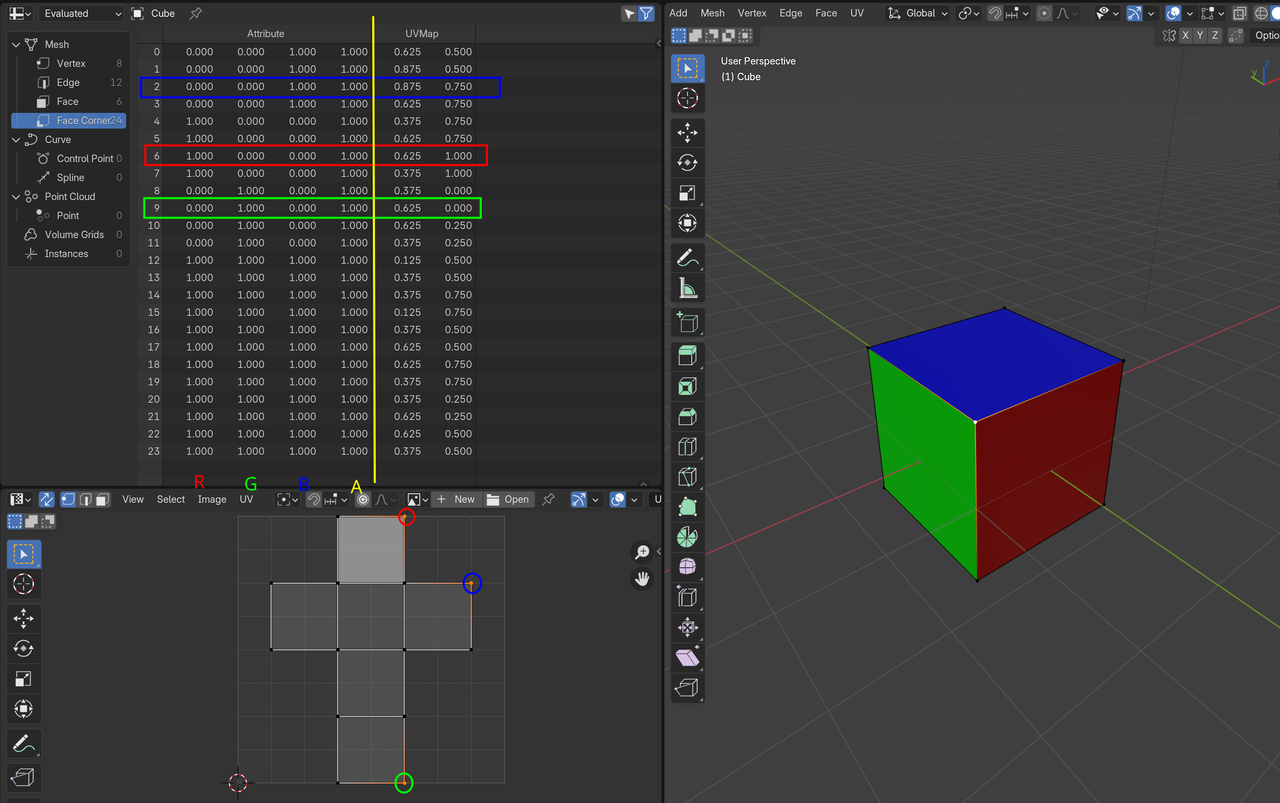
So you can assign a Color to each Face Corner (the default Vertex Color Attribute uses Face Corners), without a UV Map.
But still, for Displacement and most other Bakes, you’ll want a UV Map for the Object you want to Bake to.
I hope this makes at least a bit of sense.
October 15, 2024 at 2:28 pm #90349afaik baking means you are locking all that information into an image which would, alas, require unwrapping. That said, with a procedural texture the UV Map may not have to be perfect. Potentially one could get away with using Smart UV Project (or one of the other projection methods).
It really comes down to the model itself and the intended usage.
October 15, 2024 at 7:51 pm #90350Wow! Thank you guys!
And thanks Martin for making it so easy to visualize the vertex explanation!I think I’ll unwrap it real quickly, it’s just for pumpkins after all, should be easy. And it makes total sense that I would need the map either way.
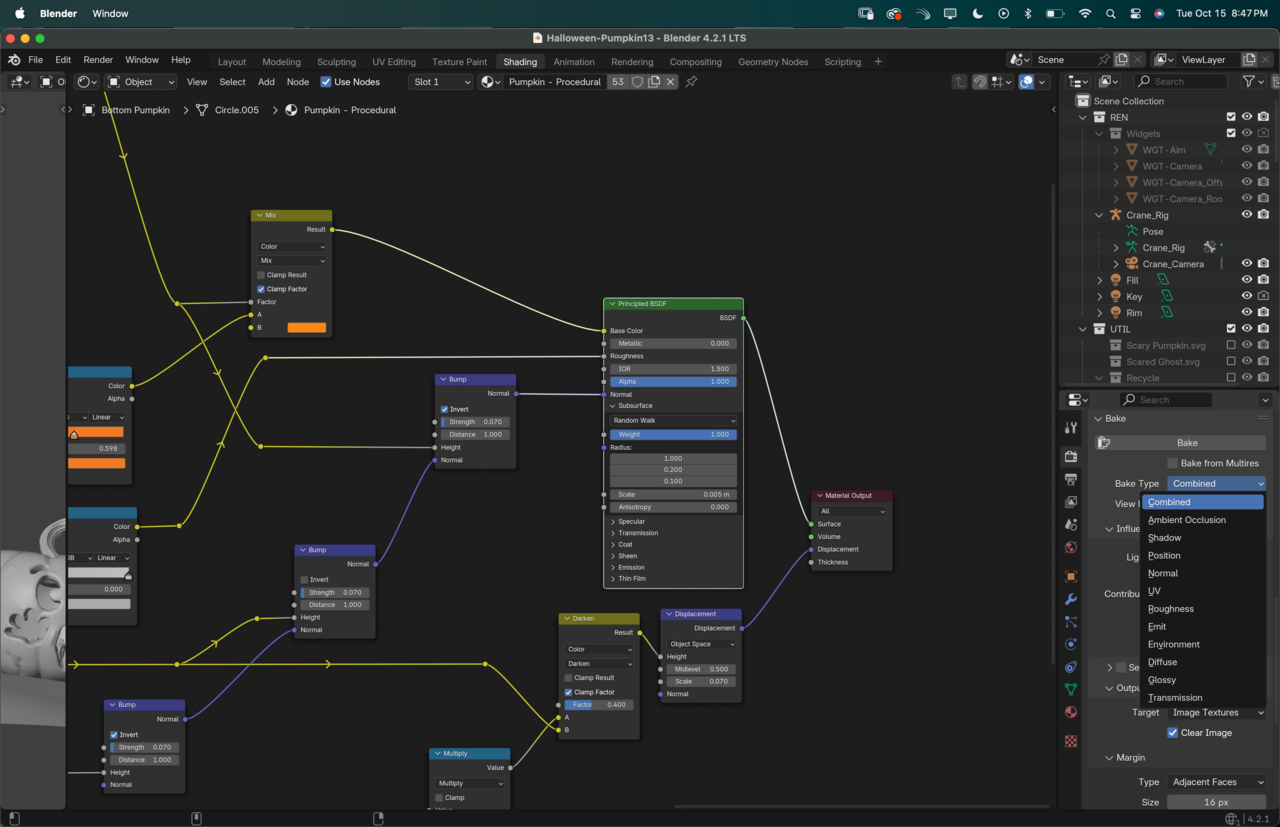
The one thing that did not get clear to me is how do I bake the displacement? 🤔 Do I just follow the normal steps for Base, Normal, Roughness and so on… and will it account for the displacement? Or will that just bake the information as it’s going into the BSDF?
 October 16, 2024 at 1:01 am #90351
Hi Nathi,
You could plug the result of the Darken Node directly into the Material Output (Surface), unplug the Displacement for good measure and then Bake the Emit:
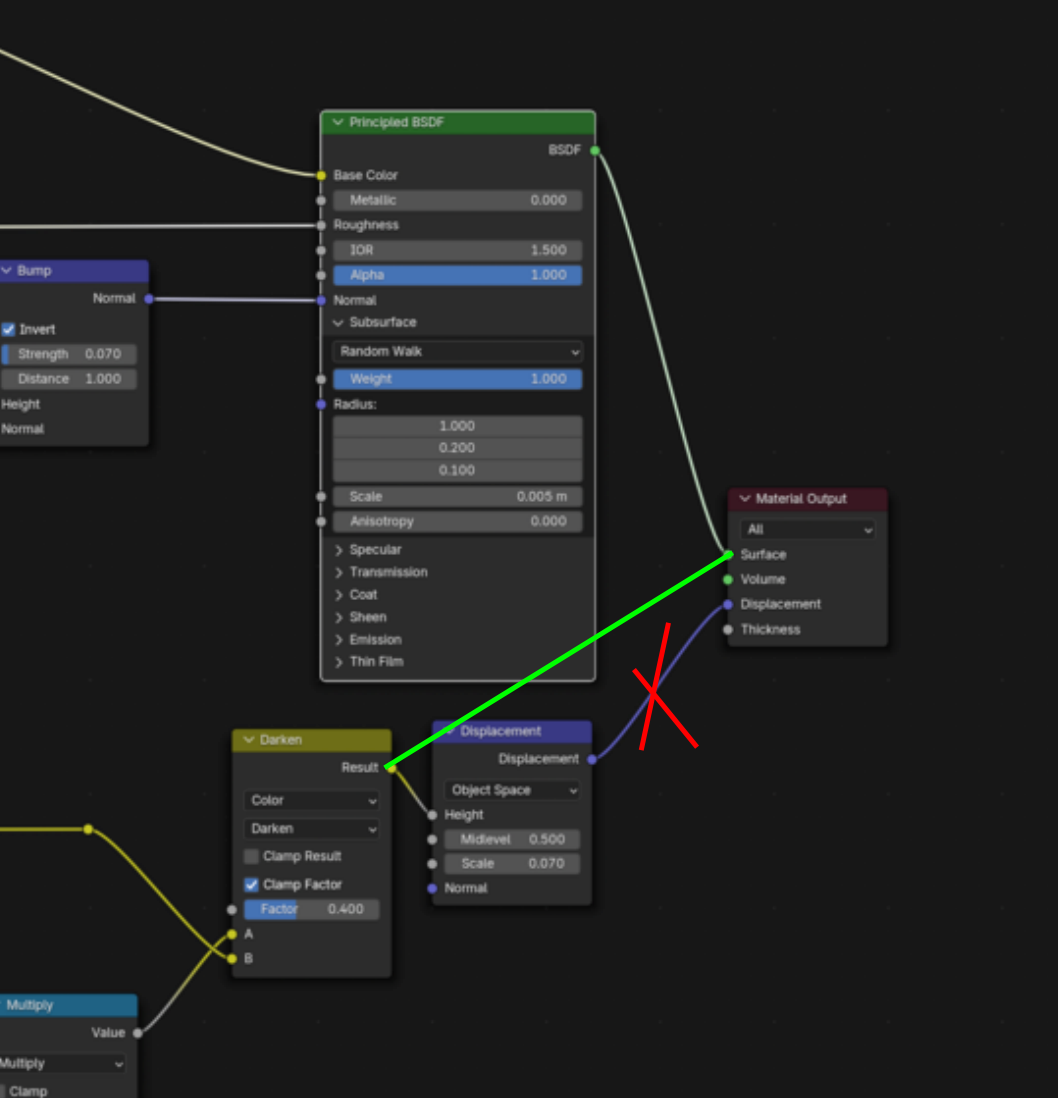
Which is a method that works well for any Procedural Texture, but you need to be aware, that Procedural Texture have ‘infinite’ resolution and as soon as you Bake it, you get the resolution of the Image Texture, which, especially with Bump and Displacement, might look quite different.
October 16, 2024 at 1:48 am #90352Oh, I just remembered that there was something about Procedural Displacement Baking in Kent’s sand dune Course…: https://cgcookie.com/lessons/convert-material-displacement-to-geometry
But that might be more specifically for Adaptive Subdivision…still might have some useful info.
October 16, 2024 at 7:05 am #90353Great! I’ll give that a try, thanks Martin! This video from Kent had lots of great tips on baking displacement and then bringing back with the modifier for the mesh.
Thanks for the recommendation, I would have never thought of looking for that info in this course.
October 20, 2024 at 9:14 am #90354About baking displacement or height map, here is probably the best video from CGMatter on the subject [https://www.youtube.com/watch?v=arvhK4tvYuY&ab_channel=DefaultCube]
October 20, 2024 at 3:51 pm #90355Sweet! That’s a great video @NikolaG, thank you for the recommendation!
-
AuthorPosts


- The topic ‘Baking with displacement? With no UVs?’ is closed to new replies.