Bevel tool

Forum Archive Bevel tool

Viewing 4 posts - 1 through 4 (of 4 total)
  • Author
    Posts
  • #18856
    Arthur Paliath
    Participant

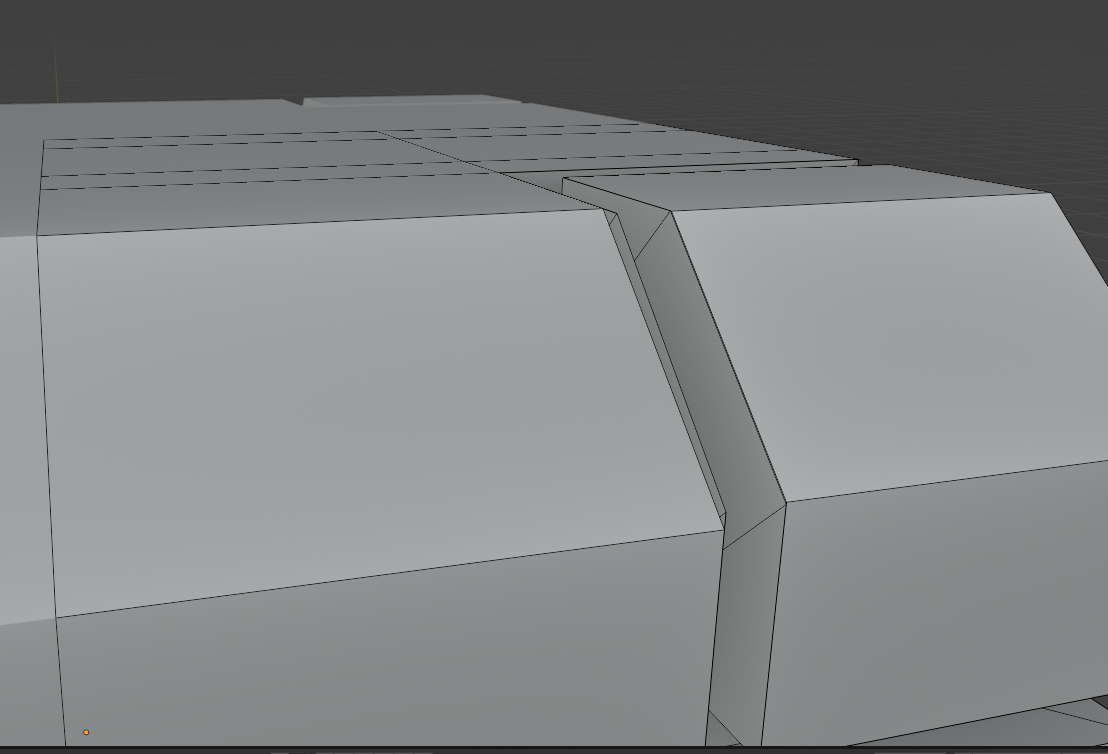
      When I move the top level at 15:59, there are faces that form on the side even though clipping is enabled that I cannot delete.

      #89907
      Arthur Paliath
      Participant

        This is what I mean
        024-09-28 234822.png

        #89908
        Martin Bergwerf
        Participant

          HI Arthur,

          I’m afraid I don’t know exactly what you mean (what do you mean with “on the side” and why do you mention ‘clipping’). I was also not able to reproduce this.

          The most likely culprits are: ‘double Vertices’, ‘inconsistent Normals’ and having a wrong Selection when trying to Bevel.

          So: (in Edit Mode) hit A to Select everything and then M > Merge > By Distance, followed by SHIFT+N. Then try again.

          Please let us know if that helped.

          #89909
          Omar Domenech
          Participant

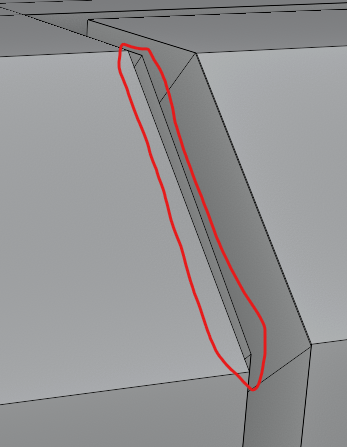
            I’m guessing you mean this part?

            Side.png

            It looks a bit funny, like there’s a face jutting out. If so as Martin says, you probably had double the geometry there, it’s hard to tell but when modeling so much can go wrong so it can be much more than one thing. If your model gets too difficult to manage because error pile up, it’s always a good idea to start from the beginning. 

          Viewing 4 posts - 1 through 4 (of 4 total)
          • The topic ‘Bevel tool’ is closed to new replies.