Can’t get Shift K OR Ctrl X to work in vertex paint

Forum Archive Can’t get Shift K OR Ctrl X to work in vertex paint

Viewing 12 posts - 1 through 12 (of 12 total)
  • Author
    Posts
  • #18754
    Perry Harmon
    Participant

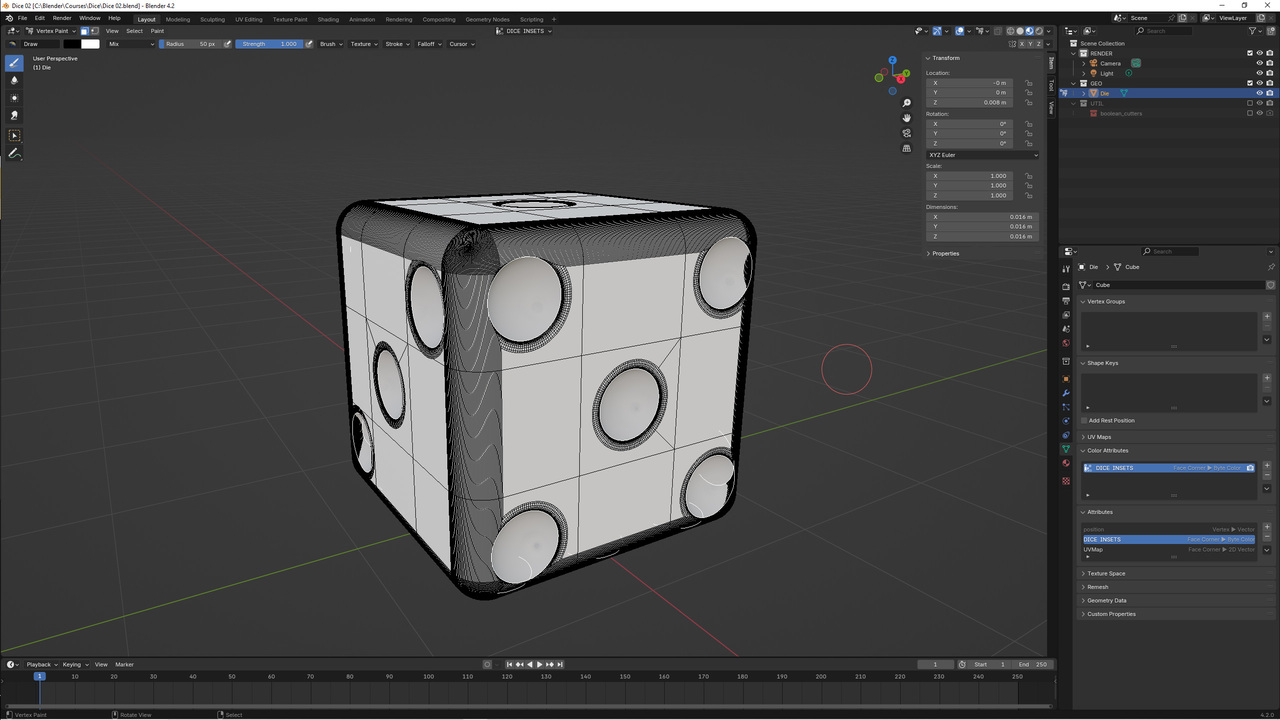
      Blender 4.2  Am following the Dice Material video and about 1:50, Kent says to hit Shift K to fill in the dimples. I’ve since learned that the Shift K hotkey has now changed to Ctrl X. Unfortunately, that doesn’t work either. I’ve restarted the project twice (in case I missed a step) but there’s no difference. Any suggestions other than reinstalling Blender?

      #89474
      Martin Bergwerf
      Participant

        Hi @pharm ,

        I’d need more information; can you post a screengrab of this?

        Some things you can try in the meantime:

           Test it on the default Cube.

           Disable all 3rd party Addons.

           File > Defaults > Load Factory Settings.

        #89475
        Adrian Bellworthy
        Participant

          Make sure the color attribute is added when you switch to vertex paint mode. No color information without the color attribute.
          Does X work to switch the color from white to black? You won’t see anything if you still have white selected.

          #89476
          Omar Domenech
          Participant

            Another basic thing that often causes trouble is that the mouse cursor has to be on the 3D viewport for the hotkey to take effect.

            #89477
            Perry Harmon
            Participant

              Okay. Disabled all third party addons. No joy. Tried it on a cube with one sphere inset. No joy. Here’s a screenshot.Screen Dice.jpg

              #89478
              Martin Bergwerf
              Participant

                Hi @pharm ,

                When I said try it on a default Cube, I meant, try it on a default Cube.

                Open a new File, Select the Cube, switch to Vertex Paint Mode, change the Color to something obvious as red and press CTRL+X.

                (Maybe it’s just that you are in Material Preview Mode and haven’t connected the Vertex Color (Attribute Node) to the material)

                #89479
                Adrian Bellworthy
                Participant

                  Yes of course, 🤦‍♂️ that will be it, material preview mode, there is no material to preview yet.
                  Switch to solid view, you’ll create the material later in the lesson.

                  #89480
                  Perry Harmon
                  Participant

                    @Martin Bergwerf       “When I said try it on a default Cube, I meant, try it on a default Cube.”

                    So, Martin. I’m unclear. Are you saying I should try it on a default cube?   Ha. Yes, I tried it on a default cube and it works fine. I’ll check that I’m in material preview mode and that the vertex color (Attribute Node) is connected to the material.  Thanks for you input.

                    #89481
                    Perry Harmon
                    Participant

                      SOLVED! I was in material preview mode and SHOULD have been in solid preview mode. Thank you everyone for your help!

                      #89482
                      Martin Bergwerf
                      Participant

                        Hi @pharm ,

                        Great that it’s solved!

                        About my remark before, nothing to worry about, but you said: “Tried it on a cube with one sphere inset”, that’s not a default Cube anymore 😉

                        A good ‘trick’, when troubleshooting is to start with things as simple as possible. In this case, to see if the shortcut maybe wasn’t working at all.

                        #89483
                        Omar Domenech
                        Participant

                          Yes, as Martin says, that is a super good advice. Whenever you are stuck, go back to simple beginnings and troubleshoot there. Complexity tends to muddle things up.

                          #89484
                          Perry Harmon
                          Participant

                            @Martin Bergwerf     Your remark didn’t offend me. I just wanted to jab you a bit for fun. If you read some of my descriptions from my gallery, you’ll note that I sometimes fancy myself a comedian (although some wouldn’t agree – my wife, for one). You are correct. I didn’t make myself clear with the “Tried it on a cube with one sphere inset” comment. I actually tried it with just the default cube but was confused because it turned the entire cube black. You were very helpful and I appreciate it. As for your “trick”, it’s a good one. Sometimes just going back to the very basic cube and trying whatever one needed to try is an excellent way to make sure the problem isn’t with the shortcut, software, or the computer itself. Bottom line, thanks again for your input.

                          Viewing 12 posts - 1 through 12 (of 12 total)
                          • The topic ‘Can’t get Shift K OR Ctrl X to work in vertex paint’ is closed to new replies.