Is there a more detailed explanation for the “select similar” tool? Including the options under it?

Forum Archive Is there a more detailed explanation for the “select similar” tool? Including the options under it?

Viewing 4 posts - 1 through 4 (of 4 total)
  • Author
    Posts
  • #18689
    Jann Raqui Tome
    Participant

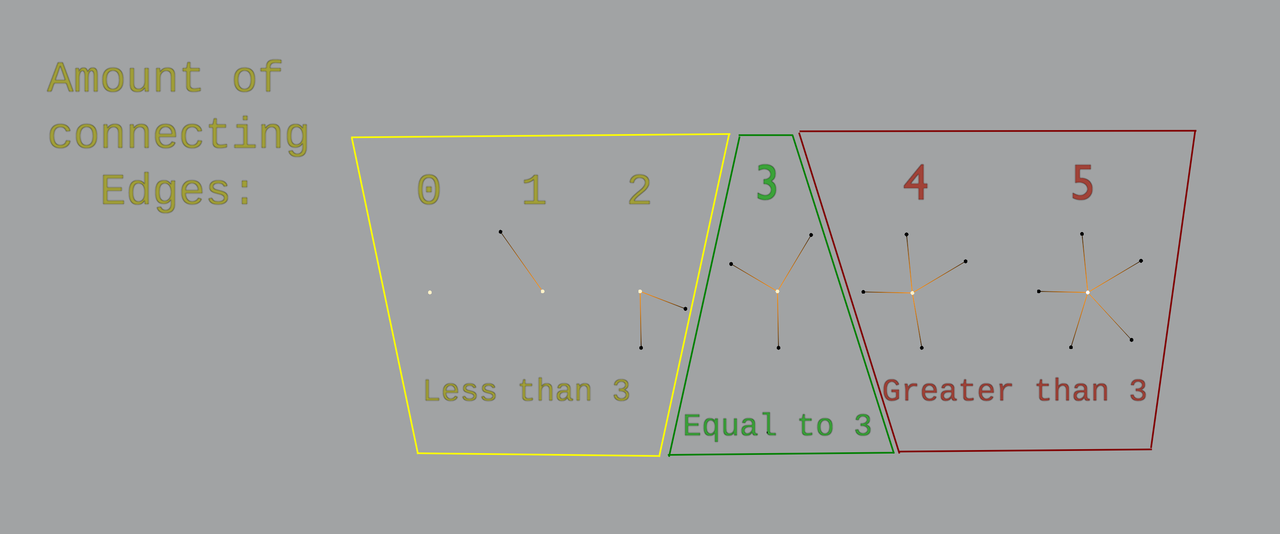
      Such as the “amount of connecting vetices”, so on and so forth. As well as the “equal”, “greater”, and “less”.

      #89197
      Dwayne Savage
      Participant

        They give more information if you let your mouse hover over the option. There is also the blender documents: https://docs.blender.org/manual/en/latest/modeling/meshes/selecting/similar.html#select-similar

        #89198
        Martin Bergwerf
        Participant

          Hi Jann,

          Maybe this visual example helps a bit:

          Similar.png

          #89199
          Jonathan Lampel
          Participant

            I didn’t dive into it any deeper than this, but if you’re having trouble with any part of it you can also ask, and we can help explain how it works. For the most part though, they’re fairly self-explanatory.

            For example, Amount of Connecting Edges counts up how many edges the vertex is connected to other vertices with and selects all other vertices that also share the same number of connecting edges. The Greater and Less options allow you to select all vertices that have more or fewer connecting edges, respectively. So, if I wanted to select all vertices with more than four connections, I could select one that has four connections, use Amount of Connecting Edges, and then choose Greater. 

            The options in the Select Similar menu change depending on whether you’re in vertex, edge, or face select mode, so there are quite a lot of them, but they all do the same thing – search through every other component and select the ones that match the criteria. 

          Viewing 4 posts - 1 through 4 (of 4 total)
          • The topic ‘Is there a more detailed explanation for the “select similar” tool? Including the options under it?’ is closed to new replies.