
I’m doing the “Blender Core Skills: The Ultimate Blender Basics Bundle” and need major help with the materials class.
Forum Archive › I’m doing the “Blender Core Skills: The Ultimate Blender Basics Bundle” and need major help with the materials class.
- This topic has 19 replies, 5 voices, and was last updated 1 year, 11 months ago by
Martin Bergwerf.
-
AuthorPosts
-
September 7, 2024 at 2:30 pm #18672
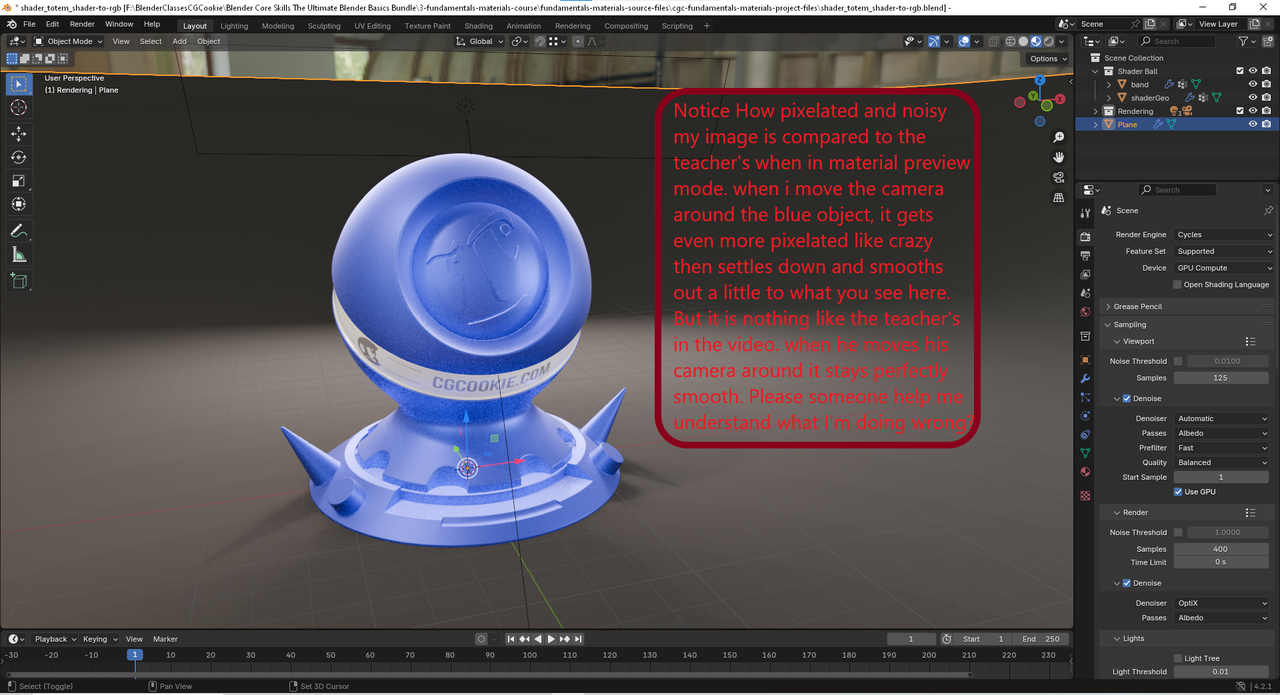
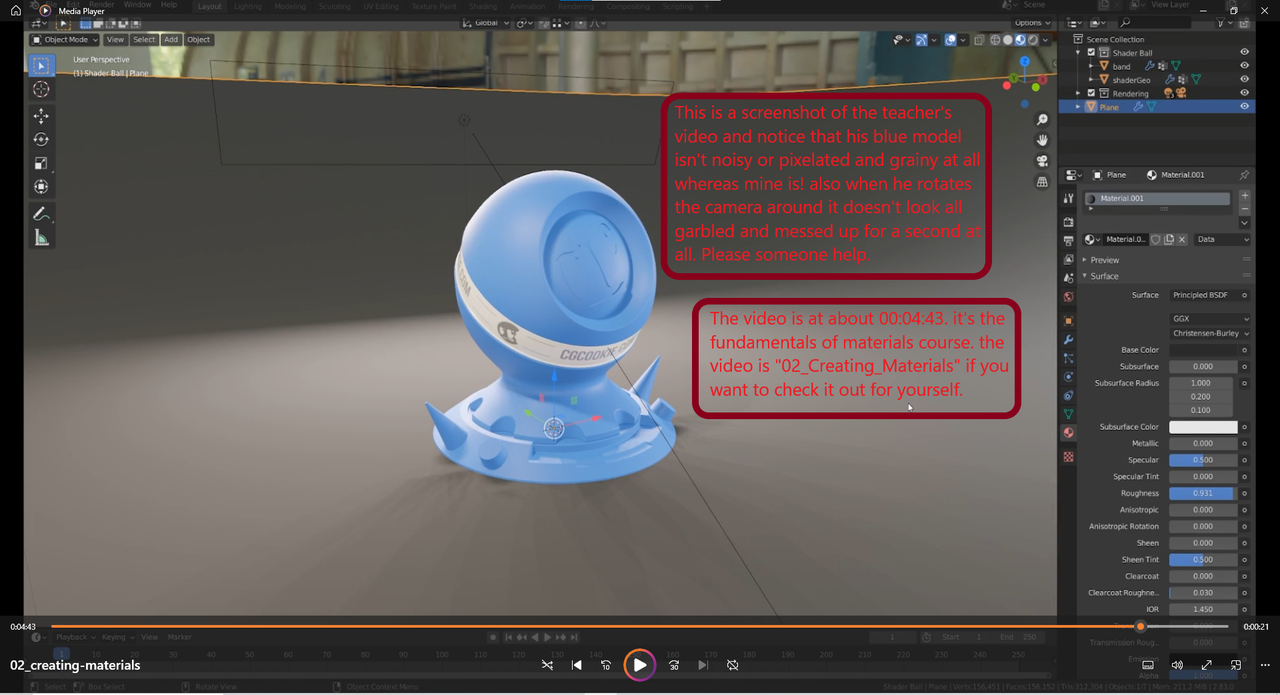
hi, my name is Tim, I’m doing the “Blender Core Skills: The Ultimate Blender Basics Bundle” and need major help with the materials class. For some reason I can’t get my Blender app to function like his when in rendered preview or material preview. Please somebody tell me what i’m doing wrong. Iv’e included screenshots with some added text to show what oi mean exactly. I tried messing with denoiser and all kinds of stuff and just can’t get it to behave anything like the teachers. i am using Blender 4.2.1. any help will be greatly appreciated because right now my heart is in my stomach and I really want to learn.
 September 7, 2024 at 3:18 pm #89123
Hello Tim. I guess to try and put your mind at ease a little bit, in the fundamentals you’re getting introductions to notions and conceptualizations, you don’t really need to worry yet about getting exactly the same look as what’s on screen, usually there’s a bunch of things that goes on before a teacher hits record and right now they aren’t focusing on result/ goal oriented outcomes, otherwise they would explain every little thing. Right now the important thing is the knowledge, that you get to know the concepts and you can play around yourself in Blender. So in the meantime, you can relax the expectation of a goal oriented training, that comes in other courses where you’re aiming for an outcome.
In this case what you’re describing it’s probably that you have the denoise on, you can see it on your screenshot, the Denoise checkboxes are on for both the viewport and the render. You can disable those.
September 7, 2024 at 4:51 pm #89124Agree with Omar to the point with the denoiser. The denoiser only affects cycles, that’s what your render settings are set to. However the material preview uses Eevee – which leads to the likely problem here:
You are using 4.2.1 while the course was recorded in 2.83.0 (see bottom right corner)
Eevee has gotten a major overhaul for version 4.2 where many settings have changed and the way eevee interacts with lighting and all. That’s likely the reason why yours looks so different. Best recommendation is to download Blender 2.83 and use that to follow along. https://download.blender.org/release/
Then once you’ve grasped the basics you can go back to 4.2 and try to adapt your knowledge to the new version.
September 7, 2024 at 6:29 pm #89125Hey Tim!
Sascha is absolutely right, and using the same Blender version that is being used in the tutorials is something that will get recommended a lot when trying to trouble shoot things.
It took me a while to get around that fact, but once I gave it a go I found following along to be much more streamlined – Sure, it does seem somewhat counterintuitive to use an older version, but while you’re learning the concepts and how things work it really is a great idea to use them! Especially as a number of functions are either called different things or are located elsewhere within the UI – I remember having a hard time trying to find certain things that had been changed while I was using a newer version compared to the ones used in the tutorials.
And as Sascha says, once you’ve grasped the basics, go back to the current version of 4.2 and you’ll find everything has been updated and easier to use and navigate – That’s why we all get excited when new versions come out!
September 7, 2024 at 8:45 pm #89126like trying to get the same “clearcoat” settings for the handheld console prpoject on cgcookie. i figured it out. but it was almost impossible without others to guide me. I kind of knew all that stuff. i just find it wierd. i’m not trying to get it exact, like the same color etc. I was just worried about the strange performance and worse visuals then the older versions. Thanks for your input. I was more hoping for an answer for what to do so that i get similar results in EVEE but i guess evee is stuck now with a horribly ugly super pixelated look in material preview mode. I already read all about EVEE renderers changes etc. Thanks anyways everyone. I want to learn 4.2 or at least 4.1. I don’t do anything behind version 3 for sure. I can guarantee alot of that info will just go to waste and i’ll be stuck digging through manuals and guides to try to figure out how to do these things in my version. which btw, doesn’t seem to have much of that info offered online yet. at least i cant seem to find it. you all answered very quickly. thank you. This is a great community.
September 7, 2024 at 8:46 pm #89127is it really supposed to look like that in 4.2.1?
September 8, 2024 at 1:55 am #89128Hi Tim @Browneyebill ,
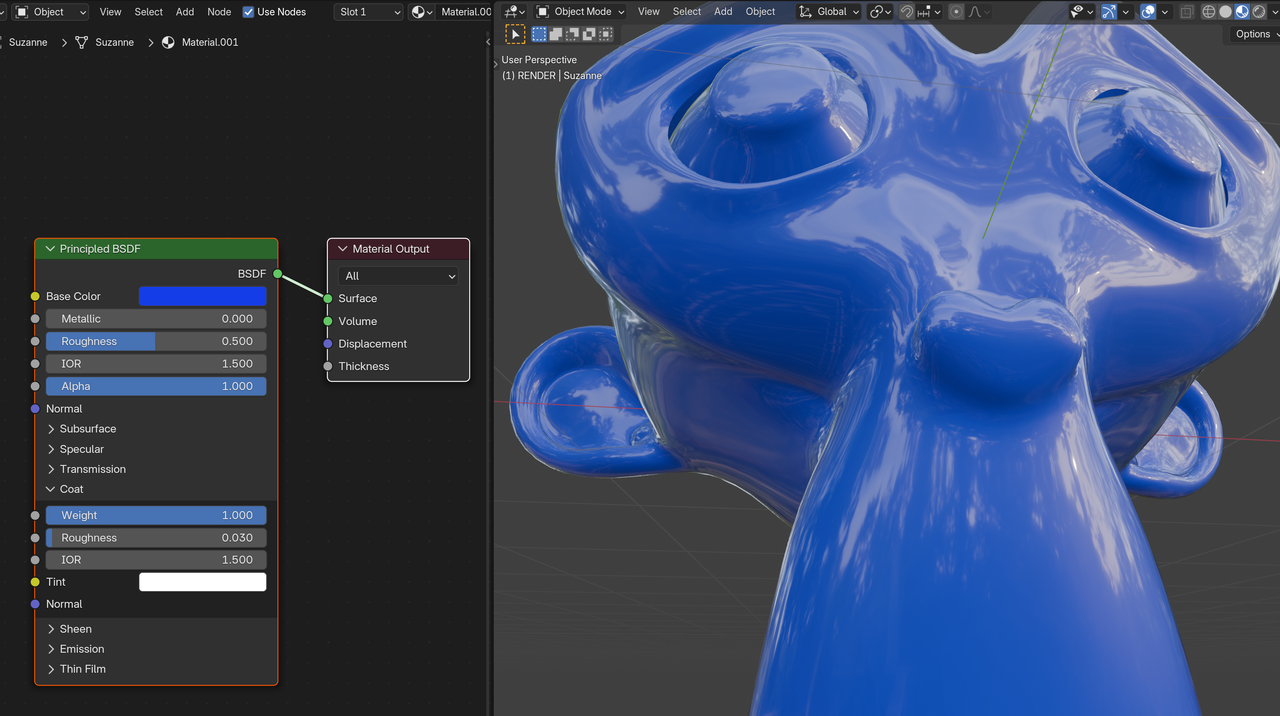
Maybe you need to update your GPU driver; I don’t think EEVEE should be that Pixelated and it definitely shouldn’t change when moving around.
This is what I get in Material Preview in 4.2.1:
And maybe check the requirements: https://www.blender.org/download/requirements/
September 8, 2024 at 8:20 am #89129Maybe you can post a screengrab video so we see what you see.
September 8, 2024 at 5:35 pm #89130now im really nervous. I was worried about that. My system is a Ryzen 5 3600 CPU, A Gigabyte Nvidia RTX 3060 12GB OC GPU, MSI MAG series CoreLiquid P240 AIO, Thermaltake SmartSeries 600Watt 80+ Gold Certified PSU, 16GB (2×8) G.Skill Ripjaws Series V Dual Channel DDR4 3600Mhz CL 16 RAM Kit, Phantek Metallicgear Neo-G/Air Chassis, My main system Drive is a 1TB Western Digital Blue WD SN570 M.2 NVME SSD, a 2TB KingSpec 2.5in SATA 3 SSD, and a 512GB ADATA SU800 2.5in SATA 3 SSD, Windows 10 64bit Home edition, ASUS PRIME B550-PLUS AC-HES motherboard, Steelseries Arctis V headset/mic, Viotek Reaper RFI25CBA 24.5in 1920x1080p 16:9 144hz Freesync/Gsync Compatible Variable refresh rate IPS Panel monitor. I would really appreciate the help. I won’t update my gpu to the latest driver until NVIDIA fixes it so it doesn’t stop “Farming Simulator 2022” from working. heres the driver version I’m currently on: “556.12-desktop-win10-win11-64bit-international-dch-whql.exe” as you can see it’s not that old. I don’t know if it has something to do with the source file from the course that i used since the naming seemed different than what was in the video and had some stuff already in it that wasn’t in the class video. I was wondering why the EVEE renderer in that particular material preview mode would have noise and be very pixelated when it moves almost like cycles. is there any other info or screenshots i can give that could help if this info isn’t enough? I’m starting to get so nervous that i’m shaking. Please help. I Appreciate all everyone has done already and will be so thankful for any advice or input. I am determined to learn Blender but I gotta make sure it works properly. I did have an older version installed of blender, but I deleted it and installed the Steam version so that I could get updates quicker.
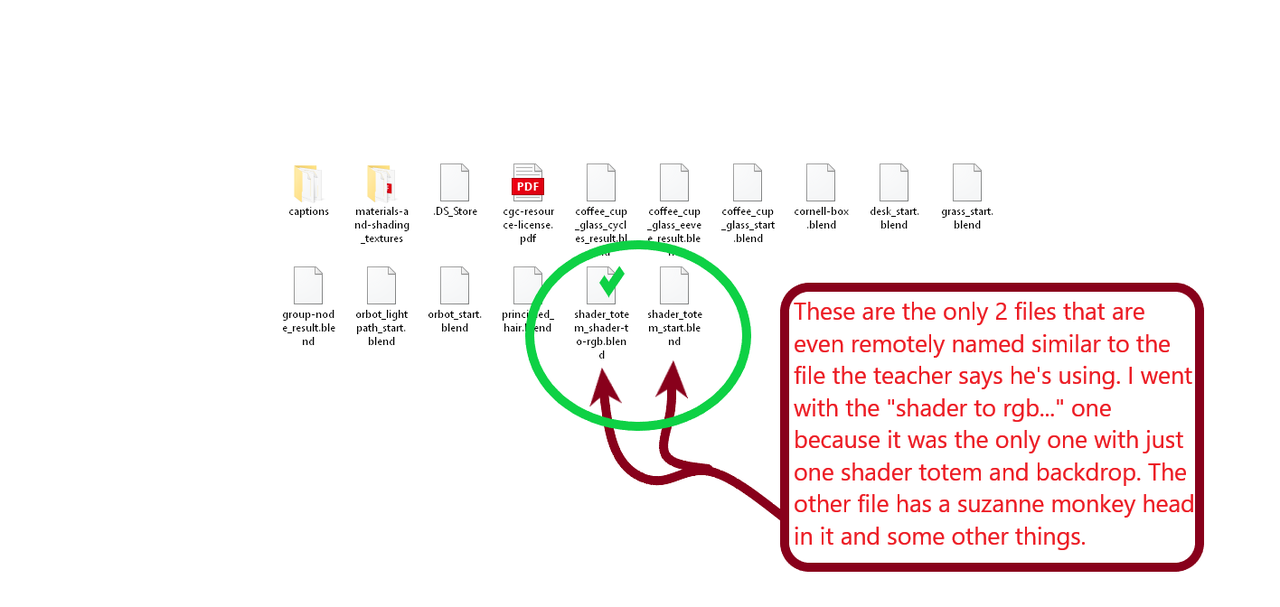
September 8, 2024 at 6:00 pm #89131Here’s a screenshot of the course source file i started with.
 September 8, 2024 at 6:26 pm #89132
Yes, you can post a screenshot or video of your screen so we can see what you mean. Perhaps what you refer as pixelated is actually just noise from the render. But there’s most certainly nothing wrong going on, most likely it’s just that you have encountered new concepts and you’re just not used to them.
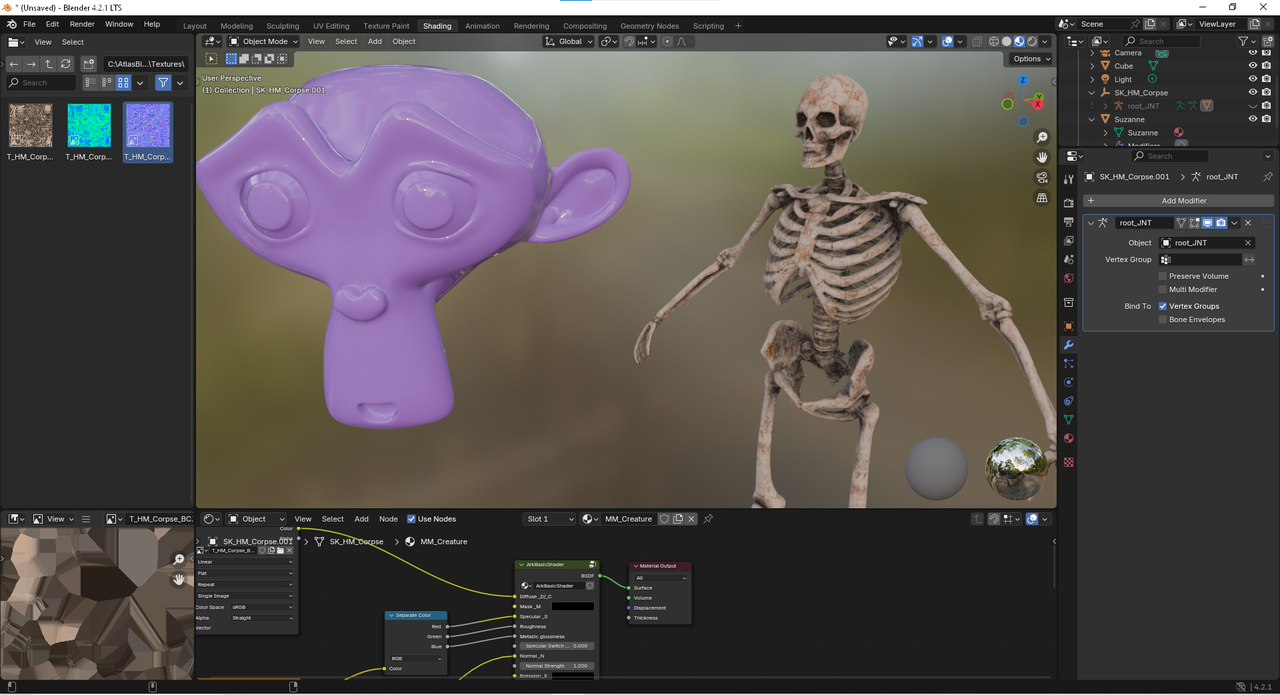
September 8, 2024 at 6:30 pm #89133The Plot Thickens!!!! I tried a brand new file and loaded in a suzanne monkey with some subdivision surface modifiers and smooth shading with a basic shader. and i also appended in the “ArkBasicShader”(a shader meant for “Ark Survival Evolved” and “Atlas” 3D assets) and through in a skeleton from ark and applied his textures. It actually works like it’s supposed to!!! I’m not sure what’s up with the course source file i used or if It was something i did to the file that i didnt realize mabe. not one bit of noise or pixelation! although i havent tried running cycles renderer yet with this file. What do you alll think!?
 September 8, 2024 at 6:45 pm #89134
Yeah all good. Probably the course file has some setting enabled that is not enabled by default. Nothing to it.
September 8, 2024 at 9:08 pm #89135The shaders have changed a bit too since 2.83 but since that is the version the course file was saved in and you say a newly created file works just fine, the problem is most likely that something in the course file is linked to a setting that has been overhauled since. In that case there shouldn’t be anything wrong with your system, seems powerful enough.
Blender files are usually backwards compatible to a certain extend, but the changes between 2.83 and 4.2 are quite significant. I just opened said file in my 4.2.1 and get the same noise and it looks totally funky. So rest assured it’s the file compatibility, not your system.

Edit: Just opened the same file with 3.6 and 4.1.1 and it works totally as intended, no noise.
September 9, 2024 at 12:10 am #89136Hey guys,
I tested that file in 4.2.1 and it works fine (the same as in 4.0 for instance). Maybe it helps if you change the Viewport Pixel Size from Automatic to 1x:

Although I don’t think that’s the problem.
We have seen discrepancies between Blender Versions before that ‘worked inconsistently’ on different systems (so far unsolved).
You might also try Downloading Blender from Blender.org, instead of through Steam…
-
AuthorPosts


- The topic ‘I’m doing the “Blender Core Skills: The Ultimate Blender Basics Bundle” and need major help with the materials class.’ is closed to new replies.