
Can a material have a max limit to it? Aka where did my material go pls help
Forum Archive › Can a material have a max limit to it? Aka where did my material go pls help
- This topic has 14 replies, 4 voices, and was last updated 2 years, 1 month ago by
Harris Clook.
-
AuthorPosts
-
July 16, 2024 at 7:57 am #18307
So my node trees have grown from little sapplings to enormous oak trees (I used to feel intimidated by them, now I absolutely love working with them). I have been working with the bump map unplugged for performance, but upon plugging it back in, the material turned black – This is while using cycles and in render preview.
I remember seeing something online about a material having essentially a maximum limit. And upon blowing through it, it turns said materials black.
I’ll add a couple shots for reference. The node tree shot is more for the number of nodes in it. Let me know if you want a more close up shot. To be fair, It’s filled with probably too many 1k image textures.
Is there something I can do to save it, other than having to pick and choose what to get rid of?
Or, if I’m happy with how it’s currently at, could I bake everything to pack it down and call it finished?
Also regarding my earlier post about organisation – I swearrrrr I’ll clean it up. It’s just a mess while I’m working bc I’m constantly making adjustments

But anywho, here’s the shots of the node tree and missing material
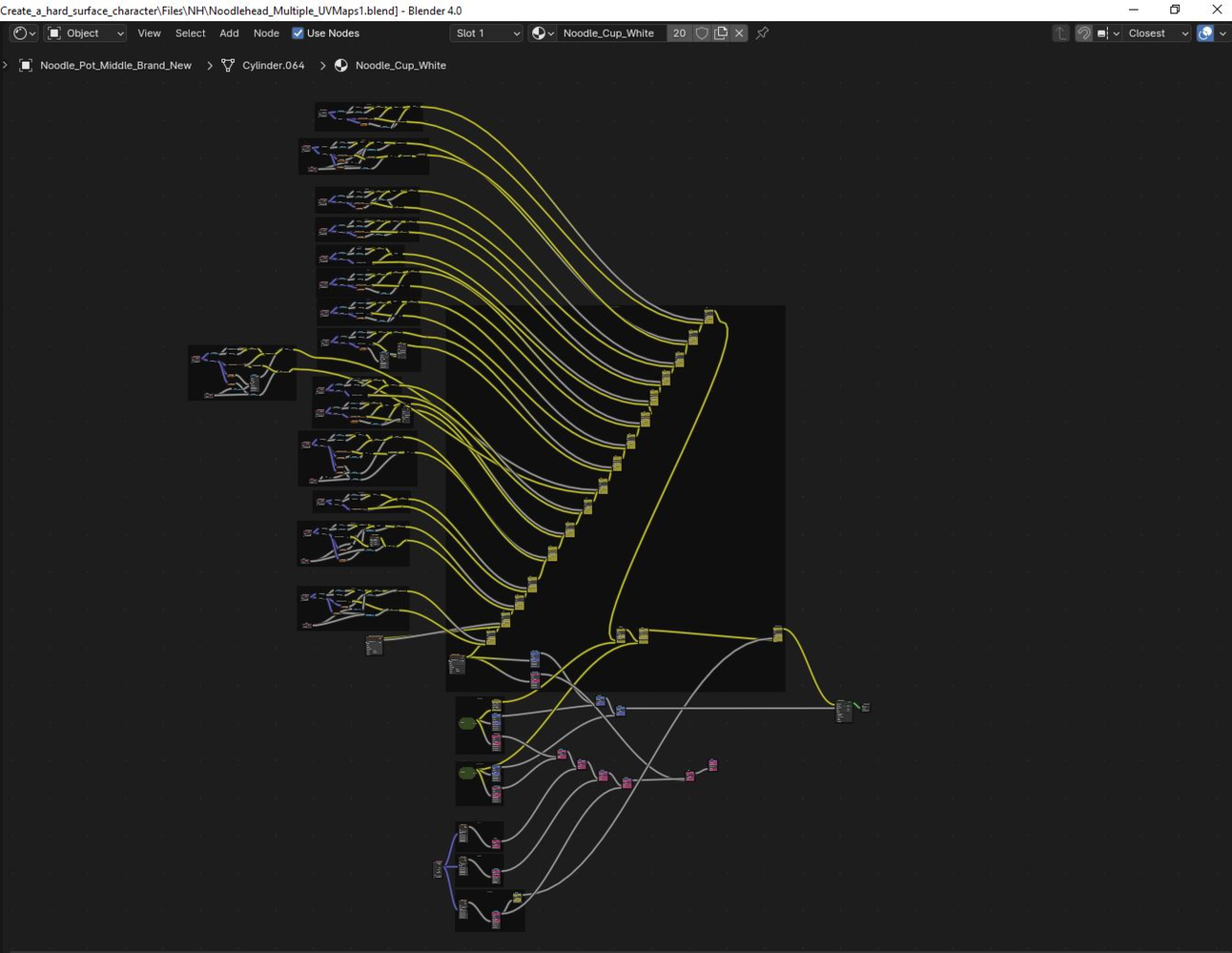
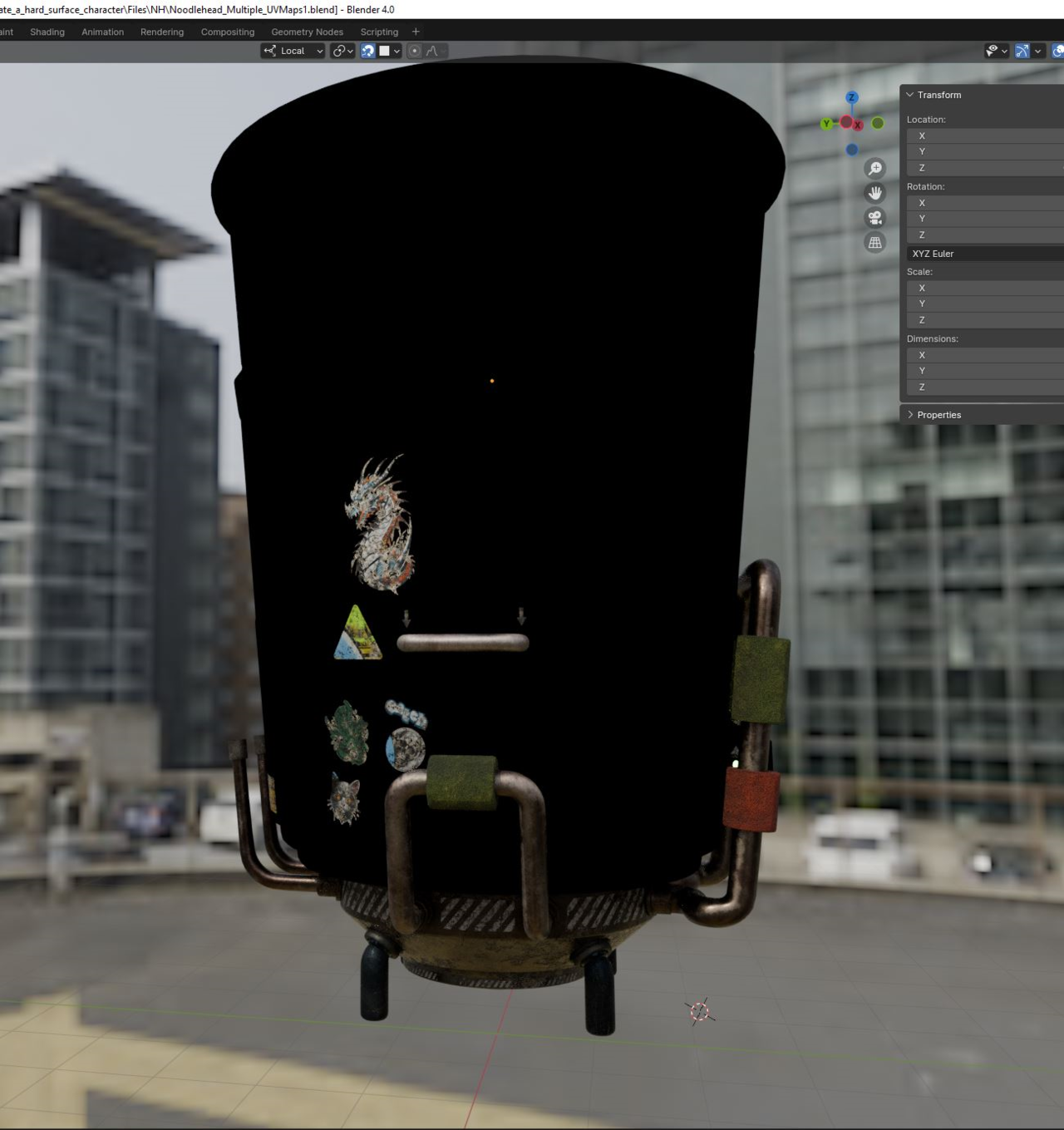 July 16, 2024 at 8:14 am #87429
I don’t know what is a limit of a material, but I’ve seen materials have a noodle soup ten times what you have.
When I get into that sort of pickle, what I do is test every stage of the material until the problem reveals itself. Do some control + shift + click from the very first node and go one by one as it builds up and you’ll get to the point where it all turns black and then you’ll know that’s where the problem lies somewhere and you start troubleshooting from there.
July 16, 2024 at 8:30 am #87430I managed to conclude earlier that it was happening when I reached a certain number of image textures. I could swap one out for another, but not add any more. However, it also seemed to happen when I would mix a couple nodes together within a frame. But I’ll try sifting through everything, and see if I can’t find any bad soup ingredients.
Do you know what is happening under the hood that generally cause materials to turn black? The answer is definitely going to be “it depends”, but is there a common occurance?
July 16, 2024 at 8:36 am #87431I’ve never had a material suddenly turn black, nor do I ever know what is Blender doing under the hood. Same goes for my car, my car has never suddenly turn black nor do I know what is happening under the hood. I just know it gets me places, same with Blender. Maybe the other guys know more about this, lets what and see what they say.
July 16, 2024 at 9:32 am #87432Hi Harris, did you try this in Cycles? Material Preview uses EEVEE and it is possible to overload your GPU.
It depends on your VRAM, but also on the amount of Textures and Nodes per Object.
I haven’t seen it turn black tbh. It often turns (partly) Magenta, or Blender just freezes or crashes.
Of course, it is also possible, that it is not because of the amount of Nodes, but a specific Node, that is not working in EEVEE, or something else completely…
If you care to share the file (don’t forget to Pack Resources!), I can see if I can figure it out, but try Cycles first, if you haven’t already.
July 16, 2024 at 9:59 am #87433I’ve seen that when I used a bump node with a normal map texture. Also sometimes happens when I plug a normal map texture directly to the normal socket without the normal map node. Also do you have any alpha or transparency going on?
As for node limits, back in 2.80 32bit version it had a limit of a little more than 64,000 nodes and 256 texture nodes(including image texture) with eevee on a minimum spec PC. So, I don’t really think that’s a problem, but if it is in 4.1(it may may be 4.2) there is an overlay that tells you how many millisecond each node use. I don’t remember if you have to check developer extras in the interface section of preferences or not. That along with right clicking status bar and checking VRAM to see how much is being used is were. I’d start.
July 17, 2024 at 5:10 am #87434Hey Martin, Yeah the material blackout didn’t occur until I plugged the bump node in and then switched to cycles.
And Hey Dwayne, in regards to alpha and transparency, yeah I’ve got a whole load of alpha and transparency going on with the image textures. I also don’t have any normal map nodes in this tree
I think I have found the culprit, however. The bump node is currently plugged in and it works fine. I have a specific image texture with a noise texture manipulating it’s alpha via a mix rgb node set to multiply. Plugging the multiply node in causes it to go black. I reckon I can live without it.
I’ll keep having a suss to see if anything else is making a fuss.
In regards to the amount of VRAM being used, it’s currently sitting at 10.2/12GB with all the bumps plugged in. The other night I saw it get to 11.8/12GB…
If I reach a point where I feel like I have exhausted all options and can’t proceed I’ll upload the blender file as a last resort – I’m doing everything I can to not spoil the surpise of my finished project 😛
July 17, 2024 at 5:33 am #87435Right, high values for Bump can cause black results if I remember correctly…
I’m really looking forward to see it finished!
July 17, 2024 at 8:44 am #87436If it’s happening with a multiple on the bump then that’s probably it. To high or to low can cause black especially if you have a strength of 1 on the bump node. Also make sure you have your bump map texture plugged into the height of the bump node. You can also try adjusting the strength. Transparency will go black if you don’t have enough bounces for transmission(I think that’s what the bounce setting is called, it’s been awhile. I rarely go over the default)
July 21, 2024 at 5:47 am #87437@dillenbata3 and I can’t tag martin or Omar. I have a sneaky thought that this might be a bug. I’ve had a few more material blackouts, however I seem to be able to fix it by essentially turning if off and on again – I just unplugged a few nodes, and then literally plugged them back in (sometimes in different orders). I’m not too sure what’s going on, nor do I feel adept enough to know what is or is not a bug. But it feels buggy. Either way, it’s not the solution I thought would work lol
July 21, 2024 at 5:55 am #87438Allllllrighty, very strange update. The material was working completely fine, but when I selected a node frame within the tree the material turned black.
Again, turning things off and on again did the trick.
July 21, 2024 at 8:17 am #87439Hm, weird indeed!
Can’t tell if it’s a bug or not…(maybe, when you finish it, you can still upload your .blend, so we can do some testing?).
The VRAM getting so close to the available 12GB is probably also not helping…
Did you try opening this in 4.1, or 4.2 yet?
And tagging me is not really necessary, because I’ll read everything new anyway (I set the sorting filter to ‘Last Updated’), but you can use @ spikeyxxx without the space if you want.
July 21, 2024 at 1:42 pm #87440That @ thing never works for me, I’ll show you. Let me @spikeyxxx and then nothing happens, it doesn’t get that cool orange underline or hyperlink thing, it comes out as letter for me.
July 21, 2024 at 1:42 pm #87441Oh what do you know, it worked this time, figures.
July 21, 2024 at 5:20 pm #87442@spikeyxxx when I submit PH and NH I’ll include the file!
Just before saving and closing down last night I found a particular slider that enabled me to turn on and off the black out which was even more bizarre. Perhaps it’s interfering values that is causing the issue. I’d be super keen for you to have a look and see if you can figure out what’s going on.
I’ve a few extra thoughts on what might be occuring. But for the time being, I’m hustling towards a Wednesday deadline for finishing the model and all its textures and materials before going overseas to my homeland of NZ for a few weeks.
-
AuthorPosts


- The topic ‘Can a material have a max limit to it? Aka where did my material go pls help’ is closed to new replies.