More than one bone selection in weight painting

Forum Archive More than one bone selection in weight painting

Viewing 3 posts - 1 through 3 (of 3 total)
  • Author
    Posts
  • #17985
    Marie Delagrave
    Participant

      I am unable to select more than one bone at a time in Weight Painting. I am a Mac user (with «Emulate 3 Button Mouse») and the shortcut is Shift Command Left mouse (which works) but I can’t add other bones to my selection. I’ve read that it is like that since 4.0 (projects.blender.org/blender/blender/issues/117256). Does someone know what I can do?

      #86084
      Martin Bergwerf
      Participant

        Hi MMarie,

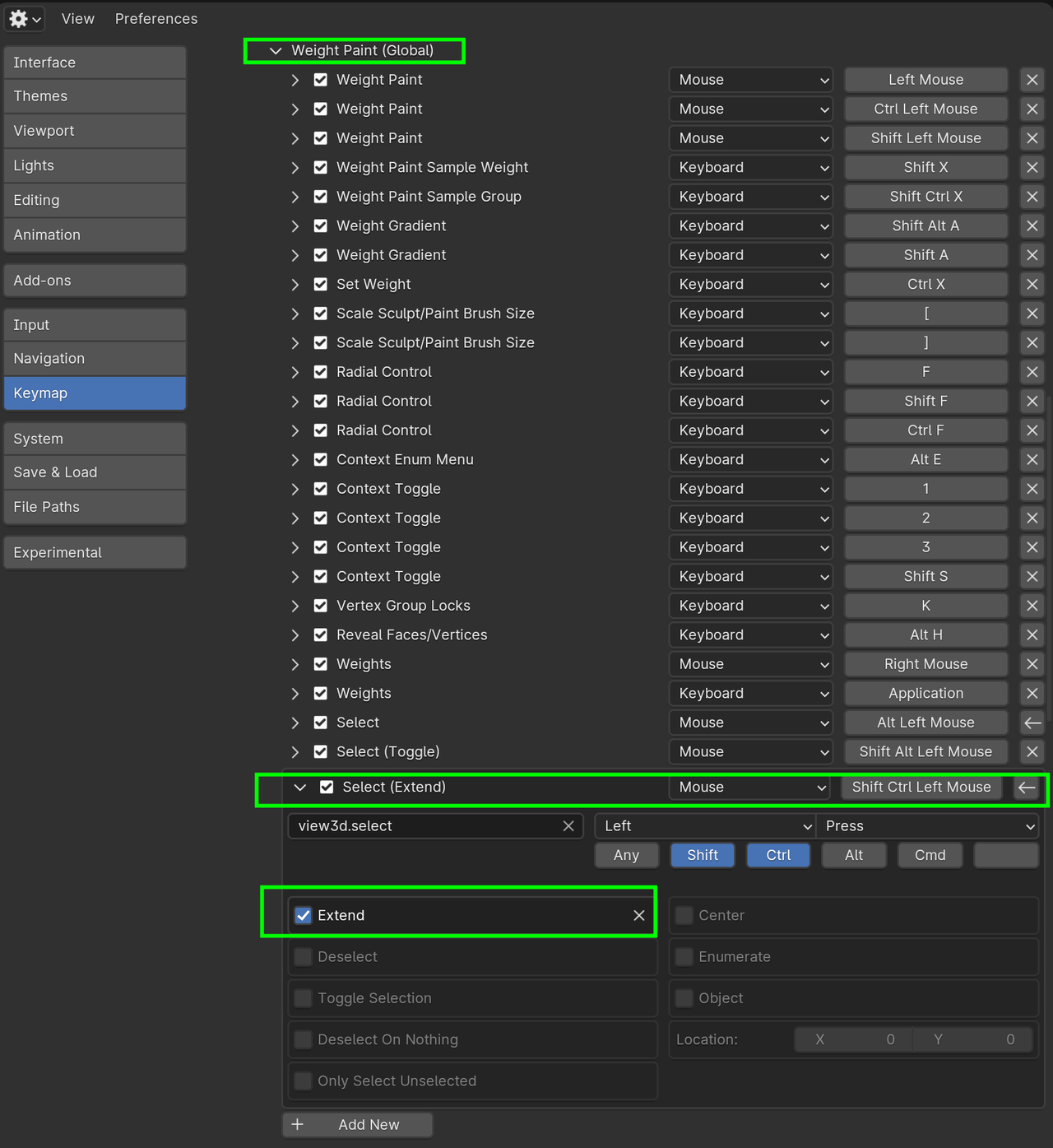
        Try enabling Extend (or what it’s called in French):

        Bones_01.png

        #86085
        Marie Delagrave
        Participant

          It works!!!! Great, thank you so much! For deselect, I use aa, otherwise, I don’t know how to deselect only one bone when many are selected. But that’s not a big problem compared to selecting more than one bone. I had to disable the emulate 3 button mouse each time. 😳 By the way: extend in French is Étendre.😉

        Viewing 3 posts - 1 through 3 (of 3 total)
        • The topic ‘More than one bone selection in weight painting’ is closed to new replies.