Why the Dark Faces when I go to Texture Paint?

Forum Archive Why the Dark Faces when I go to Texture Paint?

Viewing 3 posts - 1 through 3 (of 3 total)
  • Author
    Posts
  • #17905
    Chris Le Fave
    Participant

      When going to Texture Pain the Ax, three of the six faces that make up the base of the head are a weird, reflective dark color. In other modes, they are much darker than the normal gray color. I tried flipping them, recalculating normals for outside, inside. Nothing seems to make this appearance go away.

      It seems like blender is trying to tell me something about these surfaces but I can’t seem to undo whatever the problem is. The only other possibility I can think of is that I needlessly mirrored one of my UV islands when I didn’t need to so it’s in a weird reverse state now. Can anyone help with this?

      #85752
      Martin Bergwerf
      Participant

        HI Chris,

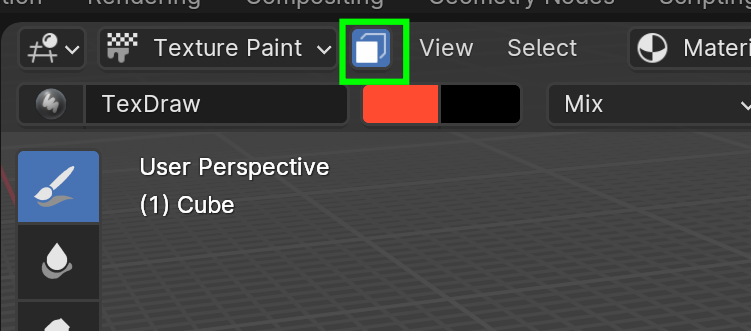
        Hard to say, maybe you have this button enabled:

        Mask_01.png

        That means that you can only paint on the Faces that you have Selected in Edit Mode. Those Faces would indeed be darker than the unselected Faces.

        #85753
        Omar Domenech
        Participant

          Upload a couple of screenshots so we can see and guide us step by step on what you are trying to achieve. 

        Viewing 3 posts - 1 through 3 (of 3 total)
        • The topic ‘Why the Dark Faces when I go to Texture Paint?’ is closed to new replies.