Questions about UV Seam and Subsurf

Forum Archive Questions about UV Seam and Subsurf

Viewing 10 posts - 1 through 10 (of 10 total)
  • Author
    Posts
  • #17703
    Nougat Time
    Participant

      Heyhey! 
      When I make a model, I usually do 1 model where I don´t apply the subsurf, do the UV Seams, and unwrap, and I do 1 model where I apply the subsurf using the same UV Seams.
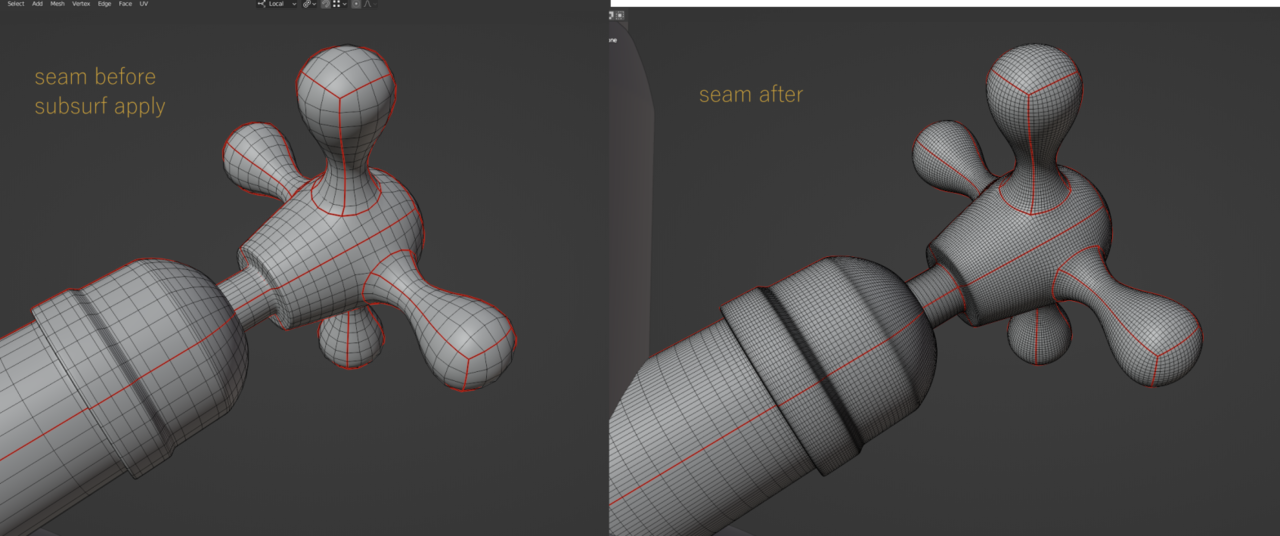
      And it usually works great! the UV Seams stay exactly where you would expect them to, like this:seam as expected.png

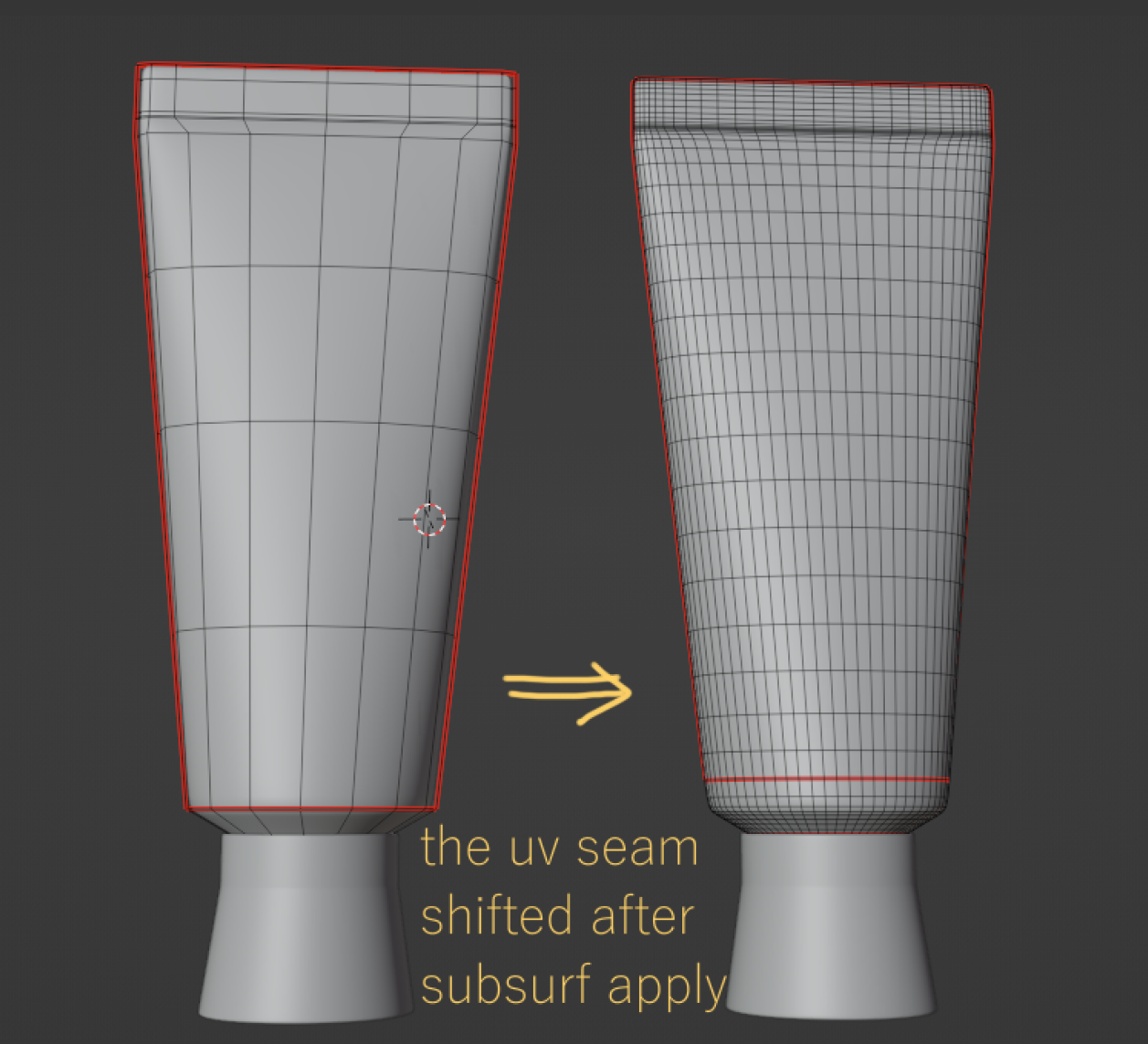
      But while making these toothpaste Containers, i noticed the UV Seam shifts (the red line goes up)after I apply the subsurf, as you can see in the following image:uv shifted.png

      My question is: why is this happening here(or why did it never happen before) and how to make it, so the uv seam stays where you would more “expect it to” when I apply subsurf…

      Thank you in advance!

      #84984
      Omar Domenech
      Participant

        You just need a supporting loop or holding loop right at the base, close to the seam, so the SubD doesn’t stretch the UV out of place. Martin made an explanation of it not so long ago, let me see if I can find the post. 

        #84985
        Nougat Time
        Participant

          I usually do only 1 set of texture materials for both the “lowpoly” and “highpoly” version, and it worked great until the UV Seam shifted like here

          #84986
          Omar Domenech
          Participant

            SubD usually stretched and shifts the seam like that if you’re not careful.

            Found the post where Martin goes into it, turns out the explanation was for you:

            https://cgcookie.mavenseed.com/community/18177-questions-regarding-the-pull-or-pinch

            #84987
            Nougat Time
            Participant

              I guess the SubD doesn’t “care” where your UV Seam is, so much like any geometry, it might get pushed around, if nothing is constraining it or holding it, which in this case, could be a support loop.(hope i got that right)
              Adding the support loop DOES sharpen the edge though, is there no way to tell the SubD Modifier “hey here´s a UV Seam, don`t move that”?

              #84988
              Omar Domenech
              Participant

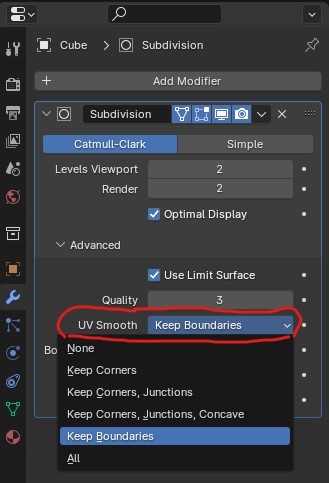
                Yeah, the modifier has a UV option to keep them, try keep corners.

                UV-Keep-Corner.jpg

                #84989
                Nougat Time
                Participant

                  That didn’t fix it, none of the options did… unfortunately.

                  Pinning the UVs also didn*t help 🙁

                  #84990
                  Omar Domenech
                  Participant

                    Ah you mean after applying the SubD, hmmm well in that case I think you may have to either use the holding edges or apply the SubD and then remake some of the seams that shift. Maybe Martin or Adrian will have a better idea though, let’s see what they say. 

                    #84991
                    Martin Bergwerf
                    Participant

                      Hi @nougat time ,

                      | “is there no way to tell the SubD Modifier “hey here´s a UV Seam, don`t move that”?

                      No, you are right, that Edge Loops can only be constraint by ‘Holding Edges’. How far away those ‘Holding Edges’ are, influences how far the original Edge Loop can move around; which also means, how much smoothing is done by the Subdivision Surface algorithm, or how sharp the Edge loop becomes…I’d recommend using two ‘Holding Edges’ one on each side and if possibly evenly spaced…again: how far away from the (in your case) Seam, decides how much or little smoothing will happen.

                      Not moving the Edge Loop at all, also means not smoothing it and therefore it stays as sharp as without the Subsurf. (it doesn’t sharpen it; it already was that sharp…)

                      Basically, what you are asking for, is that the Seam doesn’t move, but still gets smoothed, which sounds like a contradiction to me.

                      #84992
                      Nougat Time
                      Participant

                        I think I see what you´re saying, the shift of the uv seam is nothing more than the smoothing of the geometry itself, and how far it shifts depends on how even /close the surrounding geometry/loops are.

                        And if you really don´t want the uv to shift at all, you can´t use subdivision surface, cuz that´s what it does, it subdivies and evens it.

                        Thinking back the cases where it magically worked, I either had relatively evenly laid out geometry, or really close constraining loops…

                        Well I feel a bit smarter now, thank you Omar and Martin!

                      Viewing 10 posts - 1 through 10 (of 10 total)
                      • The topic ‘Questions about UV Seam and Subsurf’ is closed to new replies.