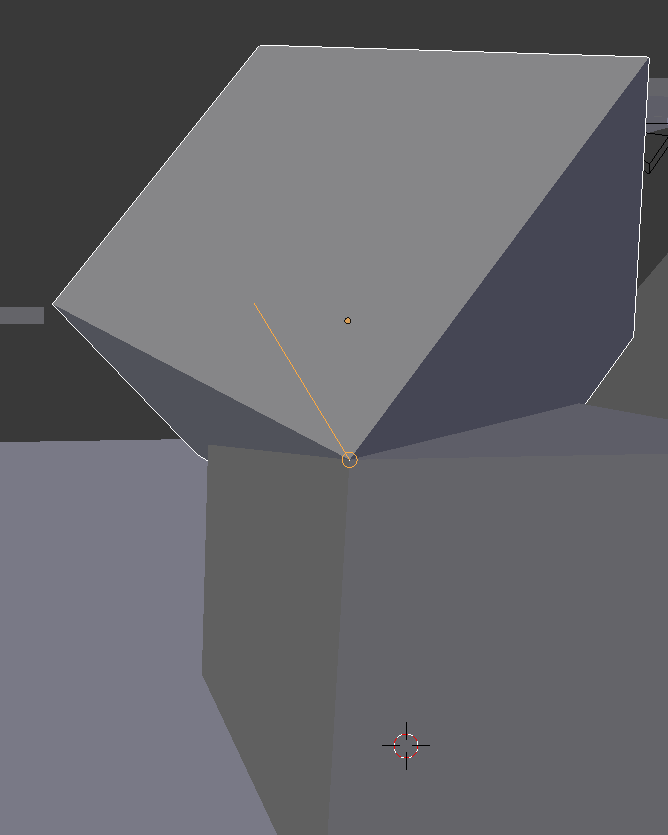
What is this line when I snap two corners together?

Forum Archive What is this line when I snap two corners together?

Viewing 6 posts - 1 through 6 (of 6 total)
  • Author
    Posts
  • #17562
    wrongwright
    Participant

      Does this line have a purpose?  I’ve seen it before when I gg a loop cut.  I tried but couldn’t slide the thing using gg.  What could it be?

      #84366
      wrongwright
      Participant

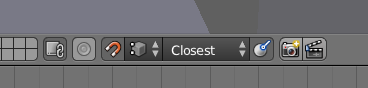
        Those were my snap settings.

        #84367
        wrongwright
        Participant

          Oh, I might be Align Rotation.  It looks off to me but maybe it’s on?  The line in the icon looks similar.  Is more a guide to show me the perpendicular angle?  Think I am answering my own question.

          #84368
          Adrian Bellworthy
          Participant

            @wrongwright, the button to the right on the snapping settings is ‘Align Rotation to Target’.
            Turn that off and the line will not show.

            Align Rotation to target can be used for snapping objects such as screws to align with the target objects face/edge/vertex. Instead of trying to manually rotate the the screw in to the correct position.

            When snapping vertices there is not much point to it, you can turn it off or just ignore it.

            #84369
            Martin Bergwerf
            Participant

              They are a sort of preview lines; especially useful, when making Loop Cuts. It helps seeing what is going to happen, before it happens.

              #84370
              Omar Domenech
              Participant

                In other words, it’s nothing to worry about, it’s just a visualization that 99.9999% of the time you wont use or wont have to pay any attention to. I see it as a way to make me look cool, when I’m using Blender and there’s people around and I snap an object and a line shows and it looks complicated and people are like wow that looks so complicated, you must be a genius knowing all this stuff, I’m like yeah.

              Viewing 6 posts - 1 through 6 (of 6 total)
              • The topic ‘What is this line when I snap two corners together?’ is closed to new replies.