
What is the difference between shader, materials and textures?
Forum Archive › What is the difference between shader, materials and textures?
- This topic has 16 replies, 5 voices, and was last updated 2 years, 7 months ago by
546_student 546_student.
-
AuthorPosts
-
January 12, 2024 at 6:59 pm #17358
Hi!
Since I’m a beginner I’m trying to understand shaders, textures and materials.
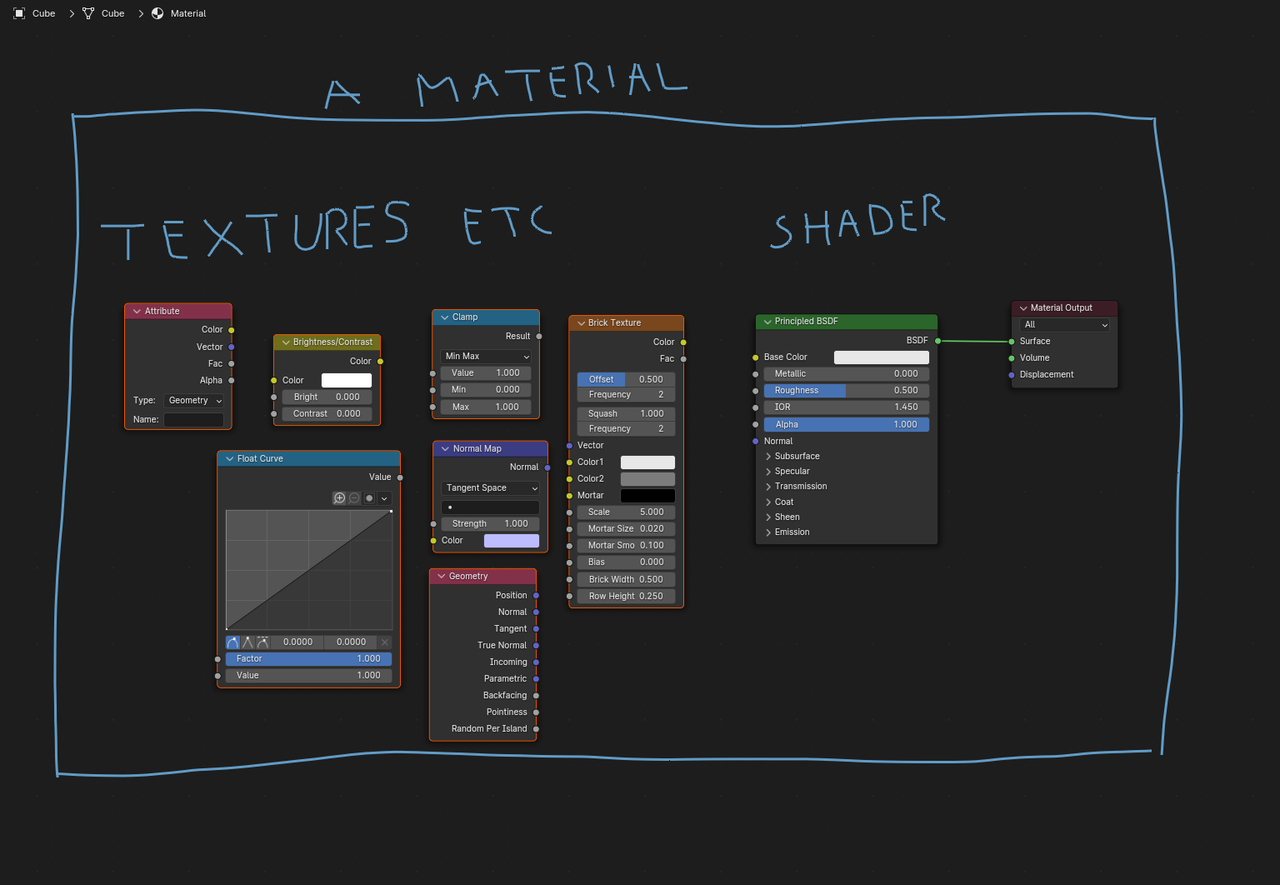
I’m not sure if the image I posted is correct, but is it so that textures, uv maps, attributes and other values are under the “textures” category. And they are plugged into shaders that “compute” those textures. And then the result is the material?
Hope that was understandable 🙂
 January 13, 2024 at 3:21 am #83478
That’s a great visual @546_student !
The terms Material and Shader are sometimes ‘interchanged’, but don’t get confused when you see/hear that (it’s nothing to worry about): your image is correct.
January 13, 2024 at 6:06 am #83479Yeah you got it right. You are trying to emulate how real world materials behaves and you have a set of parameters to make it so, in other words your nodes. If you are trying to reproduce a material such as plastic, or gold, fabric, surface imperfection, by setting up your node chain you are building a shader and it is comprised of textures and all the other set of rules you set, like metallic, roughness, IOR, etc.
Almost like a chef adding flour, butter, eggs, milk, mixing them, setting a chain of instructions like temperatures and cooking time, a bit of salt, a pinch of cinnamon and in the end your result is a pancake. Well a 3D artist is building his material or shader by adding a bit of roughness, setting his IOR, a texture here and there, setting the specularity and in the end you get your material.
January 13, 2024 at 8:21 am #83480For some reason this has been one of the most confusing things, haha, probably because I hear the terms being used interchangeably. But I think I understand it now 🙂
Thanks for confirming the image was correct and giving examples, is it more clear!
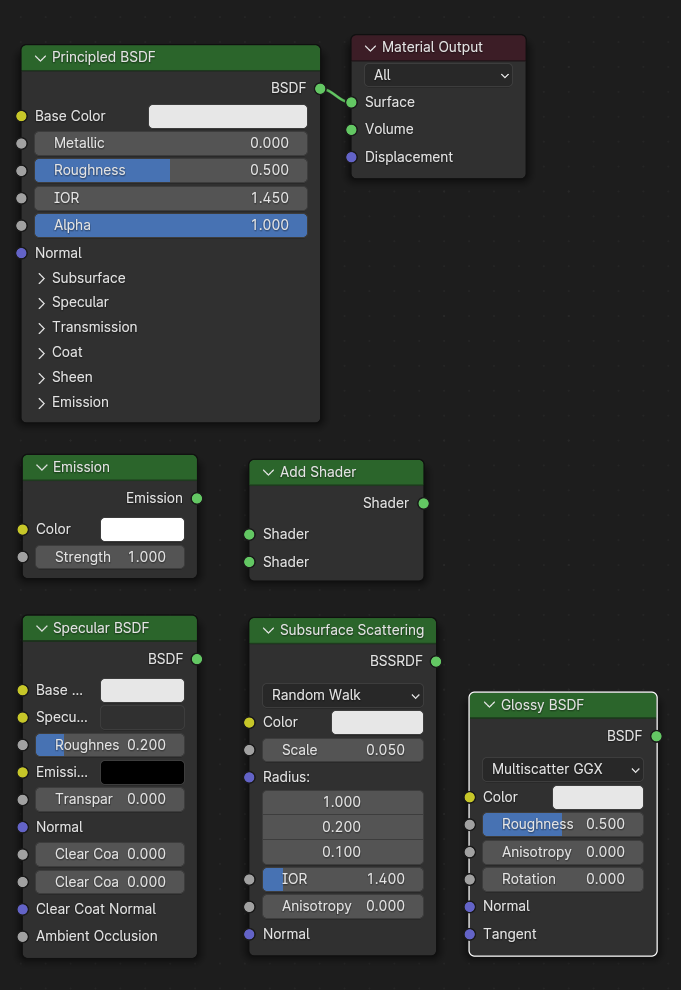
Just wondering, “building a shader”, does that mean there are different types of shaders that can be built using different textures, uv maps, attributes etc?
Like, these are examples of shaders you could use depending on what type of material you want to make. And you can’t use the Principled BSDF shader to make all kinds of materials, sometimes you need to use another one?
 January 13, 2024 at 8:26 am #83481
Texture is a 2D image. There are different processes to create the texture such as math(Called Procedural), a raster image(Commonly referred to as image texture. Technically called a bitmap texture), hard coded(Called coded textures. These are the setting in the shader nodes. Like base color, alpha, roughness, etc of the principle shader), etc.
Shader is the mathematics or the brains of the material and determine what type of mapping is used. Think of a computer. It has difference parts and one of those parts is the CPU. People will refer to the computer using the CPU name. Like I have a Intel computer or I have an AMD computer. Shaders are like the CPU of the material. Just like you can have multiple cores and/or CPUs working together, you can have multiple shaders mixed and added to work together.
Mapping just determines how a texture is applied. For example the “base color” of the principle shader determines what color the surface of the object will be. The roughness of the principle shader determines how glossy/rough the surface of the object will be. Note: both the coded textures are 1 pixel by 1 pixel textures. The base color is a 32 bit color image where the roughness is an 8 bit grey scale image. Side Node: Image Textures that are designed for a specific mapping are referred to by the mapping name. Such as Roughness map, Metalness map, normal map, etc.
Materials are what define how an object looks and it’s options depend on the render engine, but will always contain four elements. A shader, Mappings, Textures, and coordinate system.
January 13, 2024 at 8:48 am #83482Yes and kind of. There was a group of theoretical Physic papers on how light works in the real world. These Papers where then applied to 3D graphic and is commonly referred to as Physically Based Render or PBR for short. Blender devs in response to this created Physically Based Shaders(PBS). All of these PBSes have the name Principle(Like BSDF, Hair, etc). So, if you want PBR results in eevee or cycles you need to us a principle shaders or create a very complex mixtures of the other shaders. The other shader nodes are from before the PBR workflow. They are also good for stylized and artistic materials.
January 13, 2024 at 8:53 am #83483Didn’t know you can have multiple shaders mixed together. In what cases would that be useful or necessary? And is there a join node or a special way to do that?
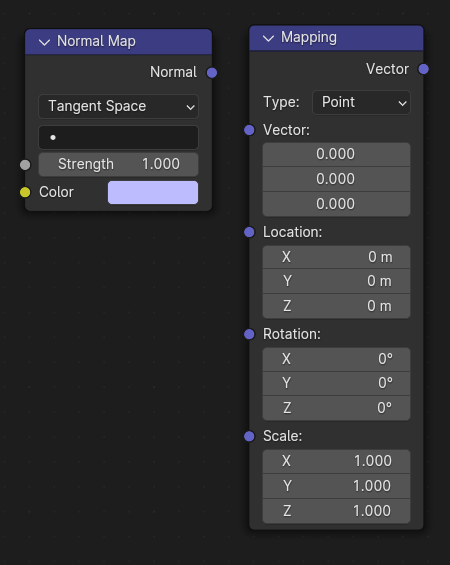
If you are using textures, does that mean that you should always also use a mapping node, or else it wont display right on the geometry? Like these:
Lot of good information, trying to understand it 🙂
January 13, 2024 at 9:08 am #83484Mix shader node and add shader nodes combine shaders using different approaches. If I remember correctly add shader node is more for volume materials. I could be wrong on that. The mix shader node is used to combine two shaders. The fac determine the mix amount. You can use an image texture to have different mix amounts across the surface of the object.
For mapping: Blender by default uses UV Map coordinates. If there isn’t a UV Map then it uses Generate. You can define the coordinate by using Texture coordinate node(Shift+a->Input). The Mapping node that you show is used to adjust or change the starting point of the coordinates. The Normal Map node is used to convert a normal map texture to face normal data. It is used to create the illusion that the mesh has more geometry than it does. For example: Instead of modeling a scar on a characters face you can use a normal map to create the illusion that the scar is modeled on the characters face.
January 13, 2024 at 9:20 am #83485As for how useful is mixing shader is, I don’t know. I know before the Principle BSDF the mix shader node was used a lot to create materials. As for me, I use the principle BSDF node and the only time I use the mix shader node is as a mask between two different principles shaders. Note: mask is 0(Black) and 1(White) image texture that switched between 2 shaders and is plugged into the fac. Black will be the top shader input. White will be the bottom shader input.
January 13, 2024 at 10:37 am #83486“Just wondering, “building a shader”, does that mean there are different types of shaders..”
That is one of those times, when the term Shader is used for Material 😉
And something that is really rare…Dwayne is slightly wrong with:
“For mapping: Blender by default uses UV Map coordinates. If there isn’t a UV Map then it uses Generate.”
Image Texture Nodes in Blender use UV Coordinates by default..if there is no UV Map, it will display a solid color!
Procedural Texture Nodes use Generated Coordinates by default (with the exception of the White Noise Texture, that needs explicit Texture Coordinates).
January 13, 2024 at 10:49 am #83487…but in most cases, I just use a Texture Coordinates Node, even if it’s not necessary…
January 13, 2024 at 2:05 pm #83488I’m pretty new to textures, mapping, uv maps and different type of terminology etc, so I’m not sure I understand everything you guys write about yet, sorry. I try to though.
So am I understanding it correctly that the Principled BSDF shader is usually all you need to use as a shader node, except for rare cases, since the other ones are built into the Principled BSDF?
Thanks to everyone for being so helpful! I appreaciate it a lot 🙂
A little difficult to learn but I will keep working on it!
January 13, 2024 at 3:38 pm #83489Thanks for the correction @spikeyxxx I’ll need to update the info in my head 🙂 I usually use a texture coordinate node even if it’s not needed as well.
@546_student Don’t worry. We all started there, and we all continue to learn. I just learned something new, that I thought I knew. Just keep being open to learning and you’ll get it in no time.
January 14, 2024 at 2:55 am #83490“So am I understanding it correctly that the Principled BSDF shader is usually all you need to use as a shader node, except for rare cases, since the other ones are built into the Principled BSDF?”
That’s pretty much it, yes. Also Mixing Shaders is slower (to calculate) than using a Principled Shader.
But sometimes you want more control over separate components (ie. Shader Nodes), or break physics, because it looks better in a specific case, then you can (will have to) use Mix Shaders instead…
…and, for instance, in 4.0, the Sheen in the Principled is different from the actual Sheen Shader Node (Cycles only).
January 14, 2024 at 6:40 am #83491I don’t miss the days where you had to build stuff from basic elements and set all the fresnel up and mixing glossy and IOR based on the grazing angles etc etc. For once I’m glad CG life is easier now. How easier is too easy and then it has a negative effect? Don’t know.
-
AuthorPosts


- The topic ‘What is the difference between shader, materials and textures?’ is closed to new replies.