What does Control Option + Numpad 0 do? and How do I fix the issue?

Forum Archive What does Control Option + Numpad 0 do? and How do I fix the issue?

Viewing 4 posts - 1 through 4 (of 4 total)
  • Author
    Posts
  • #17290
    Patrick Jones
    Participant

      Happy New Year everyone,

      I was working on a project in blender and I clicked Control, Option, Numpad 0. It messed up my camera view & workflow up. When I add a new camera & press 0, I can’t view it from there but instead it views it in another but annoying and unwanted perspective. How do I fix this minor issue? Thanks. Happy Holidays

      #83204
      Dwayne Savage
      Participant

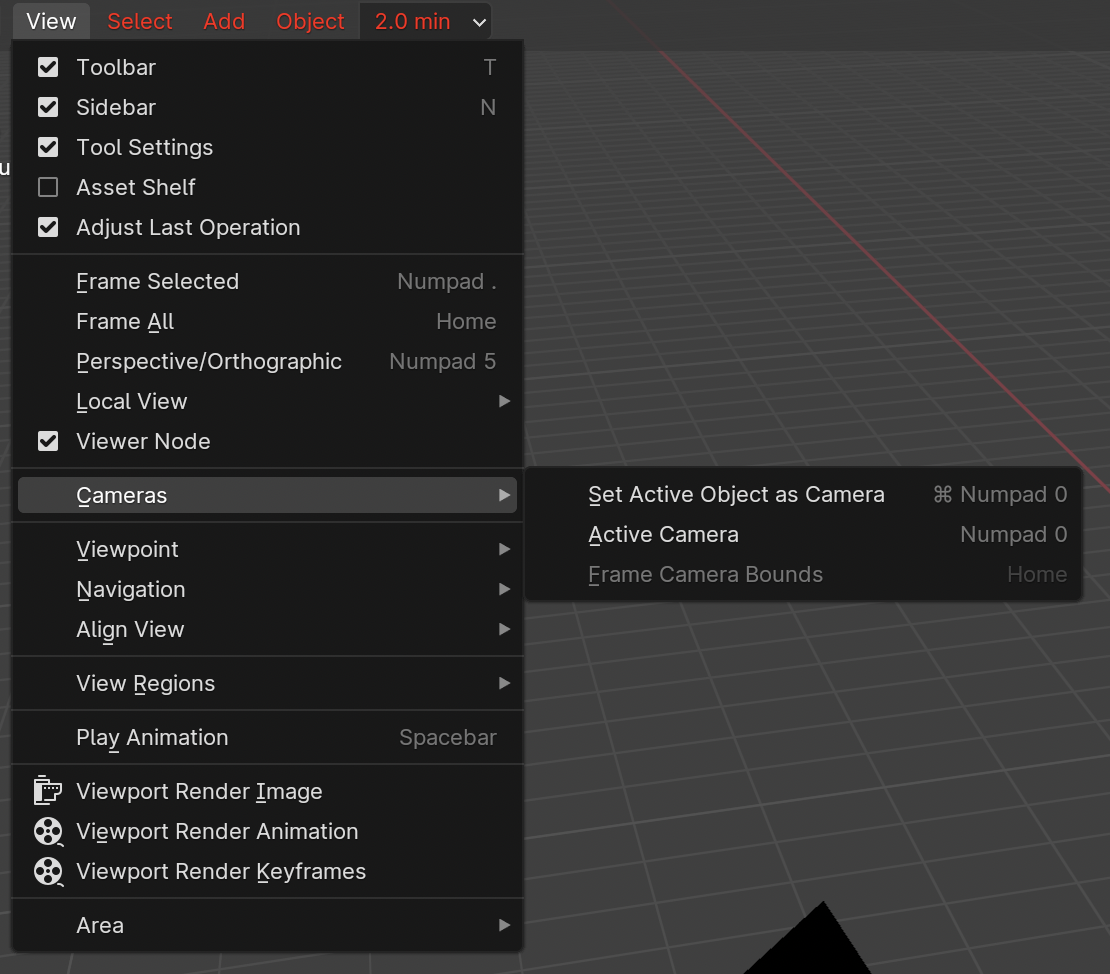
        It sets the active object as the active camera. You can select your camera and press the hotkey again or goto properties editor->scene tab->scene panel->change scene camera to your camera. Note: yes almost any object and be set to active camera. 

        #83205
        Martin Bergwerf
        Participant

          Happy New Year Patrick!

          Dwayne already gave a perfect answer; I have nothing to add to that.

          #83206
          Omar Domenech
          Participant

            You can also access that option via the menu:

            Cameras.png

          Viewing 4 posts - 1 through 4 (of 4 total)
          • The topic ‘What does Control Option + Numpad 0 do? and How do I fix the issue?’ is closed to new replies.