
-update- Auto Smooth_Blender 4.0+
Forum Archive › -update- Auto Smooth_Blender 4.0+
- This topic has 18 replies, 6 voices, and was last updated 2 years, 8 months ago by
Kerri 3D.
-
AuthorPosts
-
December 12, 2023 at 11:00 pm #17205
I downloaded Blender version 4.0.2 this afternoon (13-Dec) and Auto Smooth is available again under Normals in the Data Objects Properties. I refer to 4.1 in my original post; I should have said 4.0.1.
—
Hi everyone. I was almost done with the final video before rendering, then ran into an issue. At about 15:00, Jonathan has us go to the Data Objects Properties section and under Normals, check Auto Smooth. Well, unfortunately, that’s no longer available in Blender 4.1, and I saw on another website that Auto Smooth is now only available as a modifier. Does anyone know how to maneuver through that modifier and get the same result? Thank you!December 13, 2023 at 2:44 am #82794Hi Kerri @Kerri_3-D ,
First, the title of this question is wrong, it should be 4.1+
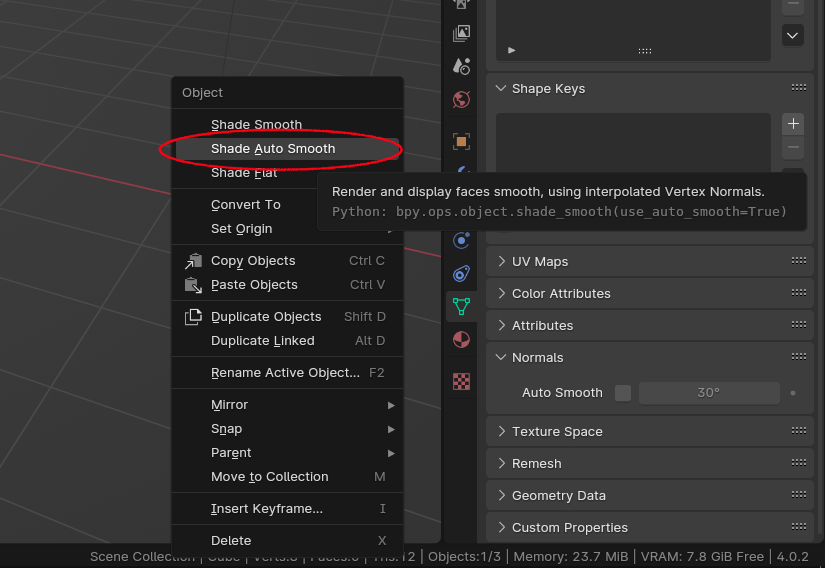
Second, Auto Smooth has not been removed! True, it is no longer in the Object Data Properties (at least I haven’t found it), but it is still in the Menu:
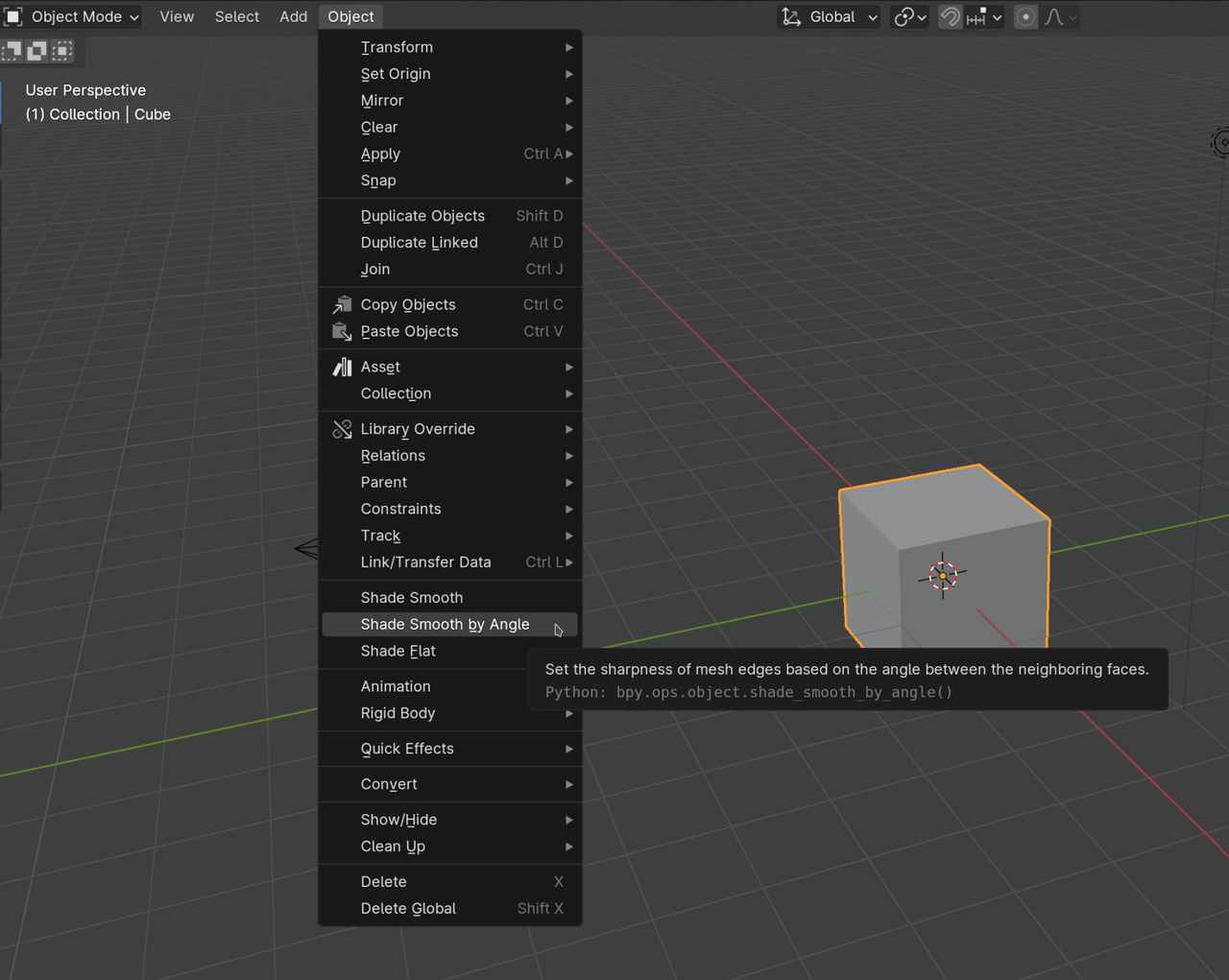 December 13, 2023 at 8:09 am #82795
Man I would love to know if the guys in Amsterdam really really think it is worth it to change things around and rename everything. They have to know how much material around the internet they are making worst or obsolete with their decisions with each Blender release. Is Blender really that much better having Auto Smooth renamed and moved? If it is, then ok, but for my lame eyes it doesn’t look like it’s a justifiable change. They could leave it as it has always been and it’s still pretty much functional and the same. Instead they change it and they crate a lot of confusion. Is the change really worth the confusion and making so much training and videos outdated? I don’t think so.
December 13, 2023 at 10:00 am #82796Hi Martin @spikeyxxx-
I named it 4.0+ on purpose. I don’t know when the Auto Smooth change took effect; I assumed it was with 4.0 (not just at 4.1), so that’s why. If it did just get rolled out with 4.1, I will definitely change the title to avoid confusion for others 🙂
Also, thank you so much for pointing out where it is in the menu! I probably should have dug a little deeper before posting my question, but I appreciate you taking the time to answer.
December 13, 2023 at 10:50 am #82797Hi Omar @dostovel
Completely agree. Especially for people like me who are fairly new to Blender and don’t yet know enough about it to troubleshoot things on our own… or find the same tools in different places. I spent more time researching where Auto Smooth had been moved to than I did on most of the videos in this tutorial, lol. Thank you for responding.
December 13, 2023 at 1:28 pm #82798Well me saying that started a conversation that lasted hours, I may have been swayed to think otherwise now. But not radically different, it’s a very broad topic lets just say that.
December 13, 2023 at 2:00 pm #82799I’m sure there are logical reasons for everything they do. I still feel that making small changes like that can hinder the learning curve a bit for newbies like me. I still love using Blender, but it definitely slowed me down last night trying to finish this tutorial. Oh well. Definitely not the end of the world 🙂
December 13, 2023 at 5:19 pm #82800The change is new to 4.1. It had to be done so that auto smooth could be done in geometry nodes. Before this it could only be done to actual mesh and not to mesh data created in geometry nodes. Keeping it in both places proved to cause to many problems from what I understand. My understanding is that it is available as a geometry node group through the asset browser. I’ll have to check when I get home from work to verify.
December 13, 2023 at 5:50 pm #82801Hey Dwayne @dillenbata3
(I refer to 4.1 in my original post; I should have said 4.0.1.).
Anyway, I downloaded Blender version 4.0.2 this afternoon and Auto Smooth is available again under Normals in the Data Objects Properties. Maybe the Blender folks had enough feedback about it and fixed it…? No idea, but the question I posted last evening seems to be a non-issue now with the latest version.
I know software updates all the time, but it has been a bit challenging to keep up with Blender’s when someone like me relies on tutorials to learn.
Let me know if you find Auto Smooth anywhere else; I’m curious to know. Thanks for responding.
December 13, 2023 at 6:50 pm #82802I agree that changes like that can certainly be annoying, especially for following tutorials, but often it’s worth it in the long run. In this case, removing auto-smooth fixes a few complaints I’ve had for a while and boosts performance quite a bit for animated high poly meshes. Thumbs up from me even though it switches up the workflow.
Luckily, you can always ask here if you have any trouble following along in newer versions. Glad it’s working as expected now!
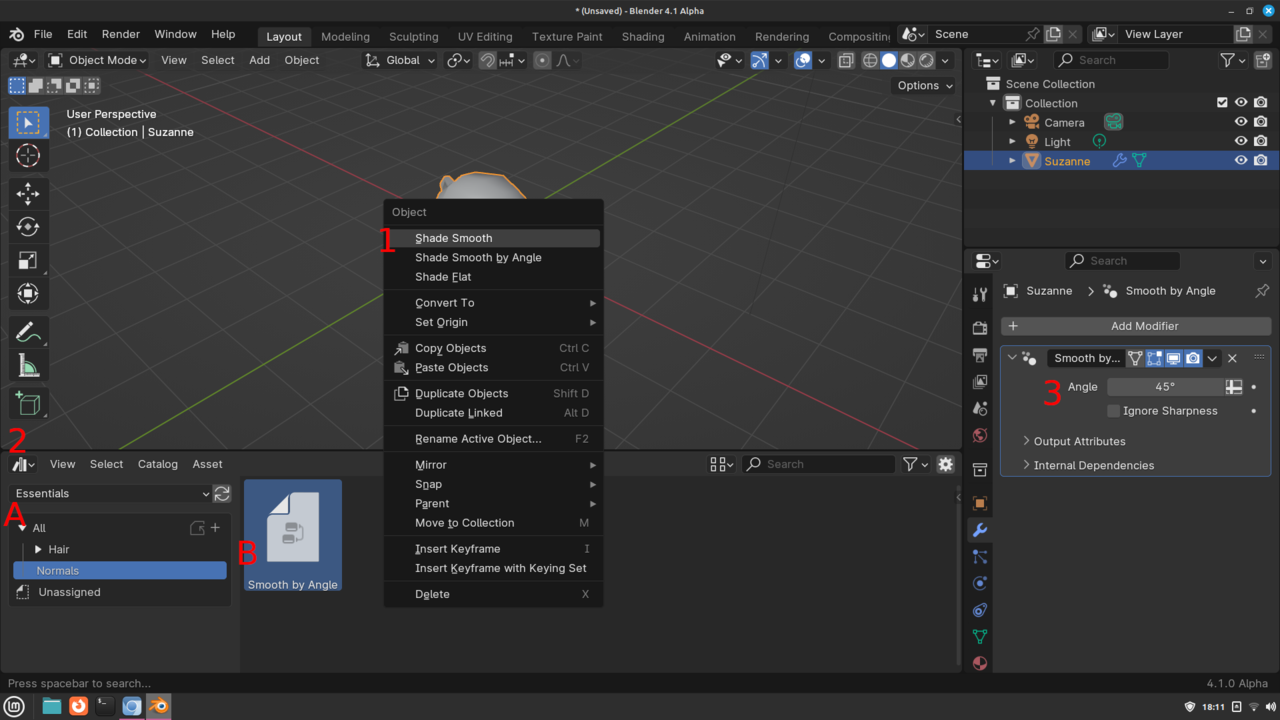
December 13, 2023 at 7:46 pm #82803The next release 4.1, which is alpha right now, will remove the auto smooth from the data tab. I just checked it and it is in the asset browser under normals category. It is also removed from the context menu(Right click in object mode). You do have a new shade smooth by angle, but that doesn’t allow you to set the angle. So to shade auto smooth for 4.1+ you will need to 1. right click object and click shade smooth.(Smooth by angle ignores the auto smooth). 2. A) Go to the asset browser. B) Optionally change to the essentials Library and click normals category C) find the “Smooth by Angle” asset. Then drag and drop it on the object. 3. Adjust angle in the modifiers tab of the properties editor. The ignore sharpness means it will ignore edges that are marked as sharp.
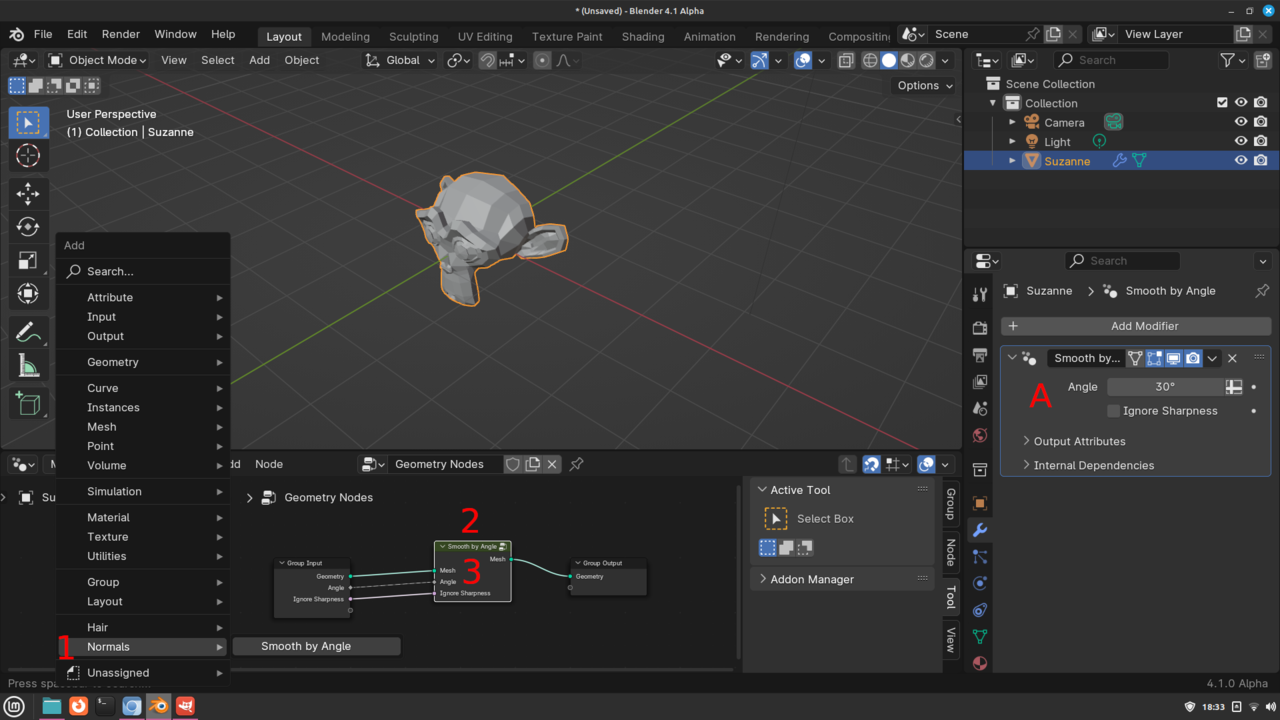
Alternatively, you can do it thru geometry nodes. Go to the geometry node editor while you have the object selected and click new. 1. Shift+a->Normals->Smooth by Angle. 2. Put node on the green line between the Group Input node and the Group Output node. 3. Adjust the angle. A) Optionally you can connect the angle from the Smooth by Angle node to the Group Input node and then you can access the angle setting thru the modifiers tab. Note:You still have to right click on the object and click shade smooth for this to have any affect.
 December 14, 2023 at 3:44 am #82804
@dillenbata3 :”You do have a new shade smooth by angle, but that doesn’t allow you to set the angle.”
Really? I am confused now:
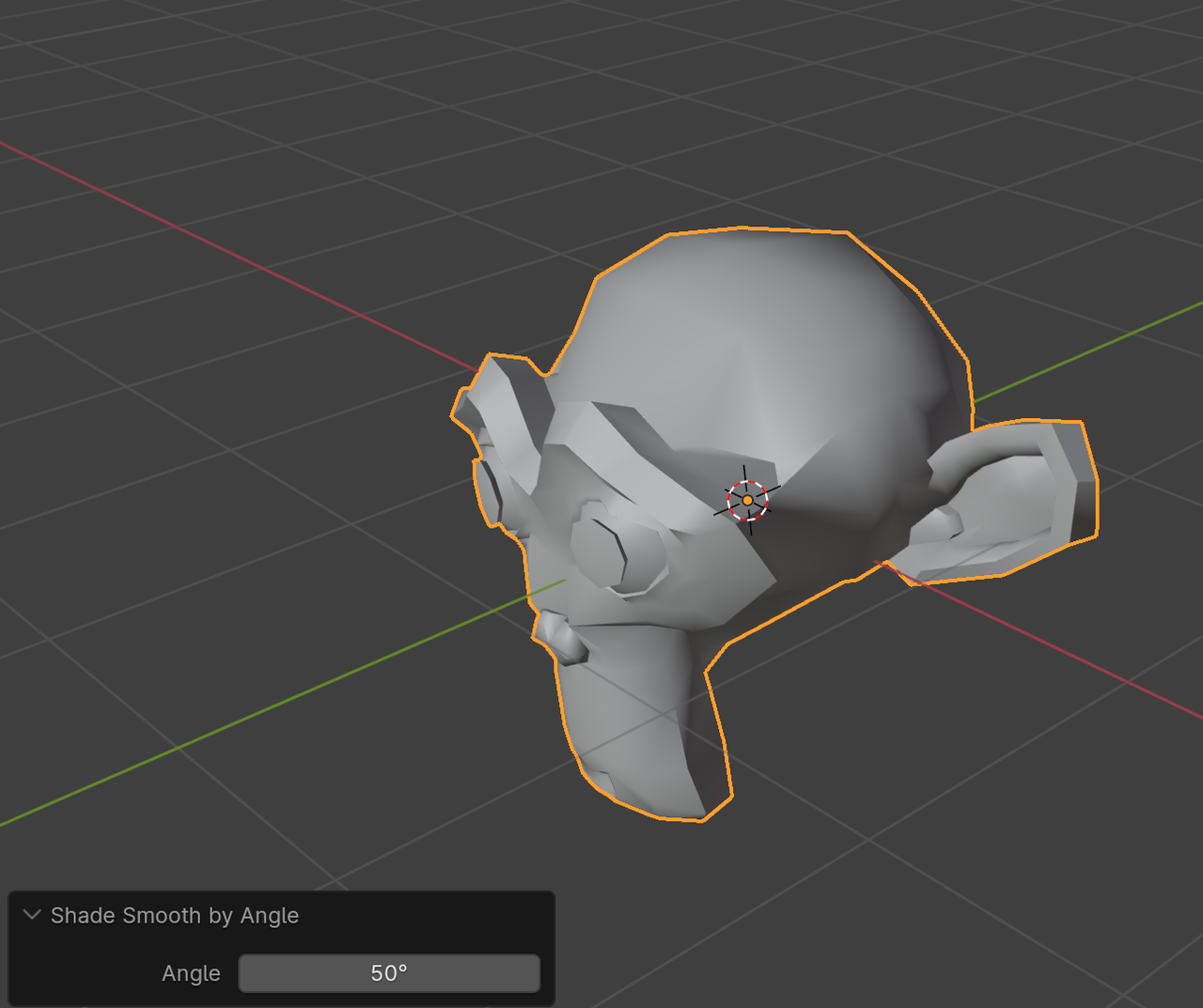
Oh wait, you probably mean that you cannot change the Angle later on, only directly after enabling it.
December 14, 2023 at 4:57 am #82805Why not finish the the course with 4.0.2?
As Auto Smooth is back in the Object Data Properties > Normals > Auto Smooth.The difference between 4.0.1 and 4.0.2 will not break anything. The last number in the sequence donates a release with minor updates such as bug fixes.
Fun Fact: Auto Smooth is also available from the RMB context menu.
 December 14, 2023 at 8:32 am #82806
Blender can easily leave you behind if you’re not careful. It’s hard for me to get rid of the neural connects I’ve built for years, but I get it, it’s for the betterment of the software.
December 14, 2023 at 10:59 am #82807Martin Bergwerf, Nope, I totally didn’t pay any attention to the adjust last operator.🤦 So, thanks for pointing that out.
-
AuthorPosts


- The topic ‘-update- Auto Smooth_Blender 4.0+’ is closed to new replies.