Why not select all vertices in x-ray mode, then F to fill?

Forum Archive Why not select all vertices in x-ray mode, then F to fill?

Viewing 4 posts - 1 through 4 (of 4 total)
  • Author
    Posts
  • #16816
    Mike Williams
    Participant

      Around ~3:45 it shows the process of holding Ctrl to “select shortest path” between vertices… this seems like an odd approach when you can just go into side view, toggle x-ray (alt Z), and select all of the points, then hit F to fill. (Same thing shown at ~6:10 for the bottom. Same result, no?

      #80990
      Martin Bergwerf
      Participant

        Hi Mike @birdcircus ,

        That won’t work, because of the Buttons and Screen that are ‘in the way’ (they are not at the bottom, so that’s why it does work there).

        I really recommend trying it and see what goes wrong!

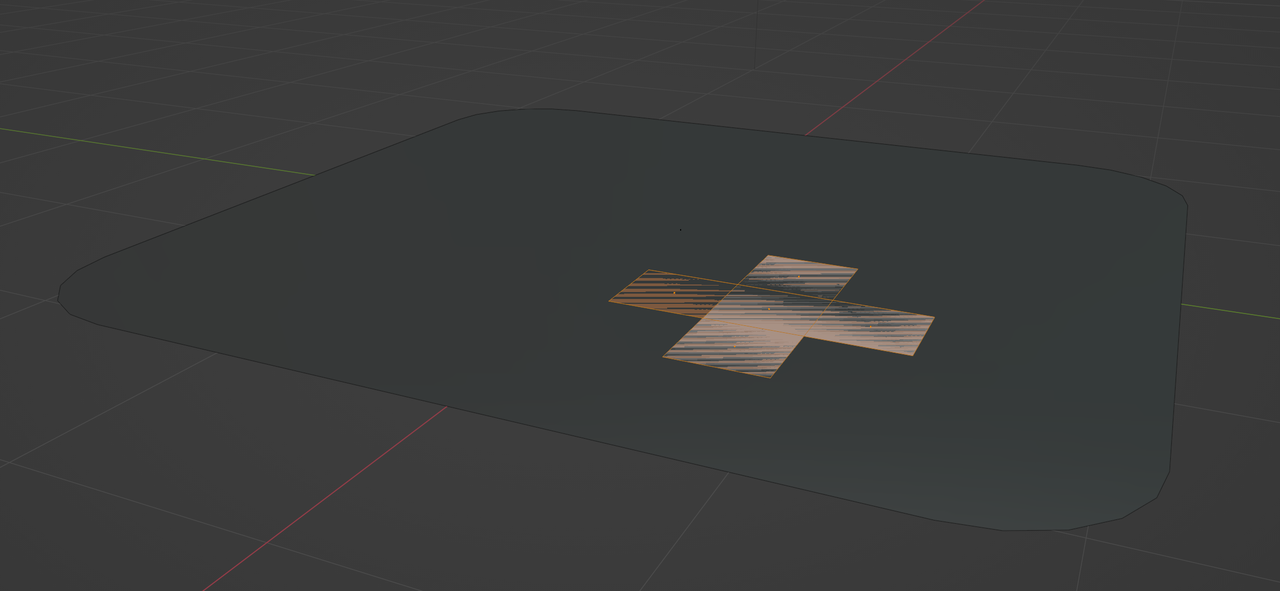
        This:

        Z-fighting.png

        is called Z-fighting and it happens when two Faces are in the same place. (The large one, made by your suggested method and the ‘cross’); Blender (or any 3D software) doesn’t know what Face to render.

        #80991
        Omar Domenech
        Participant

          Yeah, JL wants to make Ngons that are not super big and would cause elements to be separated. If you go into side view you’re going to selected unwanted vertices and will have to go and deselect things and you’ll be doing manual work yet again.

          #80992
          Mike Williams
          Participant

            Ah! Ok I see now. Thanks!

          Viewing 4 posts - 1 through 4 (of 4 total)
          • The topic ‘Why not select all vertices in x-ray mode, then F to fill?’ is closed to new replies.