
I can’t get the smooth & form desired…
Forum Archive › I can’t get the smooth & form desired…
- This topic has 5 replies, 3 voices, and was last updated 3 years, 3 months ago by
Carles Quero.
-
AuthorPosts
-
May 19, 2023 at 2:40 am #16379
I cannot share a capture right now. If you need it for responsing, please ask. I followed step by step the wonderful master-class Kent made, watching carefully all the steps Kent did with his amazing skills using CREASE, the “blue hat ball that-it-is-not-in-my-current-blender-version stuff” (I think is INFLATE?), GRAB, SNAKE HOOK sculpting tools. But I am not able to get that amazing smoothy angular aspect Kent got, for instance, in the “eyebrows”. I do not know if he does this process in this video or just in the previous to this one. Although I got achieved a good result to being my first sculpting practice, I am aware I still do not have control over the things. Is there any course where this is more deeply explained? Thank you so much in advance & one more time: my congrats for all of this wonderful work you made. My future works Cgcookie & Blender in the credits for sure. Best wishes
May 19, 2023 at 4:17 am #79250Hey Carles,
Kent will be overwhelmed and extremely appreciative of your kind words, all true by the way.I’m not sure why you don’t have the inflate tool in your current Blender version, it has been around a long time. What version of Blender are you using?
As for other courses that explain the control of things, I would say its practice that will help develop your skills further, rather than a particular course.
To help you practice, the exercise in this course is to sculpt one of the sharks from the reference, but you are not limited to one, when you have finished, start again with a different shark.If your comfortable with Blenders UI in the version you are using, there are some older courses you could look at for more practice.
fundamentals-of-digital-sculpting-in-blender – this is an earlier version of the fundamentals.
creature-modeling-for-production – another older course, but still very relevant and an excellent course for practice.
sculpting-the-wrangler-game-character – more great practiceAnd there is always the human-realistic-portrait-creation-with-blender, this course is an absolute legend, just like the instructor, a must for any digital sculptor looking to level up their skills.
Keep it going and practice, practice, practice.
May 19, 2023 at 4:45 am #79251Thank you, Adrian, for your kind response. I will dive into all the stuff you recomend. Best wishes
May 19, 2023 at 4:57 am #79252Sorry, Adrian, I forgot to answer you about the sculpting tools question. Yeah, that icon I do not have is INFLATE. I just checked it today. For some reason I find the answer after posting… I am a weird guy. I am working with the last version of Blender, so it is almost the same as the Kent’s course. I know it would be convenient working with the same one of the courses, but I can find the tool finally, thanks to some experience in other programs. thank you
May 19, 2023 at 7:28 am #79253I agree with Adrian, it’s all about the practice. Watching the tutorials is the first step, a guide that will propel you forward, but watching is only one piece of the puzzle. To achieve mastery of the shapes and forms is practice, practice and practice. We see the teachers in the videos and they make it look so easy, but they have tons of practice and their brains can make the correct tiny decision needed while ours can’t yet. And you may despair and say but that is going to take me a lot of time, yeah but time will pass nonetheless, so when the future inevitably comes, it’s better if it gets here and we’ve made the most out of it. Two years down the line you would’ve gained a skill worth having, improved your mental health, while other people spent it watching 15 seasons of a show on Netflix and still feel empty.
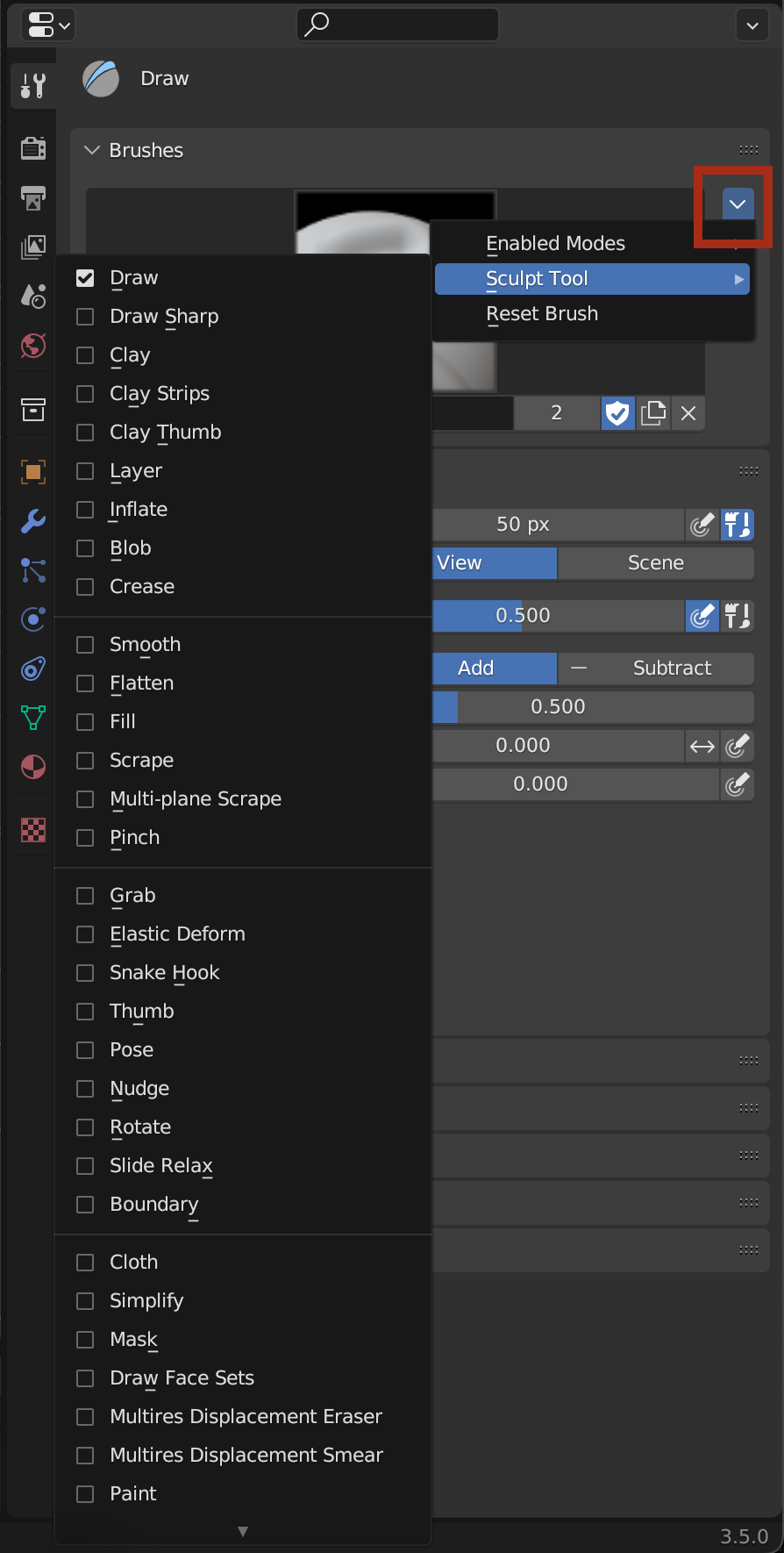
I remember in old tutorials Kent always used to complain that his brushes in Blender disappeared, he would go to sculpt and one brush wasn’t there. If I remember correctly, he just created it again. There’s a button where you can just add the brush that is missing. Be sure to duplicate a brush and then assign a brush functionality to that new one, just so you don’t overwrite a brush accidentally.
 May 19, 2023 at 7:53 am #79254
Hi again, Omar. I just noticed that the icon Kent was using was INFLATE that is changed in the new version of Blender I’m using currently. Even so, thanks so much for letting me know where I can address to edit the brushes! So cool! Thank so much for your support, guys!
-
AuthorPosts


- The topic ‘I can’t get the smooth & form desired…’ is closed to new replies.