
Office Hours – Kent’s Office – Tuesday, April 25th, 1 pm (US Eastern Time)
Forum Archive › Office Hours – Kent’s Office – Tuesday, April 25th, 1 pm (US Eastern Time)
- This topic has 11 replies, 5 voices, and was last updated 3 years, 4 months ago by
Kent Trammell.
-
AuthorPosts
-
April 20, 2023 at 1:46 pm #16247
Greetings Citizen Members! I will be opening my office via Discord on Tuesday, April 25th, at 1 pm US Eastern Time. That translates to:
- 10am Los Angeles time
- 6pm London time
- 9pm Dubai time
- 3am Sydney time (ouch)
It’s hard to pick a time that works for everyone, but I’ll also record the session for anyone that can’t make it live. Assuming I don’t forget again 🤦♂️
Have a question for me?
Ask me anything you’d like related to Blender, CG Cookie, my courses, troubleshooting a project issue, etc! If your question involves a project you’re working on, please provide a download link so I can take a closer look.
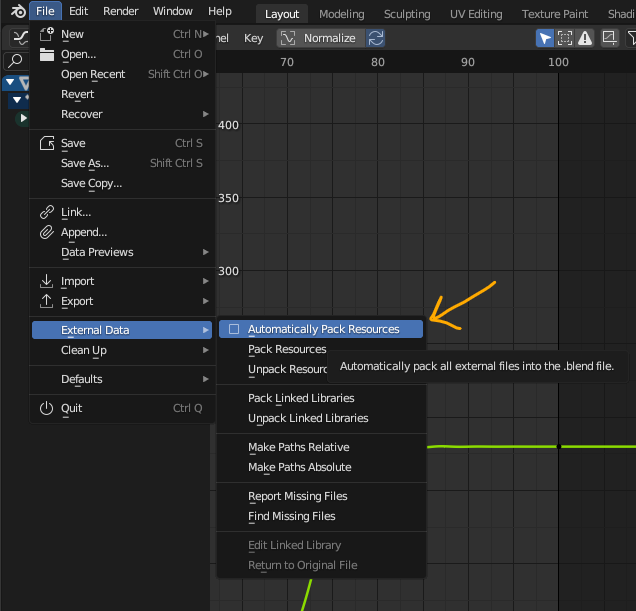
The best way to do this is by uploading your .blend to Dropbox, Google Drive, Mega, or equivalent file hosting service then copy + paste the share link here. If your project involves image textures please pack your .blend before saving and uploading by going to File > External Data > Automatically pack resources:
NOTE: Active CG Cookie members get first priority, but we’re happy to help out anyone. For more information about Office Hours, check out Amber’s recent blog post.
Video Recording
April 21, 2023 at 9:22 am #78723Can we talk about Lens Flare? I am interested in creating realistic cinematic lens flare inside of Blender, both in animations and still renders.
Maybe we can include camera concepts. Like the number of blades and ways to get a nice bokeh, ratio for nice anamorphic lenses, etc.
Is it too crazy to try and recreate the many layers of lenses in the 3dviewport parented to the camera to get realtime flare without comp? Sounds crazy tbh.
April 25, 2023 at 10:47 am #78724the looping in my homework assignment just doesn’t want to happen. I’ve uploaded it to google drive https://drive.google.com/file/d/1ym4Uxy5iNejAYp3xVzZmS4mjAUJGvEEY/view?usp=sharing
with a video (I don’t know how to make the video loop 3x)
the video’s from the tutorials don’t have that huge jump
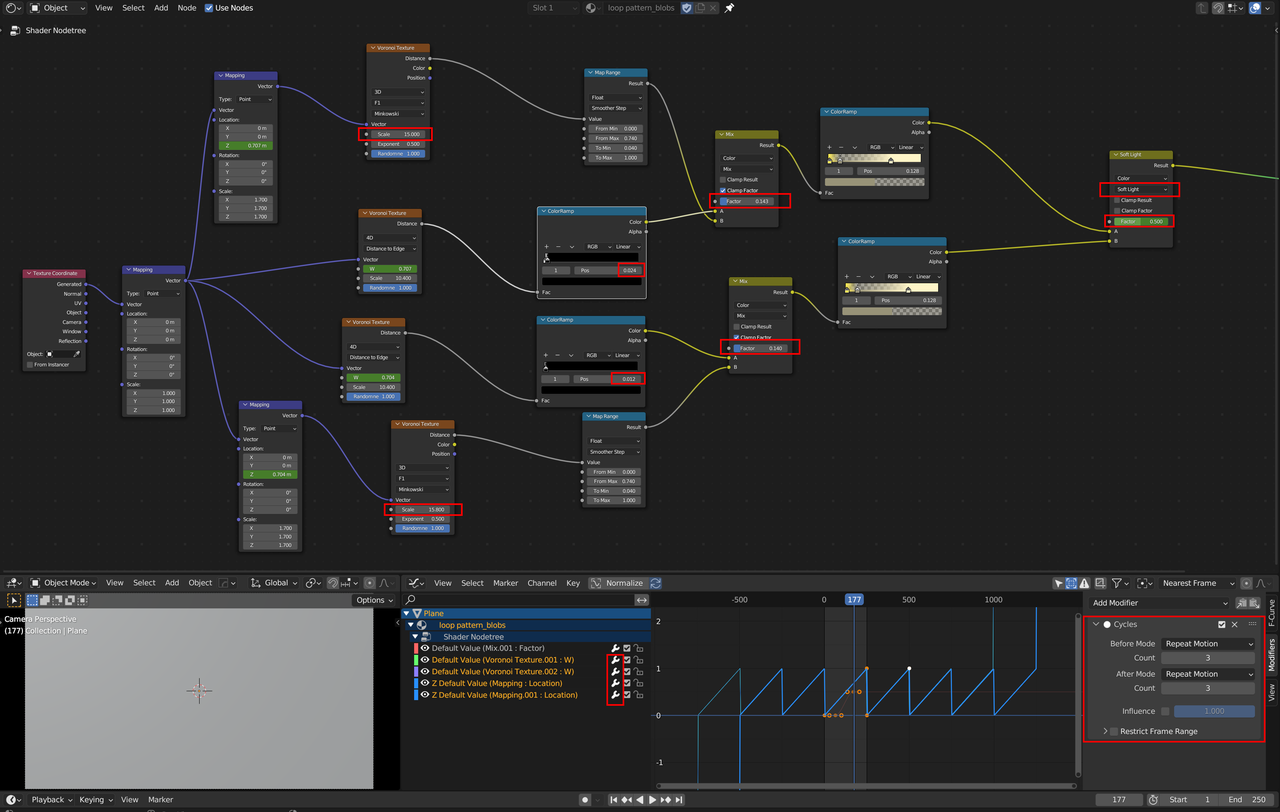
April 25, 2023 at 11:37 am #78725Here’s a summary of your mistakes Sheila, but I’m sure Kent will go over them in detail:
I hope I can be there today.
April 25, 2023 at 11:46 am #78726those things at the bottom I made later to try to loop 3x with the output (it didn’t work). What do you mean by pointing out the scale? I had several versions with different values and none of them looped as intended
April 25, 2023 at 11:53 am #78727One of the things I struggle a bit with is scope.
Doing even simple animations one can get bogged down in details.There’s an office scene.I need to create the cubes, the keyboards, mice, desks, chairs. . . and on and on before even getting to the main point of the scene or animation. I haven’t watched the bit on minimalism yet, and that could probably help, but how do small productions or individuals manage the scope for their projects?One thing I could definitely do is utilize the marketplaces – paid or Creative Commons – more. I don’t necessarily need to create a keyboard if there’s one out there already and my goal isn’t showing off a particular keyboard.Are there any other hints that you have?April 25, 2023 at 11:53 am #78728The two Scales are different Sheilas,
they make the stars jump
April 25, 2023 at 12:01 pm #78729One other question. I’m working on the Golden Gate Bridge and I’m doing it at “full scale”.
Blender doesn’t always handle huge structures well. Other than shrinking the object, is there a good way to manage large objects at full size?
Edit: Here’s a link to the model.
You can see where the Bevel modifier is working on the pyramid like structures on the cross braces.
On the tower; however, the bevel just isn’t kicking in. I’ve tried doing it by angle, by bevel weight, etc.
Edit the 2nd: Turning Clamp Overlap off seemed to resolve the issue.
April 25, 2023 at 2:57 pm #78730thanks martin ! (sorry for the mixup, I thought Spikey gave those answers because Kent said spikey in the video) I really need better glasses lol
April 25, 2023 at 3:15 pm #78731Yeah, Spikey and Martin Bergwerf are one and the same.
April 25, 2023 at 3:37 pm #78732make things complicated for an old woman here
May 8, 2023 at 10:32 am #78733@sheila5 Thanks for the reminder! I just posted my fresh OH thread for this Tuesday. If you don’t mind, for clarity’s sake, could you repost your question in that thread? I’ll be happy to take a look at your file 👍
-
AuthorPosts


- The topic ‘Office Hours – Kent’s Office – Tuesday, April 25th, 1 pm (US Eastern Time)’ is closed to new replies.