
Render Properties Tab and the View Layers Properties Tab
Forum Archive › Render Properties Tab and the View Layers Properties Tab
- This topic has 16 replies, 5 voices, and was last updated 3 years, 4 months ago by
spikeyxxx.
-
AuthorPosts
-
April 12, 2023 at 5:55 pm #16206
Hi Y’all,
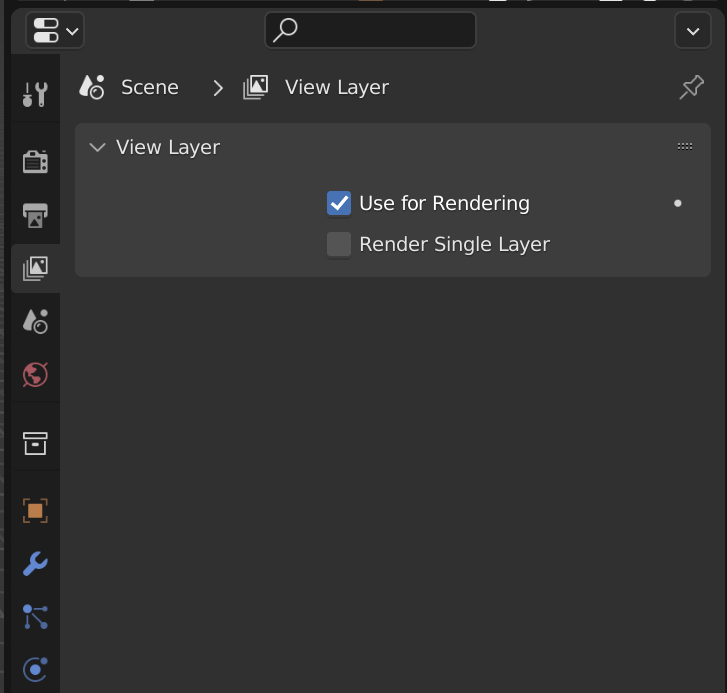
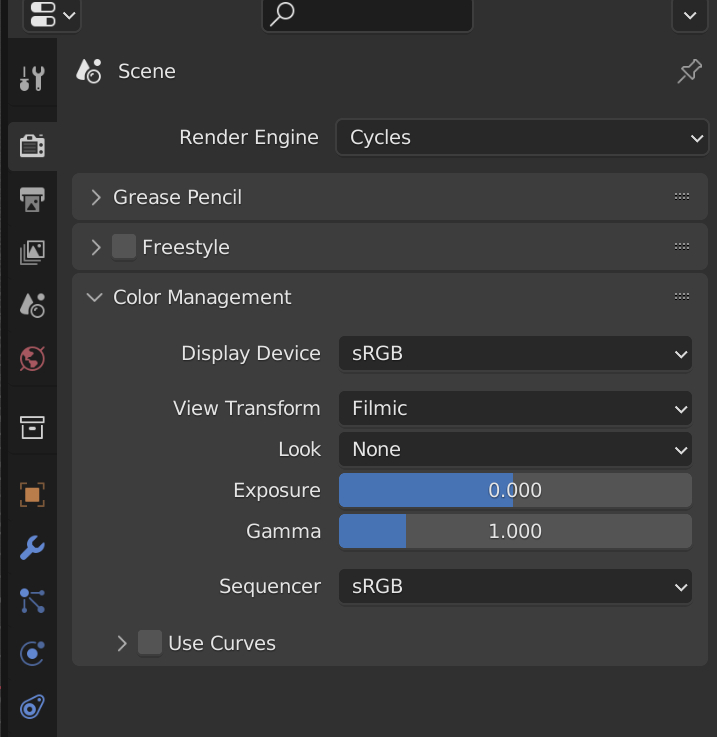
I used the model download provided and I had no issues until I went into the Render Properties Tab and the View Layers Properties Tab. It was fine for the many hours and days I have been using it until all of the sudden it gives a shortened version in these tabs as shown in the attached pics?
Do you how to get these tabs back to the normal way it was?
By any chance was the model download modified that I didn’t notice? I was sure it was fine before but now I’m not sure.
I have no idea why they changed. Ay, yi, yi…🤔😑😉
Thanks
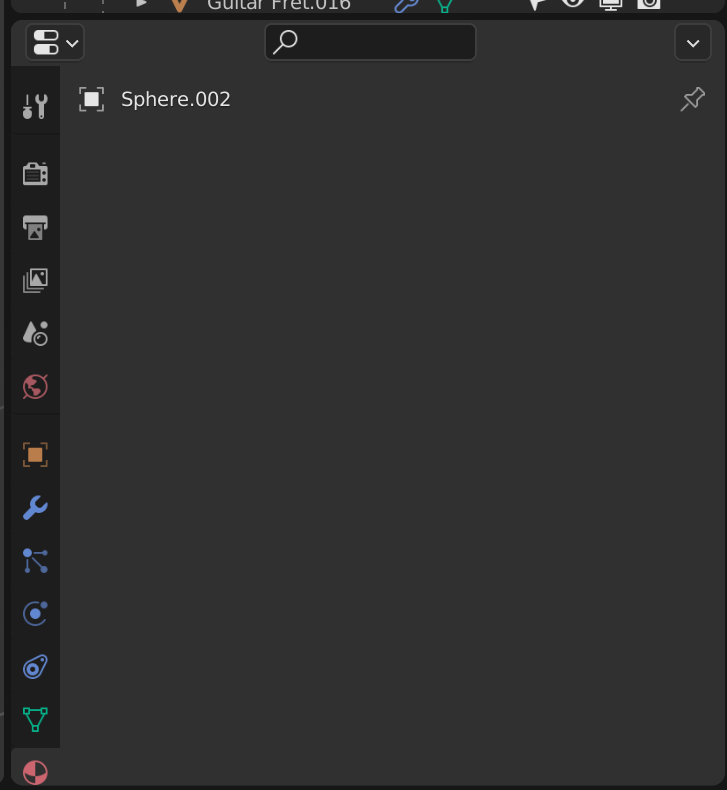
Edit: Something strange is happening. If I add any primitive the Material Tab shows nothing (See last screenshot). I’ll try rebooting the computer out the window. 8^)
 April 12, 2023 at 6:27 pm #78524
That is… quite strange. I can’t recall seeing that before and I can’t think offhand what could cause that. Can you share your file?
April 12, 2023 at 7:52 pm #78525Sure, where do I share it to?
It’s a little over 10MB file
EDIT: I started in a new model to finish some modelling and was going to append into the model with the issues after it gets resolved but now think it might be best to append the collections into the new model and see what happens.
If you still want the file, let me nw.
April 12, 2023 at 9:19 pm #78526Hi Jonathan,
It seems to be working very well when I appended the collections into a new model. The renders seem to be a bit better as well so it may be a blessing in disguise. It does seem to be running a bit smoother now, so I don’t want to waste your time and we can chalk this up as resolved. Thanks.
April 13, 2023 at 1:07 am #78527Hi Brad @brad-nbo ,
I’d love to see the broken file, if you still have it (post a link via Dropbox, Googledrive, or any filesharing service you like).
I am not entirely sure, but I vaguely remember having seen this before … 🤔
April 13, 2023 at 3:26 am #78528That is odd!
Please share the file so we can try and find the issue.Do you have any third party add-ons enabled?
April 13, 2023 at 7:13 am #78529This is now like a SCI, Crime Scene Investigation Blender.
April 13, 2023 at 8:30 am #78530Hi Y’all,
Yeah, I’ve been away from Blender for quiet awhile and had addons like Box Cutter, Hard Ops, Machin3 Tools and they kinda followed me when I went to a newer version 3.3.1 as I wanted to hopefully have a clean version but I was wrong in that. There was an notification to update Hard Ops (I think I must be several versions behind) but I ignored and just went vanilla Blender trying to refresh what I learned before and I always wanted to check out CG Cookie, so the opportunity to do that was taken.
I was thinking that in the back of my mind that these addons that followed me into the newer version I had might have triggered some code breaking and I used the courses Blend file to start with that might have compounded the situation but IDK, I’m just speculating.
I appended what I did into a new file and that seems to have resolved the issue. it works better than it was and I still haven’t done any changes to the addons yet, I just keep ignoring them, except for Enrich compositor addon.
I think that is going to be a chore of uninstalling the Blender versions I have and the addon files in the Foundation folder, then reinstalling Blender and the addons. I’m delaying that as long as possible, lol.
So, with all that nonsense, I don’t want to waste your time as I created a smozzle it looks like. But if you still do, let me know where the dropbox link is to send the file, I’m relatively new to the community format need a little guidance. Sorry for the mess and confusion, we can drop it for now so everyone can move on and not have to get involve in this mess. I let things go too long I geuss.
Thanks
April 13, 2023 at 8:36 am #78531Hi Brad,
You can upload your .blend file to Dropbox, or Googledrive, or something like WeTransfer and then you can get a link to that uploaded file and post that link here.
You are not wasting our time! I, for one would love to find out what is causing this!
April 13, 2023 at 8:47 am #78532Hi spikeyxxx,
Oh, yeah right. I haven’t used dropbox in years and I have to ask the question to myself, ‘do I wnt everyone in the world to see my shame?’. 8^)
The model is messy, lol
April 13, 2023 at 9:10 am #78533Okay, here is the link. Let me know when you got it. I’ll delete this post with the link later.
This is where I left the modeling where I added a cube and noticed in the Materials Tab that it had no material options and compounded with the render options missing it looked like to abandon the modeling and try it fresh. So, it’s messy and not as organized as I’d like but was in a rouging in mode.
https://drive.google.com/drive/folders/1mjF7MX4ZonX6o8xLtZbf5FqvzXmisGjR?usp=sharing
April 13, 2023 at 9:30 am #78534The link requires access; I just sent a request (Martin Bergwerf).
And don’t worry about the messiness 😉
April 13, 2023 at 9:56 am #78535Okay, got it. Thanks Brad.
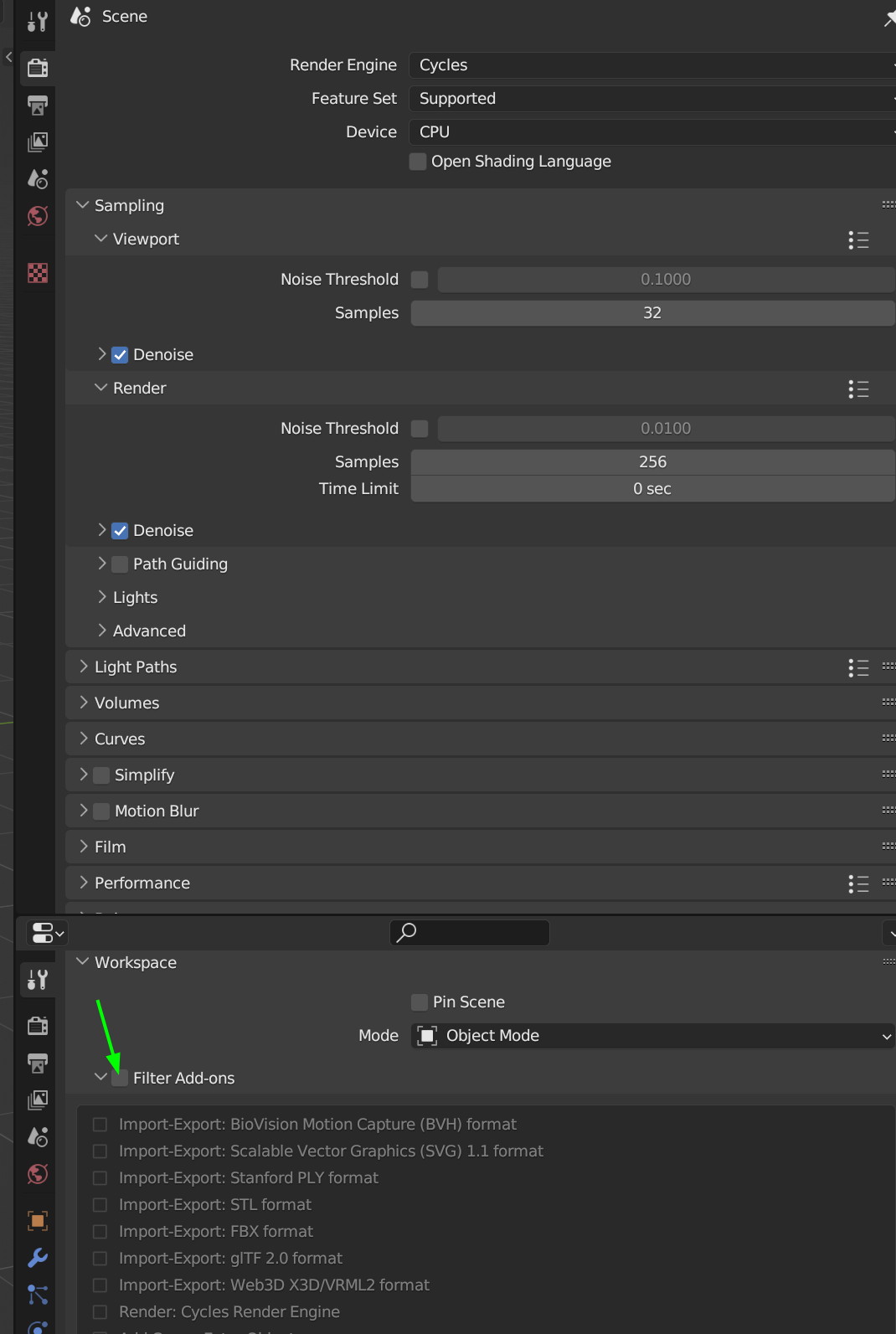
I can already tell you, that it has to do with an Addon; if I disable Filter Addons, everything seems to be normal again:
I’ll keep you posted when I found the cuprit.
April 13, 2023 at 10:00 am #78536Oh, I see, you disabled Cycles Render Engine by using the Filter Addons. (The whole list is being disabled, unless you check them.)
I actually never used that feature.
April 13, 2023 at 10:04 am #78537Hi spikeyxxx,
Ohhhh, I do remember clicking on that b it I thought I’d turned it off right after. So I’m the culprit, lol. No wonder they call it a tick mark, it just may will tick someone off. lol
Oh well, I’ll just leave that model as a reminder.
Thanks
-
AuthorPosts


- The topic ‘Render Properties Tab and the View Layers Properties Tab’ is closed to new replies.