2.58 mins in Wayne presses a key that resets the pose? What is it?

Forum Archive 2.58 mins in Wayne presses a key that resets the pose? What is it?

Viewing 6 posts - 1 through 6 (of 6 total)
  • Author
    Posts
  • #15535
    neishy
    Participant

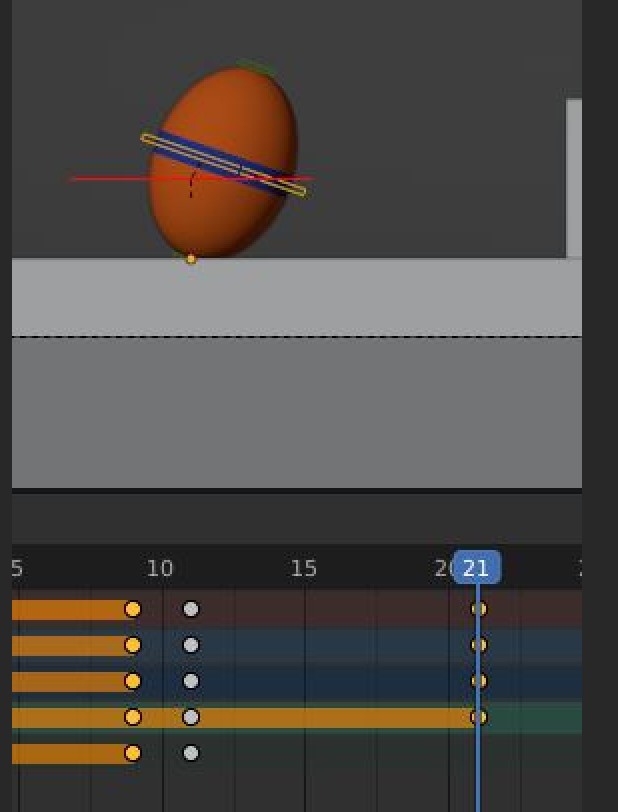
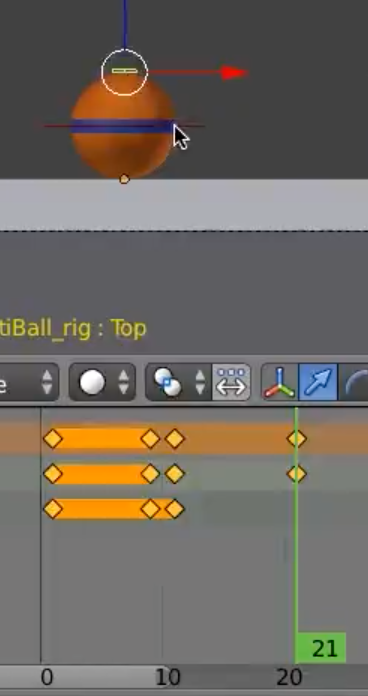
      Hi, I’m a bit stuck. I move to the 21st frame, like Wayne does, and I press the “I” key to insert a frame, which I believe is the key Wayne presses. But instead of my ball’s pose being reset from stretched back to normal, it remains stretched, which is different to what happens on Wayne’s screen. Any idea what’s going on?

      #75904
      neishy
      Participant

        0-26 at 16.37.03.png

        #75905
        neishy
        Participant

          0-26 at 16.40.08.png

          (My screen obviously)

          #75906
          Omar Domenech
          Participant

            Looks like he resets a transform. So the hotkeys that reset transforms are ALT + S to reset scale, ALT + G to reset location and ALT + R to reset rotation. It looks like he resets the scale of that bone that stretches the ball. Now I see screen cast keys can be useful.

            #75907
            neishy
            Participant

              Cheers Omar. Yes, I pressed Alt+G then moved it along, and it solved it.

              Really appreciate all the help you’ve been giving me recently. Thanks.

              #75908
              Wayne Dixon
              Participant

                Omar saved the day.
                But don’t forget that I have autokey enabled – so when I reset the transforms (Alt G, Alt R, Alt S) this keys keyed.
                If it isn’t keyed it will snap back to its position when you move the playhead 😉

              Viewing 6 posts - 1 through 6 (of 6 total)
              • The topic ‘2.58 mins in Wayne presses a key that resets the pose? What is it?’ is closed to new replies.