irradiance volume (irradiance size, turn on/off)

Forum Archive irradiance volume (irradiance size, turn on/off)

Viewing 4 posts - 1 through 4 (of 4 total)
  • Author
    Posts
  • #15018
    senyr
    Participant

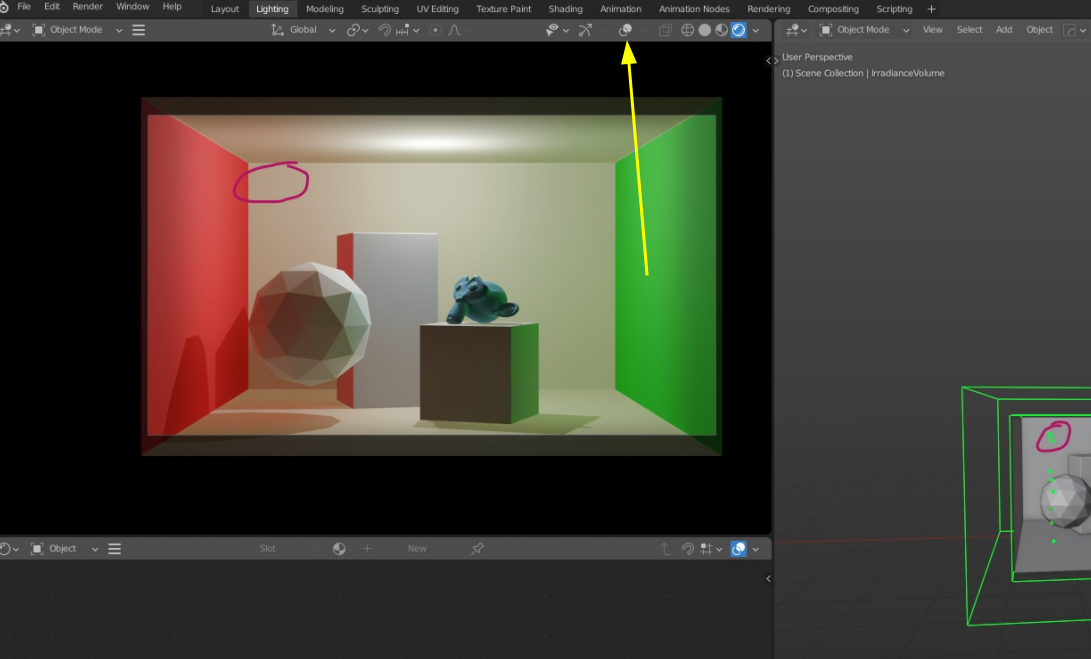
      hi, i was wondering why can’t see irradiance size dots on  the viewport

      Maybe I didn’t understand something in the video ?

      https://drive.google.com/file/d/1VCJag33KuMmBbxzPdUB5tjyRpMpa7UK5/view?usp=sharing

      #73973
      Adrian Bellworthy
      Participant

        Hey @senyr,

        Unfortunately your image is not visible, try adding it again below. 

        Click the add image tool, then click browse, find the the image in the file browser, double click or drag and drop into the box. Then hover over the image when it appears below, a + will appear, click to use the image.

        Comment tool bar.png

        You should see the dots as soon as you add the irradiance volume.

        Make sure the irradiance volume object is selected in the viewport.

        When you change the x, y and z values to 1 in the object data properties, there is only one dot in the centre, its not very easy to see.

        #73974
        spikeyxxx
        Participant

          Hi @senyr, you have Overlays turned off:

          IrradianceSize.png

          #73975
          senyr
          Participant

            @spikeyxxx 😅

            Adrian Bellworthy 🙂

            Thanks to both of you 😃

             I tried to put image into image tool, but after I attach it keeps throwing me to the cgcookie homepage

          Viewing 4 posts - 1 through 4 (of 4 total)
          • The topic ‘irradiance volume (irradiance size, turn on/off)’ is closed to new replies.