My Bevels on half the device is messed up

Forum Archive My Bevels on half the device is messed up

Viewing 7 posts - 1 through 7 (of 7 total)
  • Author
    Posts
  • #14955
    Kendrick Granville
    Participant

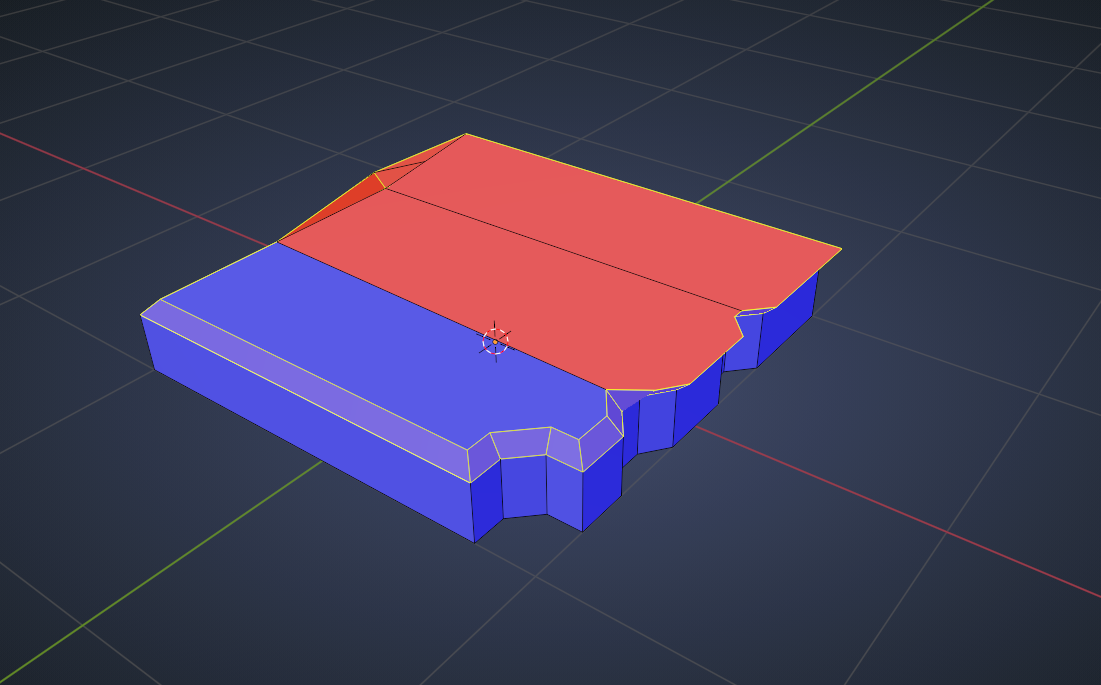
      From the pictures I believe this occurred when I refilled parts of the device after i made knife cuts for the speakers or is it something else entirely that i managed to alter lol

      #73772
      Kendrick Granville
      Participant

        Screenshot (36).pngScreenshot (37).png

        #73773
        spikeyxxx
        Participant

          @KreativeKendrick I think you have the same problem as before of inconsistent Normals:

          Normals.png

          #73774
          Kendrick Granville
          Participant

            I did indeed try Shift+N before posting this thread but that didn’t solve it for me either. I went back to my speaker save and the bevel was correct. @-@

            #73775
            Jonathan Lampel
            Participant

              I can’t tell exactly from the screenshots, but when in doubt inspect the geometry! Which vertices are causing it? Is there anything unusual about them or how they’re connected to the rest of the object? Isolate the problem and you’ll find the solution. 

              #73776
              Kendrick Granville
              Participant

                I opt’ed to restarted from my last save from the speakers and its correct now. I believe I had made some bad slices with my knife tool. Couldn’t Ctrl+Z back so i loaded my last save to do it properly the second time. Haha despite my tedious problems i am still enjoying this course very much!

                #73777
                Jonathan Lampel
                Participant

                  That’s good to hear! Good luck with the rest of it 🙂

                Viewing 7 posts - 1 through 7 (of 7 total)
                • The topic ‘My Bevels on half the device is messed up’ is closed to new replies.