Explanation of Map Range

Forum Archive Explanation of Map Range

Viewing 3 posts - 1 through 3 (of 3 total)
  • Author
    Posts
  • #13683
    ryanocerous777
    Participant

      I still can’t quite get a handle on the math behind the map range, and it keeps coming up in this video so this seems like a good place to ask. Could you breakdown for me the mathematical consequences of each input and output?

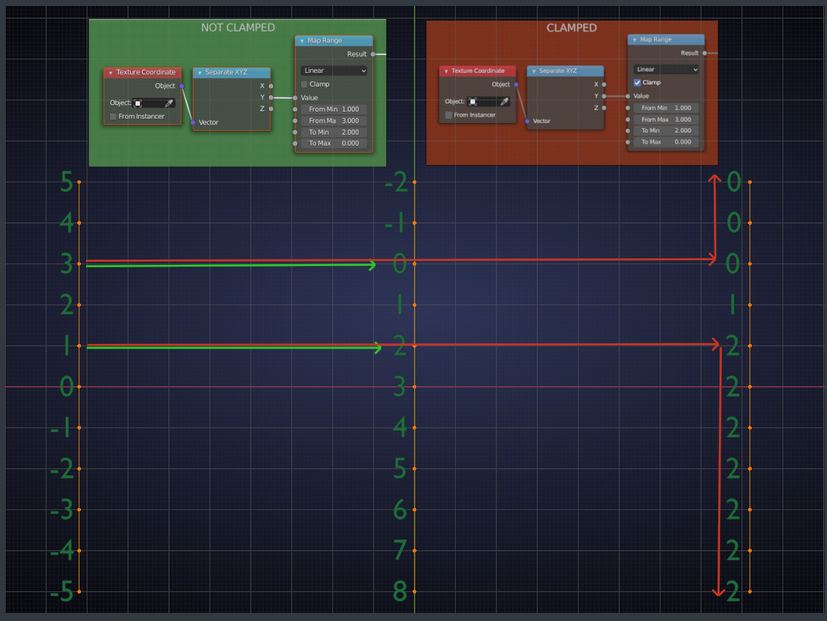
      For example, if I hook a black and white gradient texture up to a map range, I would think that lowering the “From Max” would make the maximum value on the texture lower, i.e closer to 0, and therefore make more of the darker colors darker. My thinking is it’s taking the maximum possible value and setting it closer to 0 by lowering it, but lower “From Max” makes a larger area brighter. Why is this happening? Is it condensing the “scale” of possible values, squishing values into higher levels of brightness?

      Thanks for any input you can provide.

      #64617
      spikeyxxx
      Participant

        Don’t get too distracted by the terms Max and Min.

        Does this picture help?

        We have discussed the Map Range Node in detail here: https://cgcookie.com/questions/14085-spikey-s-math-lab

        #64618
        ryanocerous777
        Participant

          Thank you! That other one with the number line that Dostovel was helpful as well. My conceptual understanding has improved,  I think, but my practical understanding is still lacking. Thanks for the link!

        Viewing 3 posts - 1 through 3 (of 3 total)
        • The topic ‘Explanation of Map Range’ is closed to new replies.