Saving the file.

Forum Archive Saving the file.

Viewing 3 posts - 1 through 3 (of 3 total)
  • Author
    Posts
  • #13246
    sdsavage83
    Participant

      I get that you have to use the Viewport Render Animation instead of the normal render options and I can do that and get the animation I want from that window. But how do I save it to mp4? It seems like It’s just a preview. I can’t find any option to output it. It looks like I could save individual images and do it frame by frame then put them together in a video editing software but that sounds really tedious. There must be a better way.

      #62116
      Cannon Raymond
      Participant

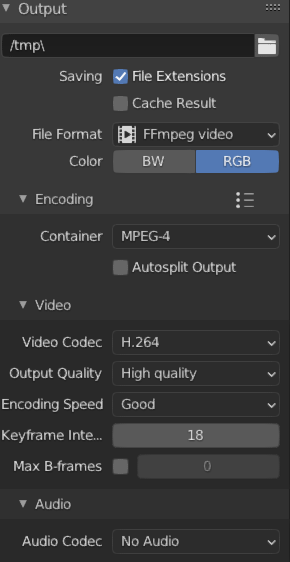
        Go to Output Properties and change your file format to FFmpeg video.

        Then Chancge the Encoding container to MPEG-4, In the Video drop down switch your Video Codec to H.264

        The last 2 settings will just be for quality so you can change that to whatever you want.

        I would Recomend Keeping the Keyframe intervals to about half of your fps.

        If you want to automatically save your Mp4 change the  – /tmp\ –  to your file location. You can also just click the file button.

        Hope This helps!

        #62117
        Wayne Dixon
        Participant

          Hi there

          The full explanation for that is here.
          https://cgcookie.com/lesson/outputting-animation

          Hope that helps.

        Viewing 3 posts - 1 through 3 (of 3 total)
        • The topic ‘Saving the file.’ is closed to new replies.