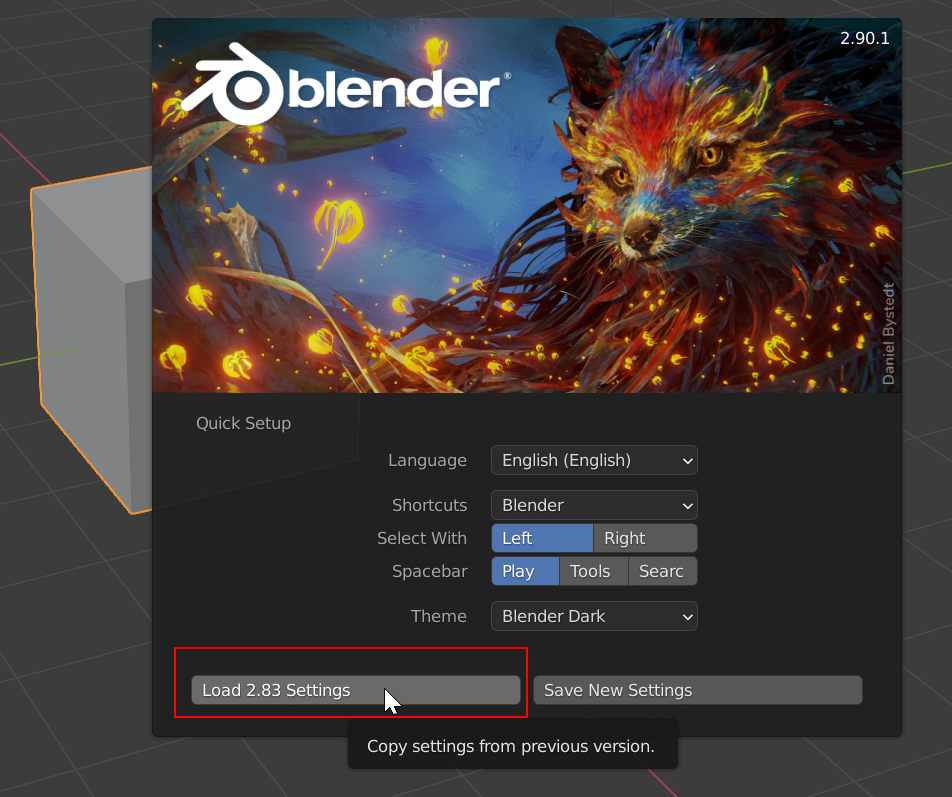
Don’t forget this gold nugget when upgrading to 2.9 or newer.

Forum Archive Don’t forget this gold nugget when upgrading to 2.9 or newer.

Viewing 4 posts - 1 through 4 (of 4 total)
  • Author
    Posts
  • #12982
    Shawn Blanch
    Participant

      I noticed this when I upgraded to 2.83 but didn’t grab a screen shot then. Thank you BlenderDevs for letting us take our custom settings into the stratosphere while we upgrade to the newer version!


      This special Quick Setup screen flashes only once and never comes back once you select your option (to my knowledge).

      #61118
      Shawn Blanch
      Participant

        Just be aware. My instance of Blender closed after clicking the Load button. BUT! When I reopened I saw all my favorite setup settings welcoming me to my new blender home!

        #61119
        spikeyxxx
        Participant

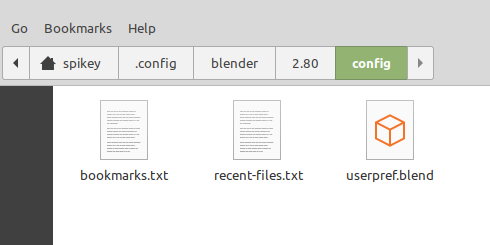
          When you’ve missed this opportunity to load the settings from an earlier version, you can simply copy the userpref.blend file from one version to another. Look up the filepaths for your OS here: https://docs.blender.org/manual/en/2.83/advanced/blender_directory_layout.html

          For instance for Linux:

          It’s really handy to know where to find the preferences and startup files.

          #61120
          Shawn Blanch
          Participant

            @spikeyxxx you always have an added nugget!

            I couldn’t agree more that it is super helpful to know where your files are for the preferences, themese, add-ons, and/or startup files.

            But I have to admit this Load previous button is amazing! It loads the startup file, the custom themes, the add-ons and the saved preferences. It’s really just all soooo magical haha, almost like witch-craft.

          Viewing 4 posts - 1 through 4 (of 4 total)
          • The topic ‘Don’t forget this gold nugget when upgrading to 2.9 or newer.’ is closed to new replies.