Fixing geometry when it no longer matches

Forum Archive Fixing geometry when it no longer matches

Viewing 3 posts - 1 through 3 (of 3 total)
  • Author
    Posts
  • #12892
    Austin Dunham
    Participant

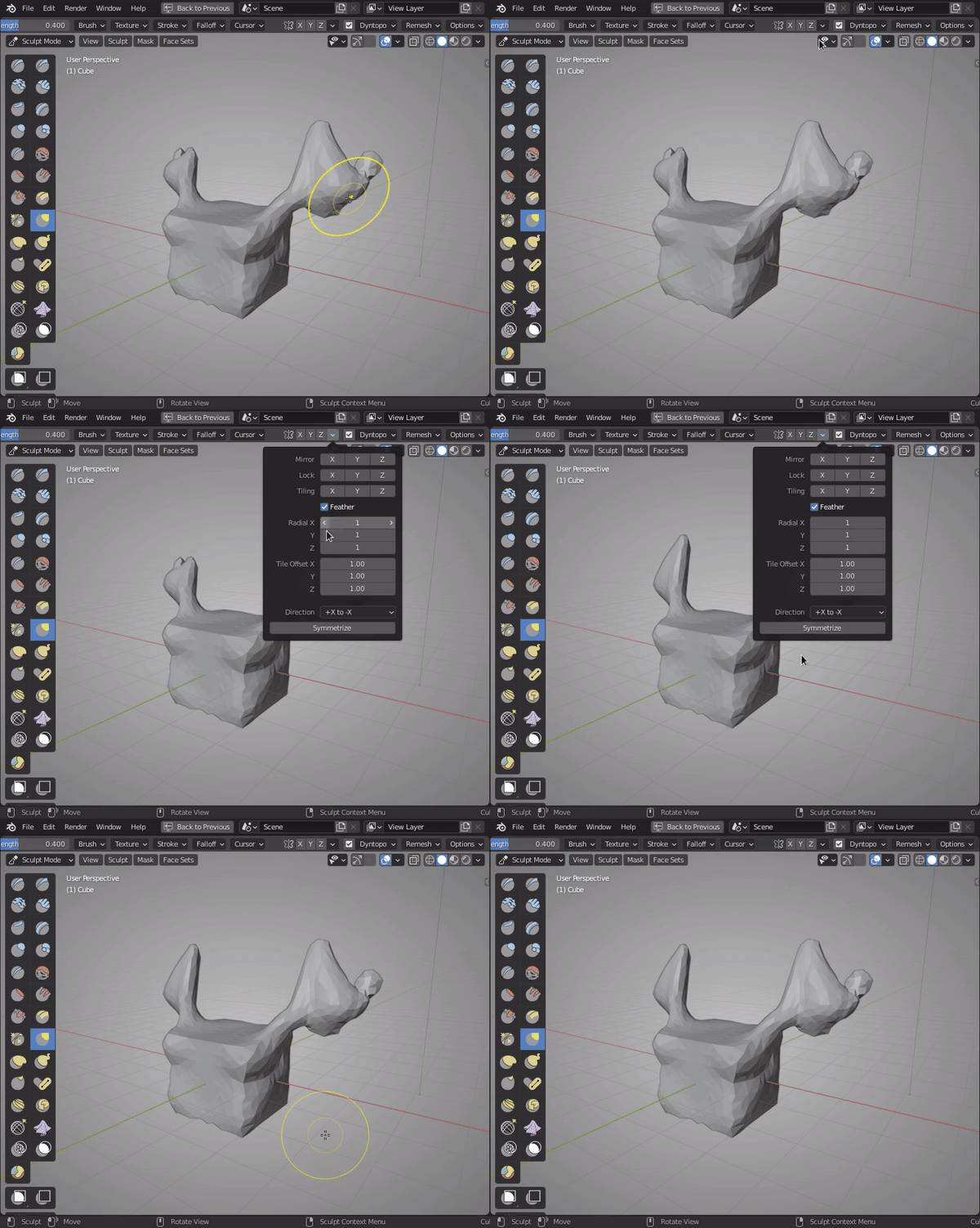
      One thing that happened while I was sculpting is the extension on the eye on half of the shark got super skinny, where the other side is like you see in the sculpt.

      The only way I found to correct this was to hop into edit mode and symmetrize the geometry, which broke off the eye stalk.  Then I had to go back in and fill in the geometry, then finally I could inflate/deflate the geometry again and they matched up.

      Is there an easier way to fix things, particularly with find geometry, when things get a little off kilter on half of one’s sculpt?

      #60837
      Kent Trammell
      Participant

        There is a faster tool for solving symmetry wonkiness!

        The Symmetrize button used to live in the Dyntopo menu but has since been moved to the drop-down menu beside the X,Y,Z symmetry buttons. If you ignore the location of the button, the explanation here still applies.

        #60838
        Austin Dunham
        Participant

          Ah, nice!

          Thank you!

        Viewing 3 posts - 1 through 3 (of 3 total)
        • The topic ‘Fixing geometry when it no longer matches’ is closed to new replies.