
Hi, Is there any way to know how many objects are referencing other object?
Forum Archive › Hi, Is there any way to know how many objects are referencing other object?
- This topic has 9 replies, 3 voices, and was last updated 6 years ago by
jjkaran101.
-
AuthorPosts
-
August 21, 2020 at 9:18 am #12539
Example- I have a object named Master. Master object is used as a reference in many drivers and constraints(like master object rotation is used in some driver and it is also referenced in constraints like Limit distance constraint). So, is there any way to list all those references where Master object or its properties are used. In my case I am using someone else rig and it has many bones,constraints,drivers etc and I can’t able to understand the connections between them so I thought it would be cool If i could check which thing is used for what?
August 21, 2020 at 9:46 am #59494Oooooooo I am interested in the answer to this too.
August 21, 2020 at 2:36 pm #59495I would try it with the Outliner.
1) Drivers
When it comes to drivers you can search for the object of interest in the Outliner and count how often it’s displayed indented below the word “Drivers”. In the following example, the default cube drives two objects: one cone and one icosphere.
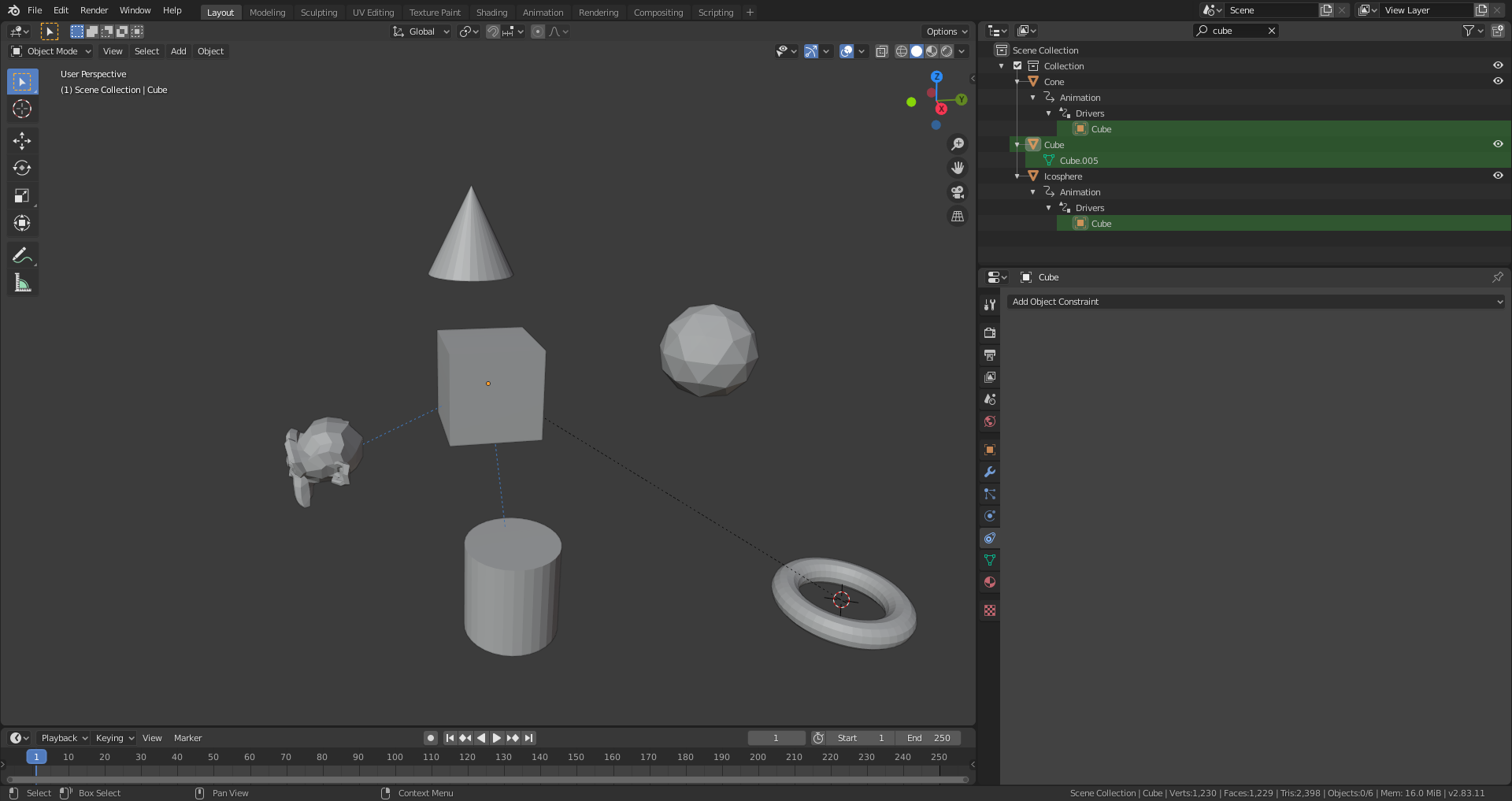
The search operation unfolds the hierarchy tree and shows our “Cube” object two times indented below the word “Drivers”
2) Constraints
The constraints unfortunately don’t show the referenced object in the Outliner but you can search for “constraint” in the Outliner’s search field:
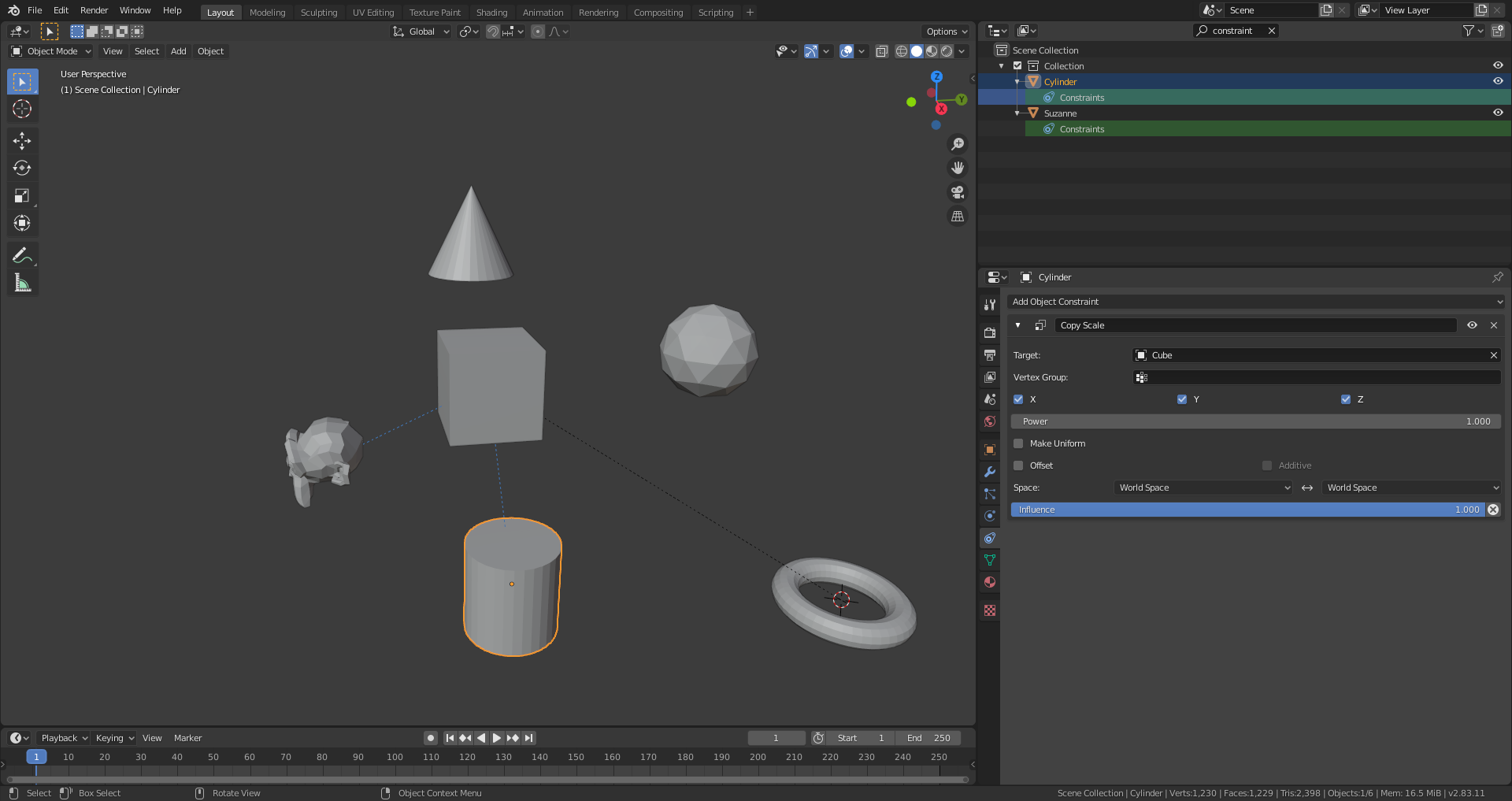
The cylinder and Suzanne each have a constraint and the blue dotted lines (default theme) in the 3D Viewport show that they are limited by the cube. Clicking on the cylinder and selecting the “Constraints” tab in the Properties Editor lists the constraints for that object.
3) Parent-Child-Relationships
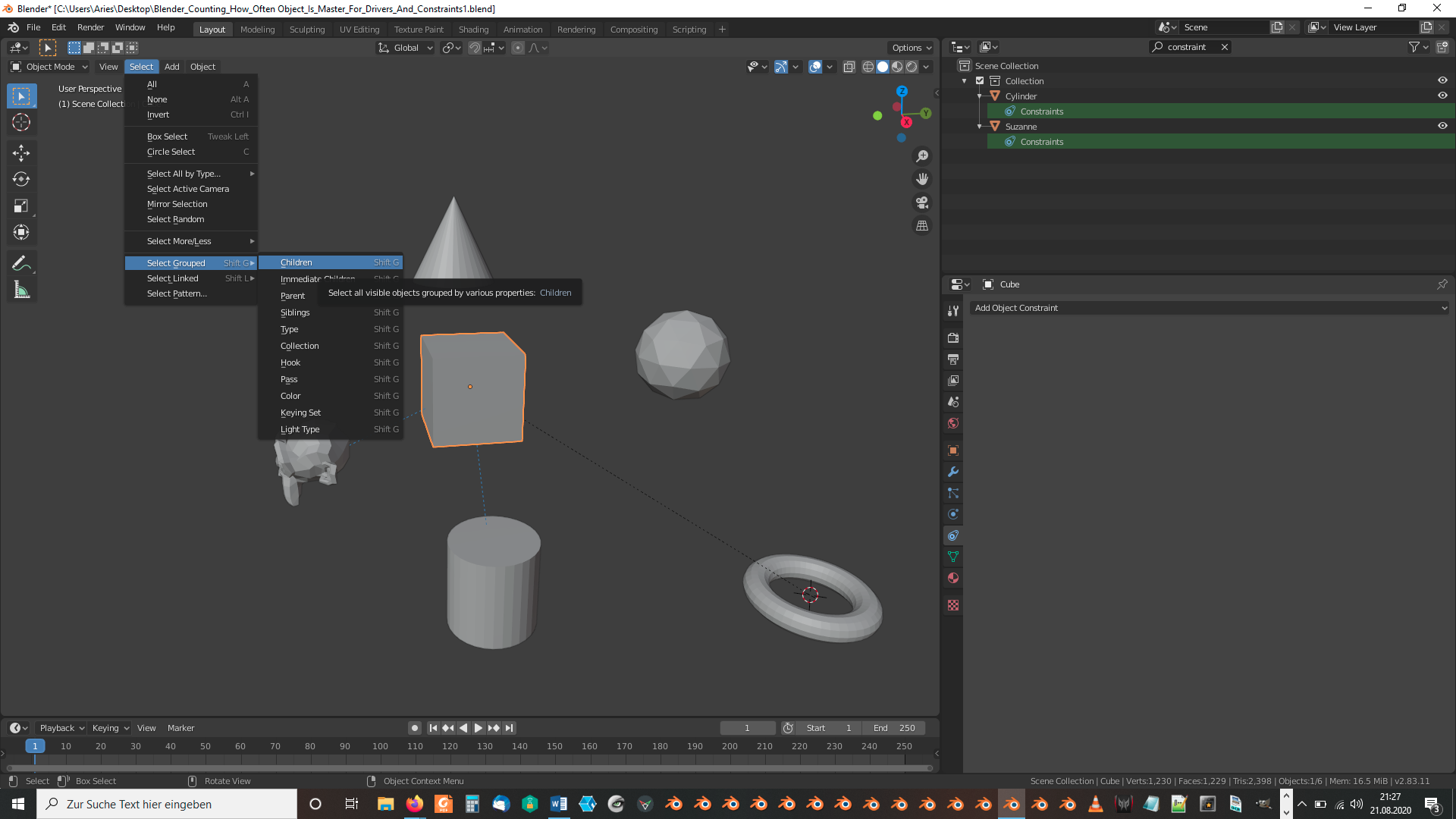
Select only the object for which you want to know how many children it has. Then select “Select” => “Select Grouped” => “Children” or use the shortcut “SHIFT ” + “G” at the same time and then “C”. The statistics at the bottom of your Blender window now show you how many objects are selected. The parent object is automatically deselected by the select operation mentioned before so that you get directly the number of child object to your first selected parent object. The parent-child relationship in the default theme is displayed by a dotted black line (as long as this overlay isn’t switched off).
File is here.
August 21, 2020 at 3:07 pm #59496Hi, Thanks for the reply.
I want to point out somethings.
1) blue dotted line which represents constraint link only shows up in object constraints only not in bone constraints(in my case maybe because of some setting. let me know if there is some setting like that)
2) These techniques do not apply on modifiers like Mirror modifier in which you can select other object’s region for mirror axis.It doesn’t show any information regarding what object is used in outliner (maybe its a extreme case)
3) Last point in which you said“If you select the cube and choose “Select Grouped” as under point 3) and then “Siblings”, you get the objects marked which are driven and constrained by the cube in the example file:”
This doesn’t work like that. it selects all the siblings whether they are driven by cube or not (I think it works at it should but your statement is little misleading).
Apart from that Thanks for helping me. I didn’t knew that I can check drivers through outliner like that.
August 21, 2020 at 3:08 pm #59497The “Select Siblings” operator isn’t usefull in our context (other than I thought first) since it simply selects all objects without parents in the example file linked above as the Blender manual describes:
- Siblings
Select objects that have the same parent as the active object. This can also be used to select all root level objects (objects with no parents).
So, I’ve corrected that in my first post by removing point 4).
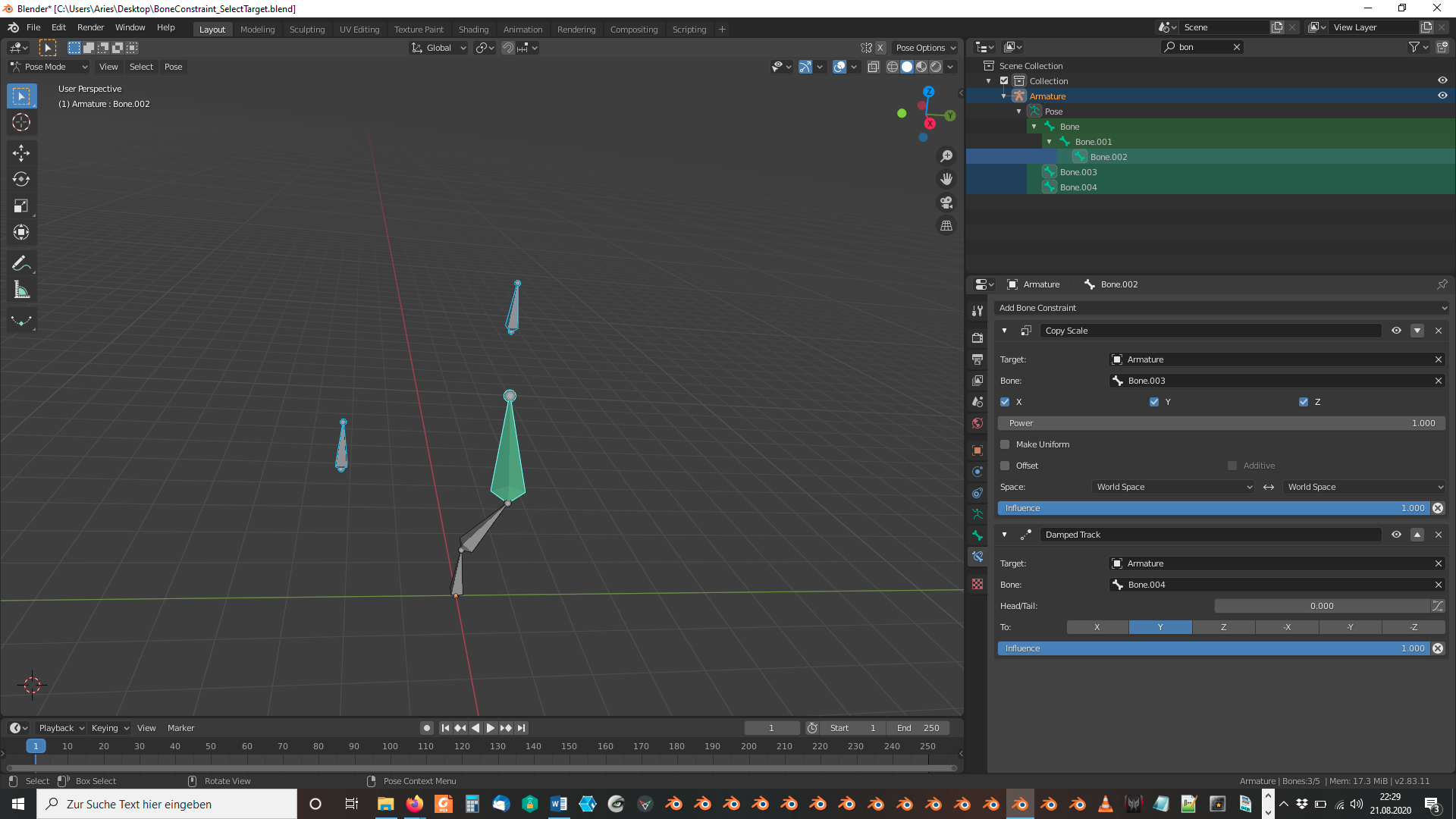
August 21, 2020 at 3:29 pm #59498For bone constraints:
Select in “Pose Mode” a bone with a constraint (displayed in green in default theme) and choose “Select” => “Constraint Target”:
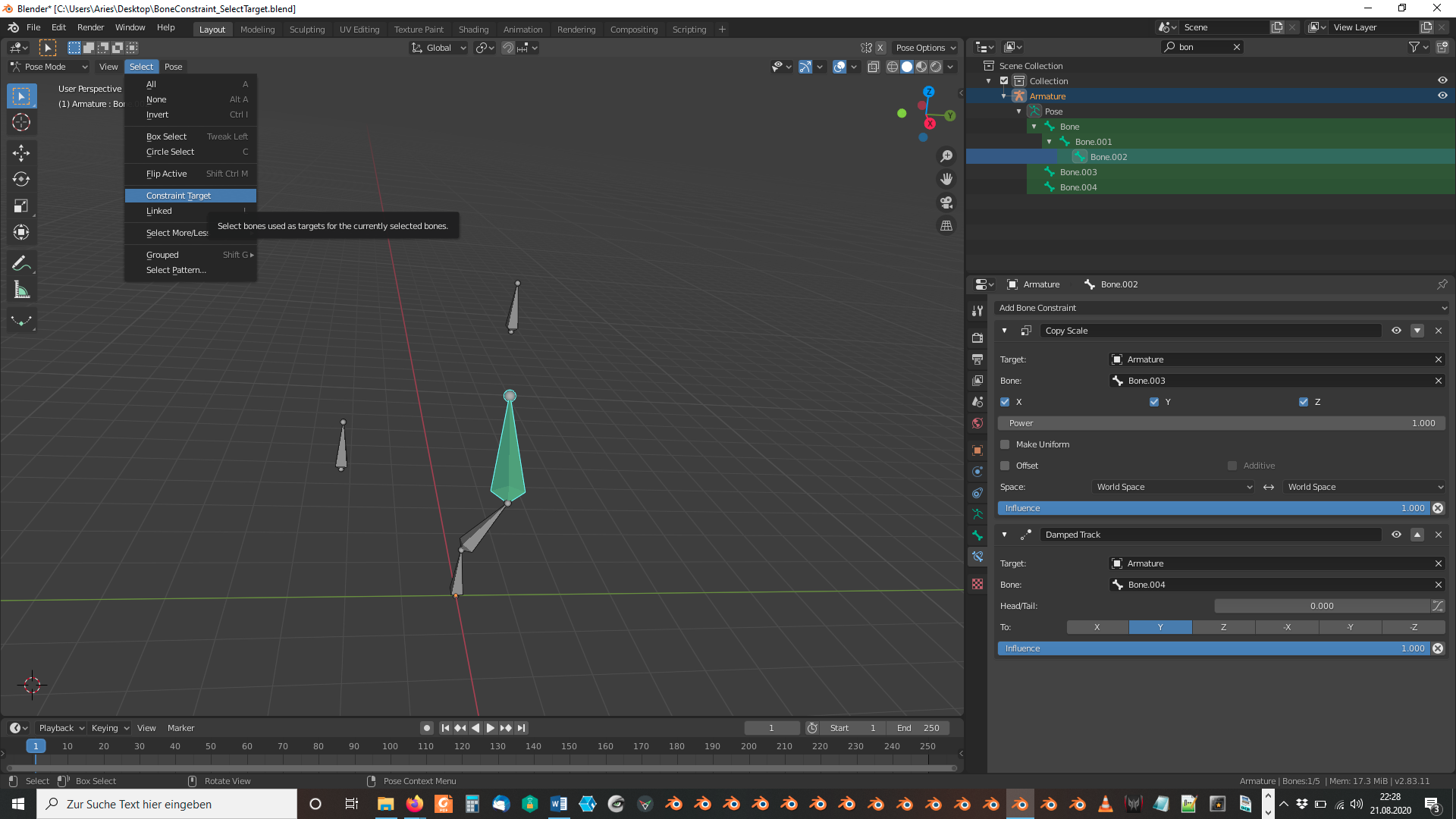
Result:
 August 21, 2020 at 3:44 pm #59499
Dang, This is awesome how couldn’t I miss that.
Thanks that’s awesome now my 90% problem is solved thanks to you.August 21, 2020 at 4:05 pm #59500But is it possible in reverse . I mean selecting the constraint target and getting that constrained bone. Actually from this case only I thought of this question and I still don’t have answer to it.
August 21, 2020 at 4:39 pm #59501I would simply select that bone in “Pose Mode” and scale it, rotate it or move it and look whether other bones react to these transformations. In most cases, your target bone should be in the proximity of your constrained bone as for example a “Pole Target” for “Inverse Kinematics”.
August 22, 2020 at 1:53 am #59502Its not that straight forward. let’s suppose I apply Track to constraint to a bone(name-victim) and this is a parent of many bones . Then when the target bone move it will move the bone(victim) on which track to constraint is applied and due to parent child relation more bones will be moved. Now if drivers are also used which uses Victim Bone properties then there will be more bones moving. So if I am not the one who made that rig then it would become difficult to understand.
Although its not that difficult to find the victim bone but still lot of guess work needs to be done. -
AuthorPosts


- The topic ‘Hi, Is there any way to know how many objects are referencing other object?’ is closed to new replies.