Objects’ Unknown Linkage

Forum Archive Objects’ Unknown Linkage

Viewing 5 posts - 1 through 5 (of 5 total)
  • Author
    Posts
  • #12240
    Michael Pascucci
    Participant

      I’m embarrassed, this is probably so basic.  I’m a  nube and just getting used to 2.83.  

      I’ve got objects that seem to be connected and I can’t see a connection and I can’t unconnect them.  when I move one the others move with it, but not in a linear fashion.  They all move at different rates.

      How do I unconnect them?  Why are they moving in this manner?

      #58411
      spikeyxxx
      Participant

        Hi Michael!

        Don’t be embarrassed.

         Also no need to call yourself a nube (definition: ‘Someone so pitiful and idiotic the they have not even the meager skills to be titled a noob…’), but I guess you meant noob;)

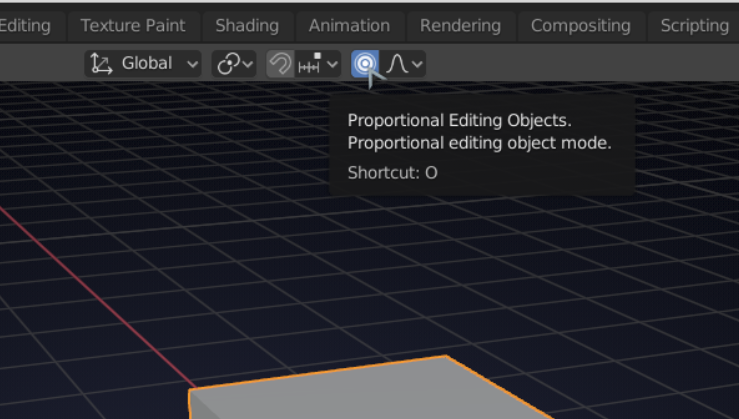
        I am not sure, but my best guess is that you accidentally pressed the O key and thus activated ‘Proportional Editing’:

        Could be something else, but this sounds the most likely to me…

        #58412
        Michael Pascucci
        Participant

          So Simple.

          I’ve got a lot to learn.

          Thank You spikeyxxx

          #58413
          spikeyxxx
          Participant

            This  happens to me (and other people) as well sometimes. The first time you may be clueless as to what is happening, but the next times you’ll be able to recognize this faster.

            And yes, you’ve got a lot to learn, but so do I…that’s part of the fun!

            #58414
            Shawn Blanch
            Participant

              It’s not about the destination. It’s about the journey. Next time take a screen shot or post your blend file and it makes it much easier to give guidance for unique problems. You end up spending a little less time explaining because a picture is worth 1000 words.

              Keep it up though. That’s why we are all here.

            Viewing 5 posts - 1 through 5 (of 5 total)
            • The topic ‘Objects’ Unknown Linkage’ is closed to new replies.