
Why do they look like this?
Forum Archive › Why do they look like this?
- This topic has 8 replies, 4 voices, and was last updated 6 years, 3 months ago by
Kent Trammell.
-
AuthorPosts
-
May 23, 2020 at 7:55 pm #12058
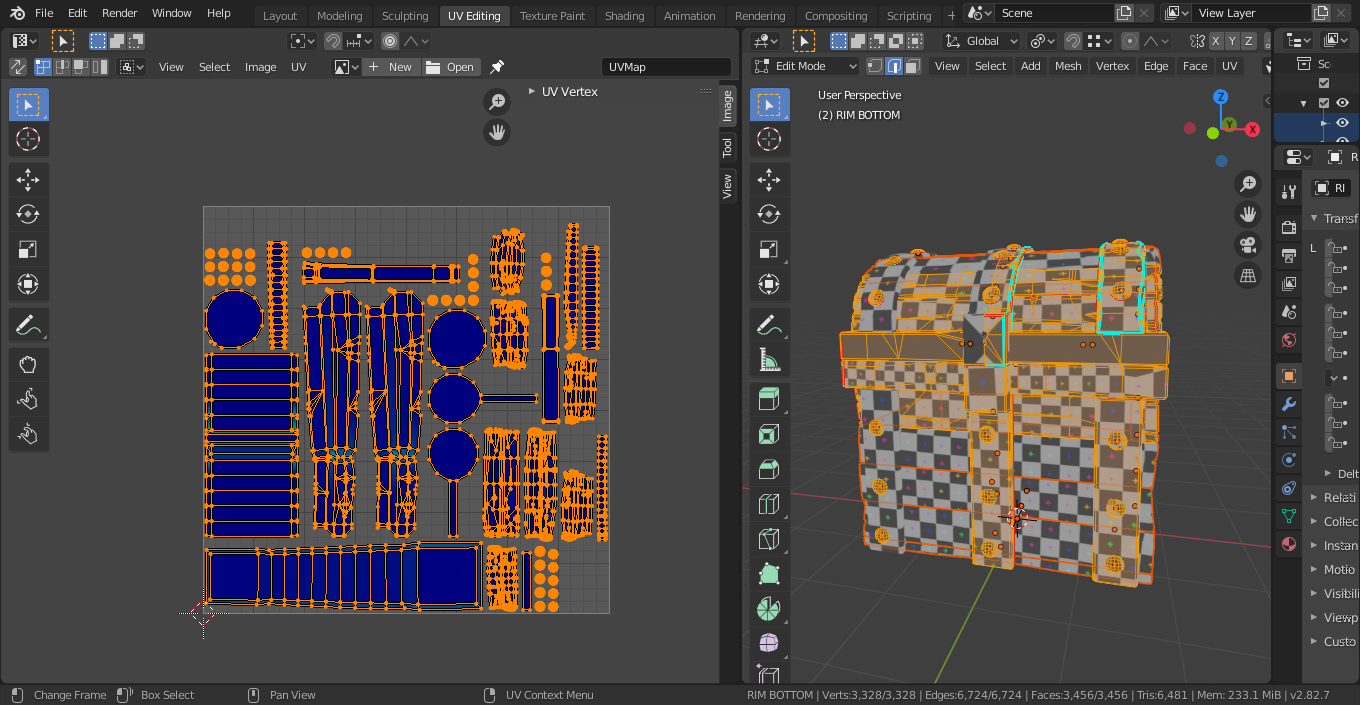
I’ve tried applying the scale to every individual object, but for some reason, everything looks off somehow. I’m not sure where I went wrong in the modeling/seam marking, but if somebody could look at the screenshot and help me out that’d be great. Check out the blend file here – my google drive
 May 23, 2020 at 9:59 pm #57240
Hey @joebods I downloaded your file and 2 things I want to share:
1. I think you did a great job modeling the treasure chest
2. You definitely need additional training on UV unwrapping and proper use of seems. You probably already know this. I am no expert myself but typically if there is a sharp-ish corner then there needs to be a seem to handle that bend (most of the time). This is an intermediate/advanced topic to be honest (at least I think it is).
I re-posted your blend file to your shared location: Treasure_Chest_edited_blanchsb
It’s not perfect but it is much better. I also packed your blend file. You can unpack it if you need to.
Let me know how I did. I definitely messed up a lot of your workflow doing this so I don’t recommend using my file if you need to tweak things (I removed all parent and linked duplicate relations and deleted one hinge that I could not for the life of me figure out it’s uv problem so I just duplicated another hinge and put it in place of the deleted one.)
The main metal rim and the lock piece rim and the hinges were the main problem areas. They need a little love and then you should be able to get a better texel density on your UV’s.
There are some great uv unwrapping vids on YouTube. I personally learned a lot form Blender Guru on this and I believe I remember @spikeyxxx posted a great UV unwrapping video link to another blender guy who is an unwrapping master.
Blender Guru UV unwrapping an Anvil
Advanced UV unwrapping magic tutorial: By Daniel Bystedt
I also got UV packmaster pro add-on to help me quickly try and fix your uv’s and make most use of your uv map.
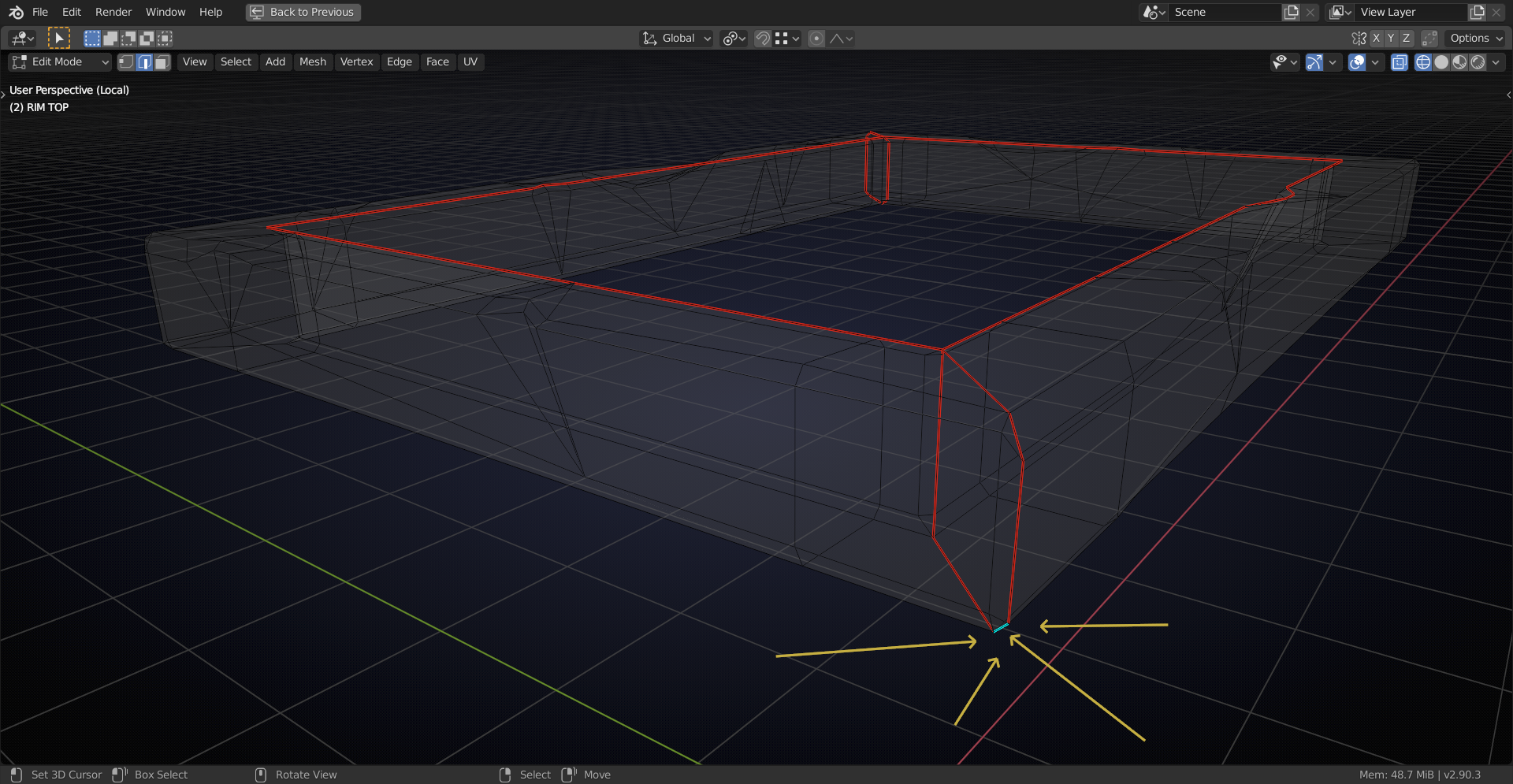
May 24, 2020 at 1:50 am #57241@joebods you missed an Edge when making seams:
You should delete Cylinder.002 (it’s a really small one that is forgotten, but still contributes to the UV’s).
You tried to Apply the Scale to each individual piece, but you missed a few:
Box.012,
Cylinder,
Top.002 and
Top.006. (And all the ones that are Data linked. Make Single User, Apply Scale, re-link Data; you know the drill.)
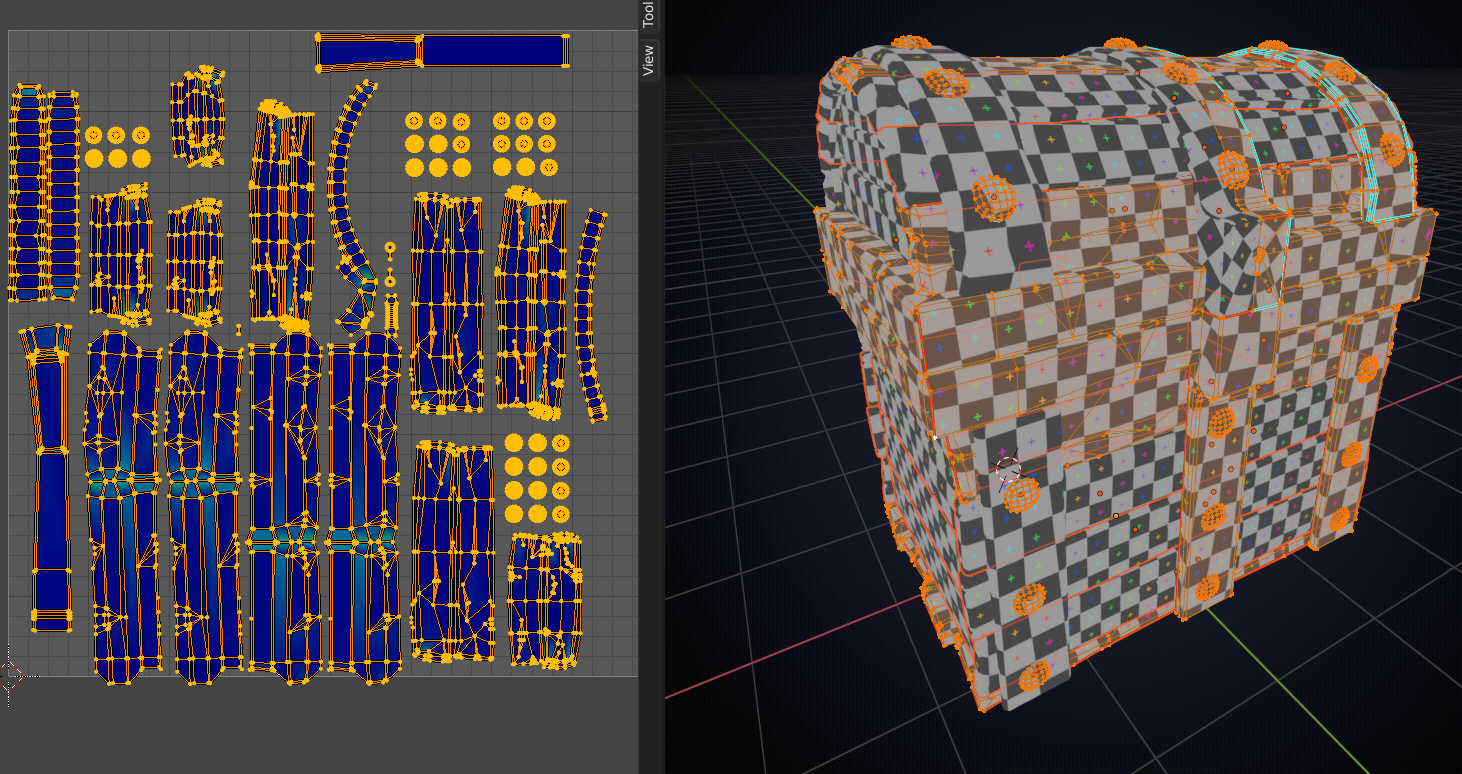
Then you get something like this:
 May 24, 2020 at 2:56 pm #57242
So what I’m understanding is:
I tried to apply the scale to every individual piece, but missed those that you mentioned. Furthering that I should also make single user to every object that has data linked to it, and then apply the scale to that object. After that I link them using UV Data, right?
May 24, 2020 at 3:32 pm #57243Right; when a piece has linked data, Blender won’t let you Apply the Scale (it will give you a warning that you can’t do that), so, if four planks have linked data, you must first make each of them a single user, then apply the scale and then you can link them again.
Normally you would apply the scale before making linked duplicates, but it’s good to know what to do when you have forgotten that.
Blender will also give you a warning when you try to UV Unwrap something with non-uniform Scale, but it will still unwrap, so that if you miss that warning, you just get strange results.
May 24, 2020 at 3:42 pm #57244I did it! Thank you so much!
May 24, 2020 at 3:45 pm #57245Thank you for the links! I looked at your edits to my mesh and I really appreciate you taking the time to point out where I could improve. I applied some of what you said and it definitely helped!
May 27, 2020 at 1:07 pm #57246Thanks for the A+ help @blanchsb 🙇♂️
May 27, 2020 at 1:12 pm #57247@spikeyxxx THE Blender Problem Fixer 🙌
-
AuthorPosts


- The topic ‘Why do they look like this?’ is closed to new replies.