Deselecting in Blender 2.8 with ALT + A

Forum Archive Deselecting in Blender 2.8 with ALT + A

Viewing 3 posts - 1 through 3 (of 3 total)
  • Author
    Posts
  • #11740
    Ingmar Franz
    Participant

      In Blender 2.8, default setting for deselecting elements is now ALT + A (former Blender 2.79 and earlier hotkey for playing animations which are now played with Spacebar per default)

      #55902
      Wayne Dixon
      Participant

        Correct @duerer 

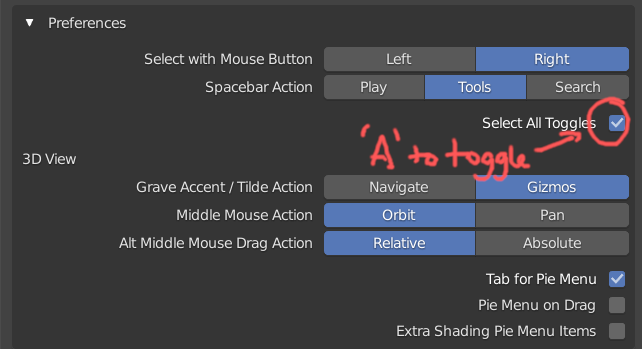
        You also have the option in the Keymap settings to enable the ‘A’ key to toggle the selection (same as 2.79)

        #55903
        Ingmar Franz
        Participant

          Thank you, Wayne, for the hint. I personally find it clearer in Blender 2.8 and “Spacebar” is also the hotkey for starting a video in many video players. Also, deselecting with  ALT + A avoids possibly selecting a whole bunch of objects if you just want to be sure that nothing is selected. There seem to be a lot less shortkeys now in Blender 2.8 but it’s more than equalized by the cleaner structure.

        Viewing 3 posts - 1 through 3 (of 3 total)
        • The topic ‘Deselecting in Blender 2.8 with ALT + A’ is closed to new replies.