
Make this eye node work well with armature modifier
Forum Archive › Make this eye node work well with armature modifier
- This topic has 16 replies, 4 voices, and was last updated 6 years, 6 months ago by
of Nodes & Noodles.
-
AuthorPosts
-
March 9, 2020 at 10:10 am #11473
Hello Kent, this video is very helpful.
I want to ask about a question.
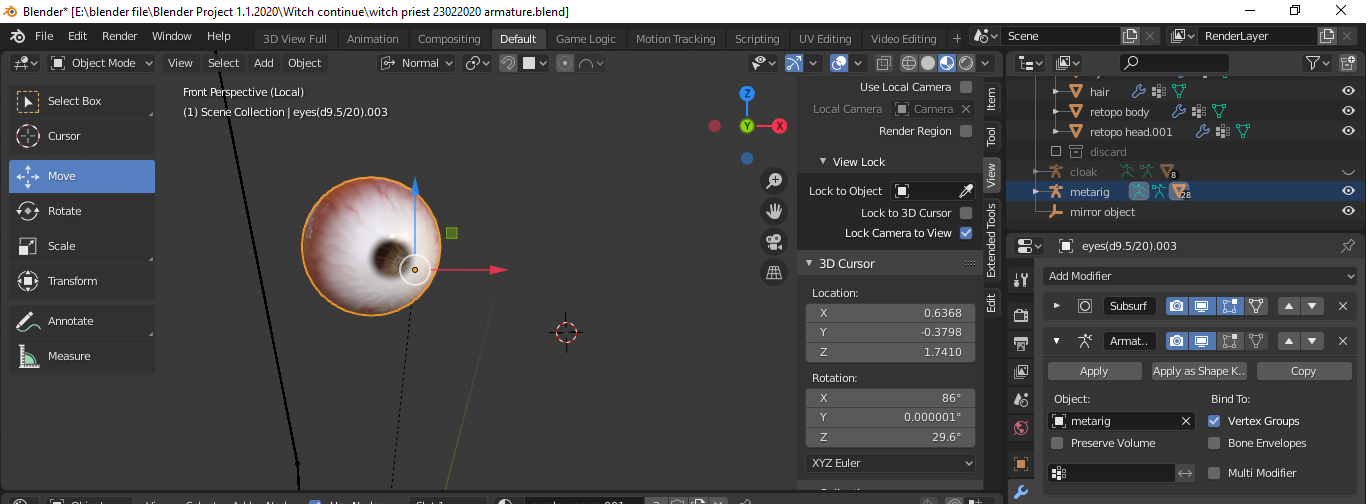
When using this eye node along with armature modifier.
All the texture will be offset if you move/rotate the bone that you assign to the mesh.
Is there anyway to prevent it work from offset with Armature modifier?
If it cannot, is there anyway I can make the eye move/rotate as the bone transform?
 March 9, 2020 at 11:08 am #53523
Hi there! I haven’t seen the tutorial video but I’m guessing Kent uses the Object output of a Texture Coordinates node for the procedural material.
If this is the case, you can bake the Object coordinates to a texture and then use that texture as texture coordinates in the procedural material.
Please ask again here if you need help doing this.March 9, 2020 at 11:50 am #53524Theoretically, I think you should be able to use drivers for the Location, Rotation and Scale of the Mapping Node.
That is: drive the X Location of the Mapping Node to minus(!) the X Location of the Armature > Bone, and so on…
This works for the Location without any problems, but the Rotation is not so straightforward.
But still, just an idea;)
@gcs_dev ‘s proposition of baking the Object Coordinates to a texture sounds a lot easier!
March 9, 2020 at 10:20 pm #53525Can you show me how to bake the Object coordinate to a texture? This is first time I heard about it 😀
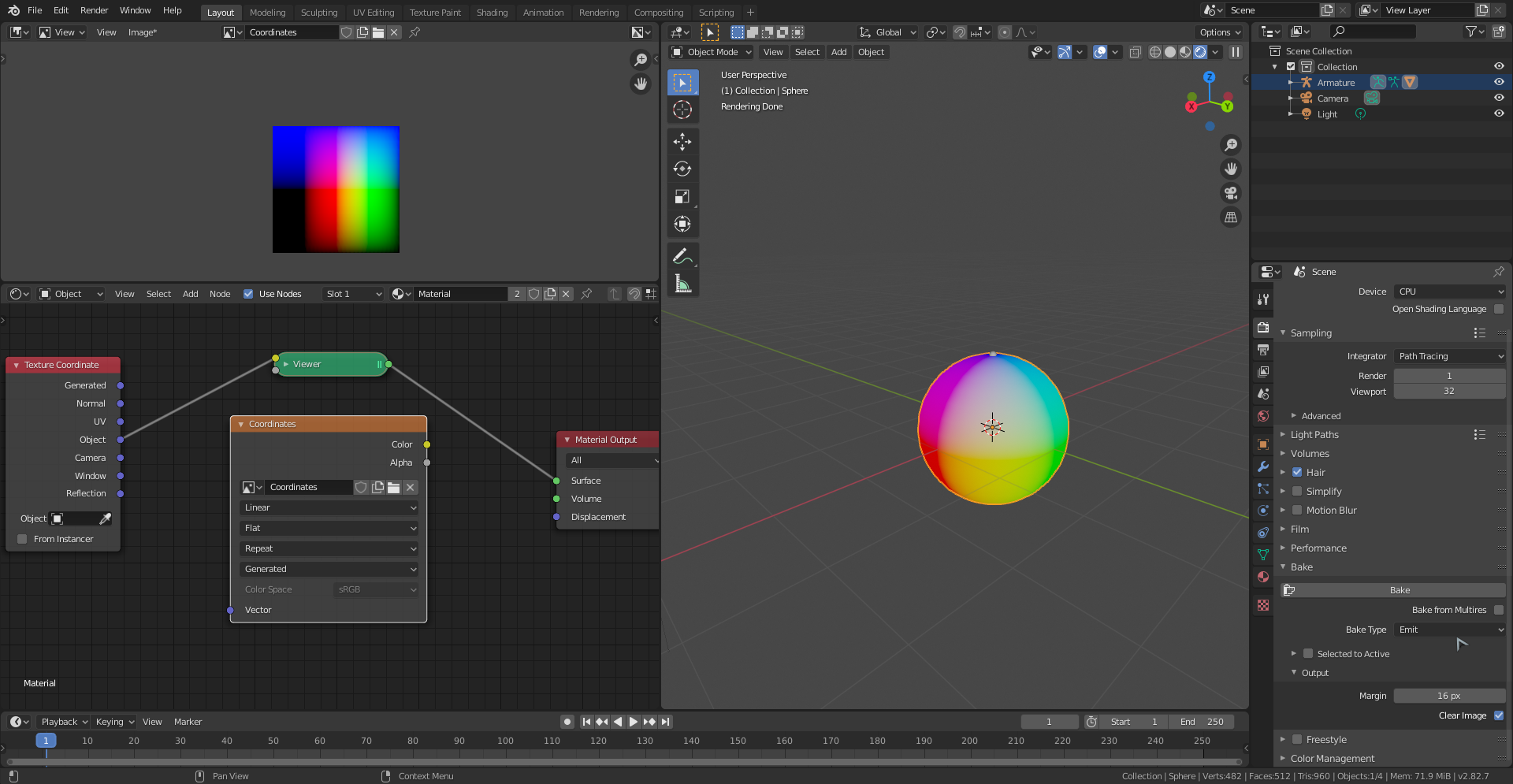
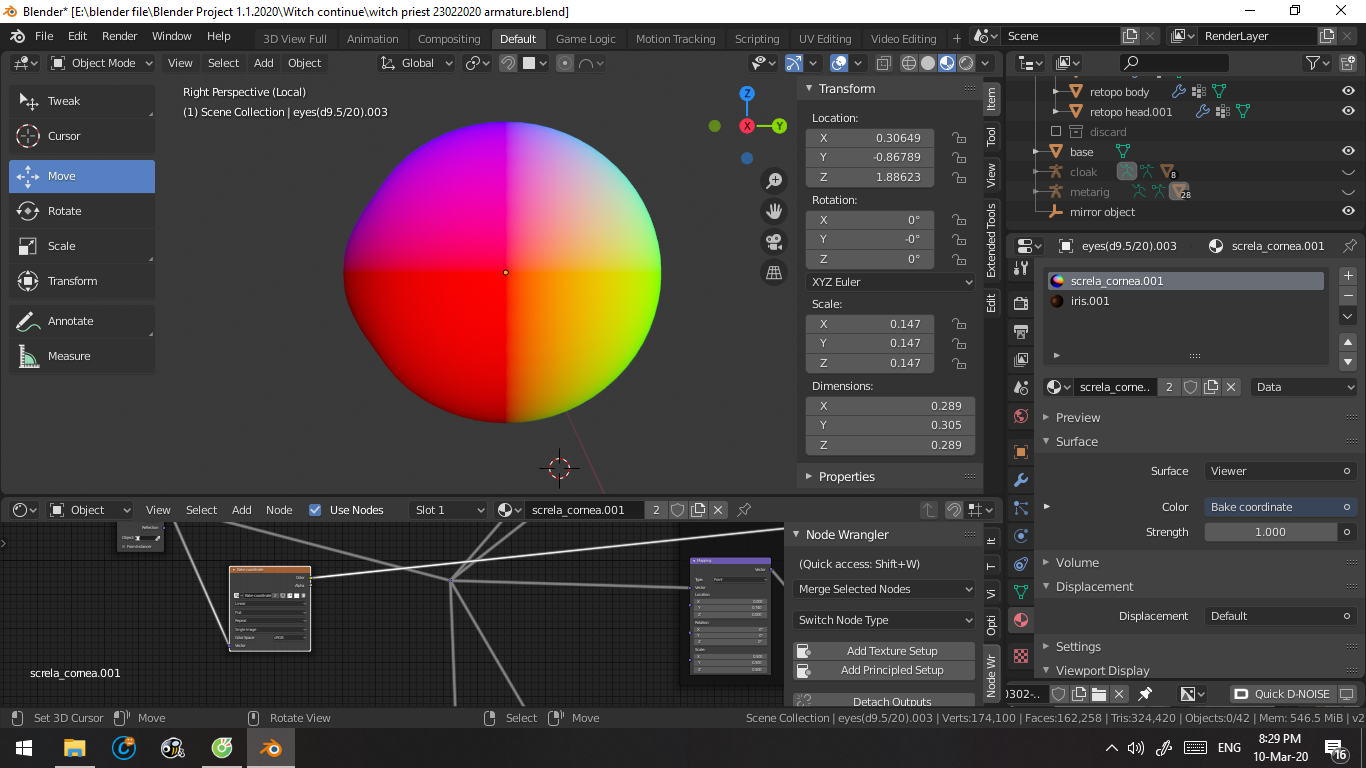
March 10, 2020 at 1:53 am #53526Make a new texture and plug the Object Coordinates into a Viewer Node (Emission). Select the Texture Node with the texture you created and Bake the Emit pass.
Then you get something like this and you can use the Image Texture instead of the Object Coordinates.
 March 10, 2020 at 5:33 am #53527
@spikeyxxx is on the right track but there’s a little more to do in order to account for minus numbers, and numbers greater than 1, which can’t be represented by a texture.
Could you please post a screenshot of your sphere with the armature deactivated so I can see where the Origin of the sphere is?March 10, 2020 at 8:09 am #53528March 10, 2020 at 10:26 am #53529Ok, it looks to me like the left side of the eye is probably all black indicating minus numbers, so we’ll have to fix that.
Here’s the process, step-by-step, from beginning to end:
- UV unwrap your sphere (the automatically generated UV map will work fine)
- Create a new Image texture 1024*1024 (resolution isn’t very important but I wouldn’t go lower than 512*512) and set it to 32 Bit. We’ll name it “Tex Coordinates” for this example.
- Open the Shader Editor and copy the setup below: (This setup assumes that all three dimensions of the object are the same. If this is not the case, you’ll need a Value node and Multiply by 0.5 for any dimension which is different from the others.)
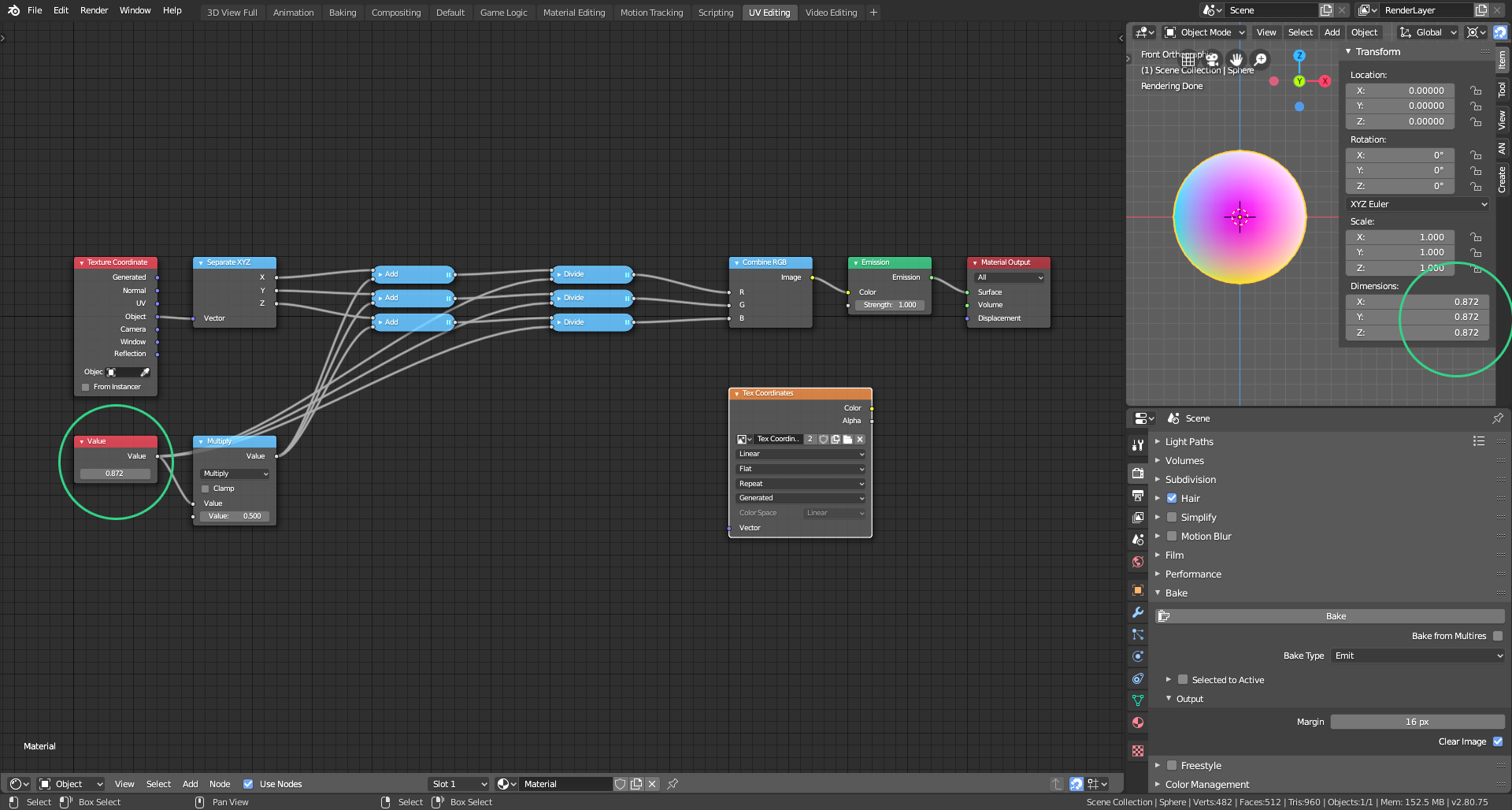 Copy and paste the dimension of your object into the Value node (highlighted by the green circles)
 - Bake your texture as you did before.
Now to use your new Tex Coordinates image copy the setup below:
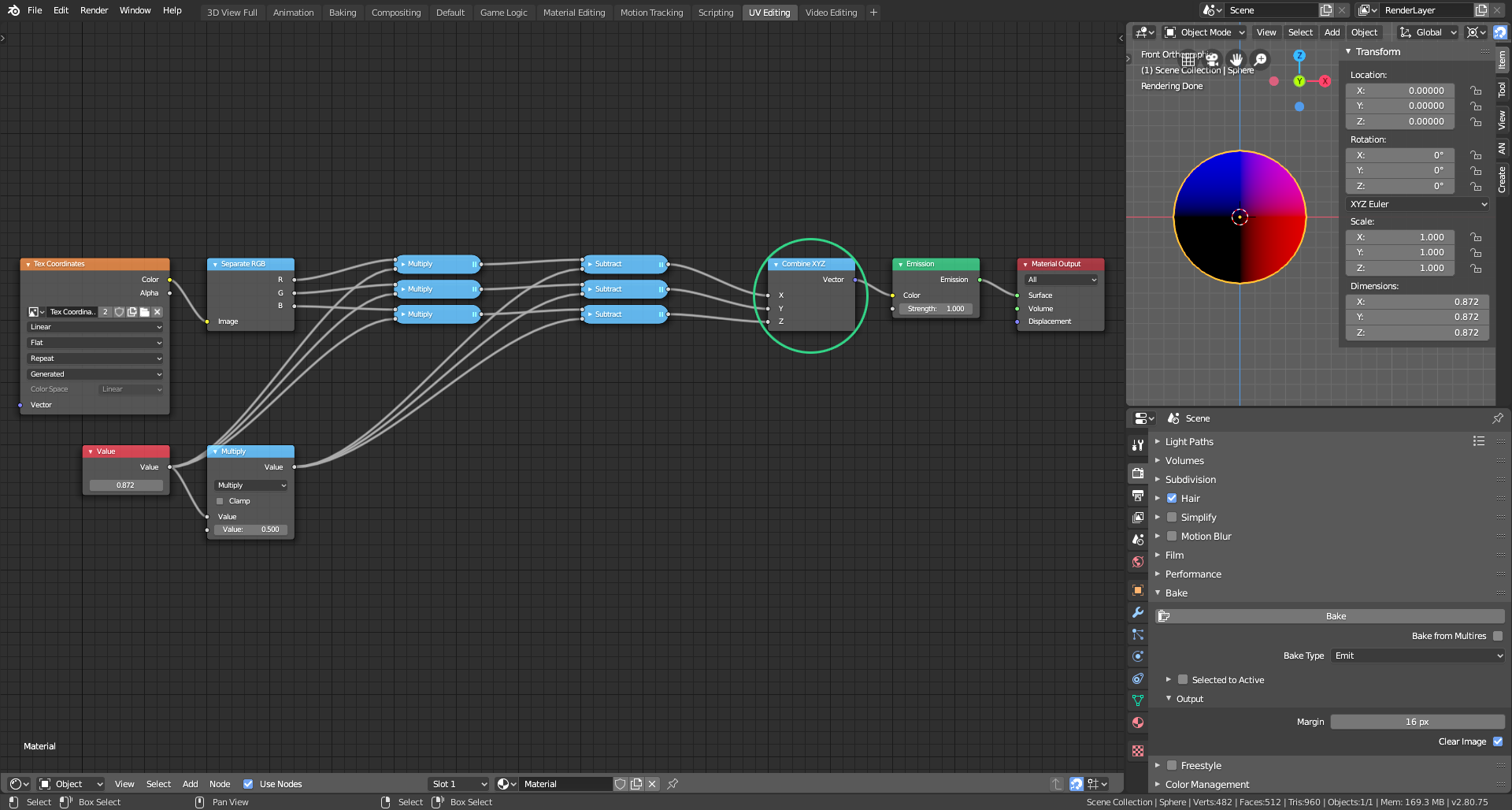
This Combine node (highlighted in green) is now your texture coordinates node.
I hope this is clear enough. Please do ask again if you need more help.
March 10, 2020 at 10:31 am #53530It’s cases like this that make me REALLY miss the old “Bake to Vertex Colors” option. Does anyone know why that was removed?
March 10, 2020 at 10:35 am #53531
@spikeyxxx @gcs_dev You both have shared some clever information here. Thanks so much for taking the time to help a fellow member so thoroughly!Admittedly I’ve never thought to bake the object coordinates to a texture. That’s kinda brilliant.
Alternatively @zhuk0v1811 could parent the eyeball object directly to the bone instead of using vertex weights.
March 10, 2020 at 10:38 am #53532Thanks Kent! The idea came to me a while ago when I wanted to use my procedural wood on a curved-back chair.
Directly parenting the object to the bone is definitely much simpler and quicker! Why oh why do I complicate my life so???
March 10, 2020 at 10:48 am #53533Absolutely brilliant @gcs_dev! Thanks for sharing!
(I’ve never used Bake to Vertex Colors, but that was Blender Internal… Maybe Eevee will get baking at some time and have that functionality????)
March 10, 2020 at 10:54 am #53534Thanks so much Spikey!
I still reckon @theluthier ‘s solution of parenting the object to the bone instead of using vertex weights is much more efficient and easier, but it (nearly) never hurts to have one more node-based trick in our arsenal.
March 10, 2020 at 10:55 am #53535Man, it’s that simple…
Thanks Kent!
March 10, 2020 at 10:57 am #53536@spikeyxxx Right!? I’m headbutting my desk for not thinking of that!
-
AuthorPosts



- The topic ‘Make this eye node work well with armature modifier’ is closed to new replies.