Scaling, moving, rotating along axis hotkeys not working

Forum Archive Scaling, moving, rotating along axis hotkeys not working

Viewing 7 posts - 1 through 7 (of 7 total)
  • Author
    Posts
  • #11333
    Krystal Franqui
    Participant

      This is a new issue I’ve noticed. For example when I hit “G” to grab an object and try to then press the x, y, or z keys to select that axis to move it no longer will do this. Instead it gives me what ever menu is attached to that key such as the delete menu for x ect… I didn’t used to have this issue and had been pressing G and then x to move along that axis only in the past with no issue and I’m not sure why this is no longer the case. This issue applies to the Move, Rotate, and Scale tools equally. 

      #53090
      spikeyxxx
      Participant

        @cfranqui83 make sure that you are pressing the correct keys (this happens to me sometimes, especially when it’s getting dark and I’m to lazy to switch on the light; I press  F instead of G and then X gives the Delete confirm..).

        Also make sure that you press X,Y or Z directly after G, R, S. So not: G Enter X or something like that.

        #53091
        Krystal Franqui
        Participant

          I did go back and try a few times being sure to just peck carefully at the keys with a single finger to make sure I didn’t fat finger the wrong key and I still seem to get the same issue. Perhaps there is a setting that I changed by accident, I’ll reset my user options to see. This is strange and a little bit frustrating. I know of other ways I can achieve the same results but I really want to learn the correct way as my own little work arounds tend to have unforeseen side-effects that are not good in the end.

          #53092
          spikeyxxx
          Participant

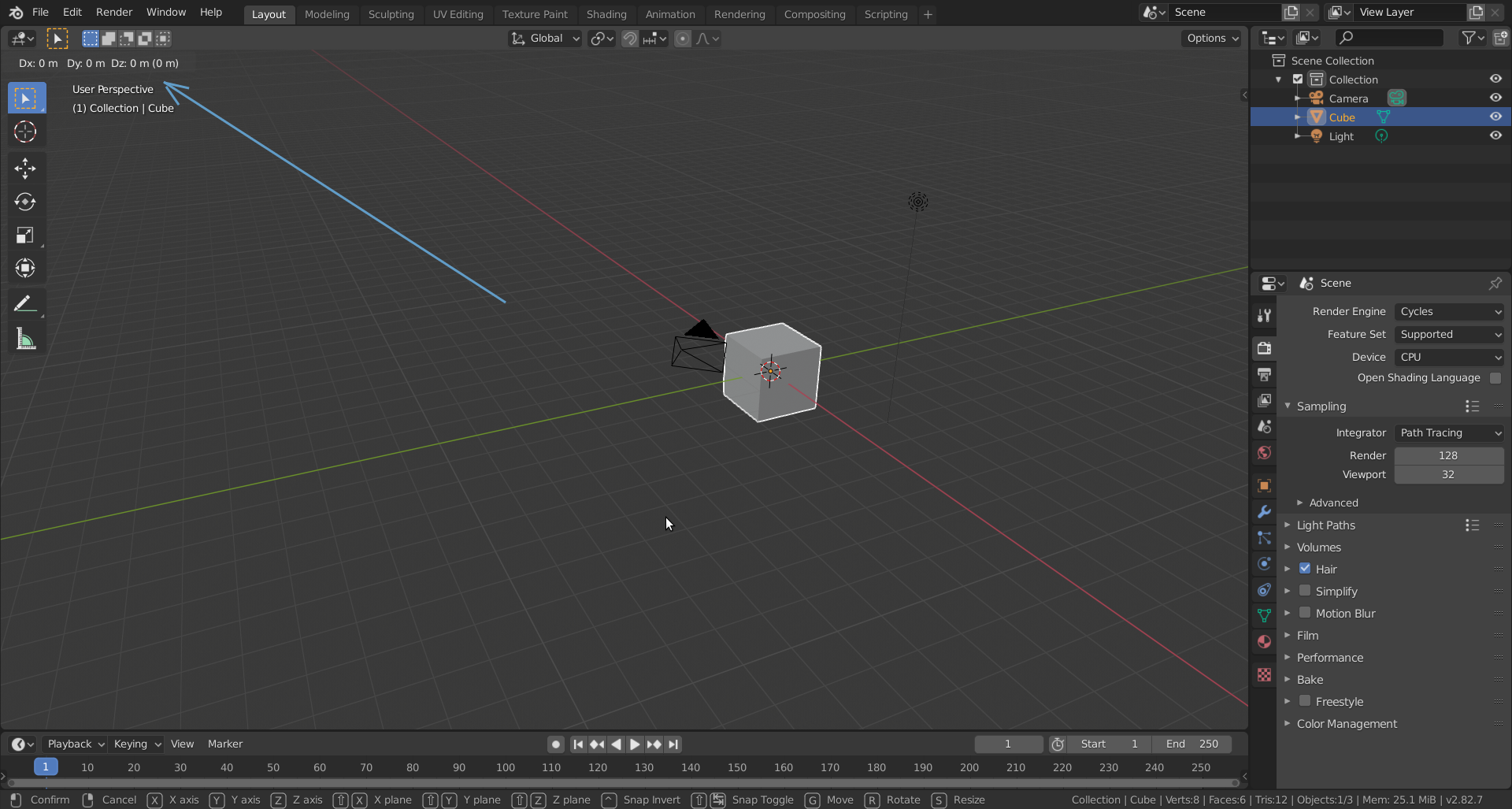
            Very strange! This is what you should see when you press G

            Also look at the bottom, where the options are.

            #53093
            Krystal Franqui
            Participant

              Ok, I’m definitely not seeing that. I press G and my tool switches to the move tool icon but I do not get the location information shown in your screenshot. 

              Thank you for taking your time to try and help me, I really appreciate it. 

              #53094
              spikeyxxx
              Participant

                Curiouser and curiouser…

                Try File > Defaults > Load Factory Settings.

                Something similar happens when you use Industry Standard Keymap, but then W, E, R switches between the Active Tools Move , Rotate and Scale…

                Could it be an Addon that you are using?

                If G switches to the Move Tool, then it is clear that X then deletes…

                #53095
                Krystal Franqui
                Participant

                  Yes! That was it! I switched to default settings and that seems to have cleared up the issue! Thank you so much! I had a feeling I may have accidentally changed a setting at some point but I wasn’t sure. Back in business! Thank you for the help!

                Viewing 7 posts - 1 through 7 (of 7 total)
                • The topic ‘Scaling, moving, rotating along axis hotkeys not working’ is closed to new replies.