issue with the material around the cutout in the top

Forum Archive issue with the material around the cutout in the top

Viewing 11 posts - 1 through 11 (of 11 total)
  • Author
    Posts
  • #10984
    sheila5
    Participant

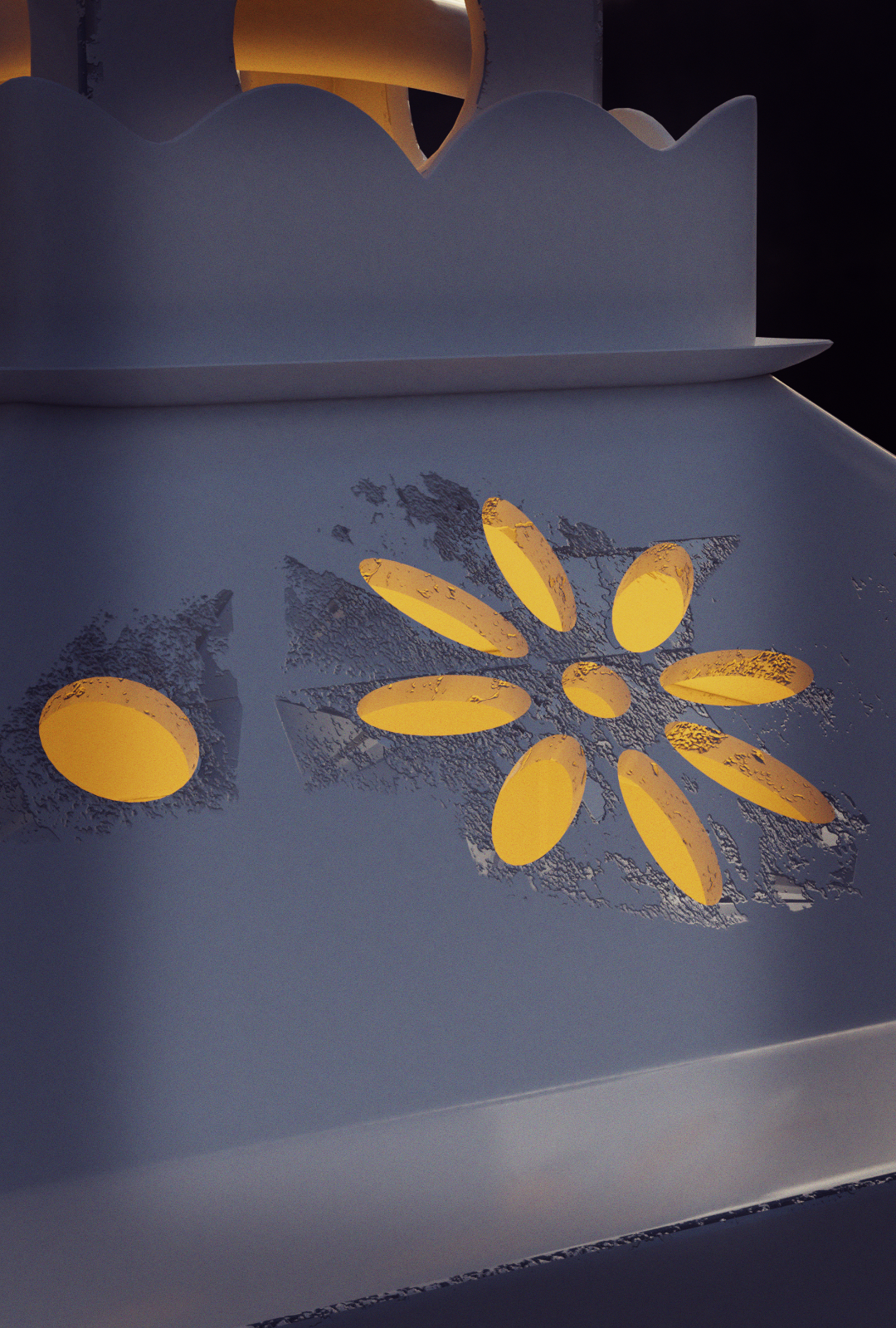
      I used the lantern material as is from the downloaded files, but around the cutout it displays differently https://cgcookie.com/u/sheila5/projects/autumn-lantern 

      Is there something I can change that will solve this?

      And ps why is my file so much bigger, like 130k instead of 24k?

      #51930
      Kent Trammell
      Participant

        It looks like maybe the normals are wonky? Try going to the object data panel and enabling “Auto Smooth”.

        #51931
        sheila5
        Participant

          that wasn’t it alas, I already used auto smooth and also checked the normals. I did have some issues before the boolean worked as intended with the top, perhaps that has something to do with it? 

          btw the file is bigger because of the candle I made (from the other tutorial)

          #51932
          Kent Trammell
          Participant

            @sheila5 I’m trying to look closer but the image is pretty small. Can you post a close-up render of the cutouts?

            #51933
            sheila5
            Participant

              #51934
              sheila5
              Participant

                I also added it to sketchfab but there the problem is not as clear  https://sketchfab.com/3d-models/autumn-lantern-97b4ea386a2f4eb6aa0449217396fe19 

                #51935
                Kent Trammell
                Participant

                  @sheila5 Ah I see. That’s actually the texture used to rough up the edges of the material. It uses the pointiness attribute of geometry node to determine a factor for the texture to take effect. To fix the extreme effect around the cutouts you can try dialing down the pointiness color ramp.

                  #51936
                  sheila5
                  Participant

                    thanks that is indeed it, but geez it’s hard to fiddle it exactly. It’s either too much or too little effect. Might look tomorrow at it again.

                    #51937
                    Kent Trammell
                    Participant

                      @sheila5 Additionall you could apply the boolean modifiers, layout quick UVs (Smart UV Project), and paint a black and white texture to be a factor that controls how much that scratch texture effects that specific area. That’s obviously more involved and breaks the procedural flexibility.

                      For whatever reason that area wasn’t so much a problem in my experience.

                      #51938
                      sheila5
                      Participant

                        applying the boolean completely messed up the cutout. I’m leaving it as it is now because I want to do a few more interesting tutorials (for example the chest coin explosion). I’m taking a short break in december and will come back in the next year for some more awesome content . Thanks for your help

                        #51939
                        Nahian Ilham
                        Participant

                          I know I’m super late, but the same thing has happened to me.

                        Viewing 11 posts - 1 through 11 (of 11 total)
                        • The topic ‘issue with the material around the cutout in the top’ is closed to new replies.