
how to make the contextual grease pencil tool menu pop up ?

Forum Archive how to make the contextual grease pencil tool menu pop up ?

Viewing 4 posts - 1 through 4 (of 4 total)
  • Author
    Posts
  • #10889
    florian8989
    Participant

      Hi,

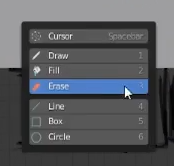
      How can I make this menu pop up ?

      (video 1 “Blocking” at 10:39)

      Thanks !

      #51513
      Jonathan Lampel
      Participant

        In the older version of 2.80 beta, the spacebar action was set to the toolbar. You can still get this if you want by going to your preferences and changing it under Keymap at the top right. 

        #51514
        Shawn Blanch
        Participant

          @jlampel  Follow-up Q. Is there a way to keymap that context menu to another key perhaps?? I know that the MeshMachine add-on does this for their tools using the “x” or “y” keys. It opens up a context menu similar to what happens when you push the space bar. Plus when that context menu opens it lets you push other keys on the keyboard for additional functionality (even keys that are “normally keymapped” for other stuff have a second “superpower” now per-se!)

          How does one go about adding that for a given tool like this?

          #51515
          Jonathan Lampel
          Participant

            Sure, you can do that in the preferences! Search for the keybinding for W (for example) and disable it. Then search for the name toolbar and replace it with W. Now W brings up the tools instead of cycling selection modes! 

          Viewing 4 posts - 1 through 4 (of 4 total)
          • The topic ‘how to make the contextual grease pencil tool menu pop up ?’ is closed to new replies.