
Fins deform after joining.
Forum Archive › Fins deform after joining.
- This topic has 17 replies, 7 voices, and was last updated 6 years, 1 month ago by
stawpeed.
-
AuthorPosts
-
September 18, 2019 at 7:11 pm #10723
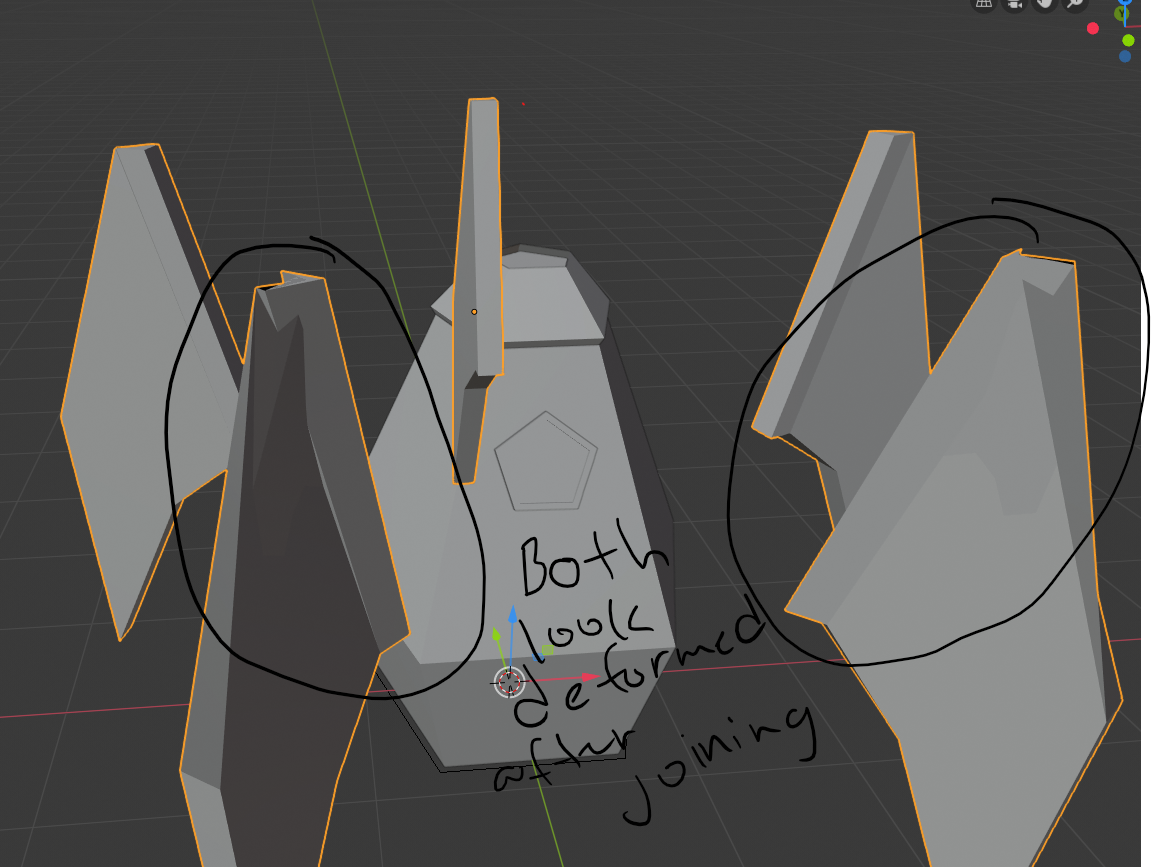
When I join the 5 rocket fins together they somehow deform?
 September 18, 2019 at 8:07 pm #50961
Now that IS weird. Hmmm.
Have you tried applying scale and rotation to everything before joining?
September 18, 2019 at 8:48 pm #50962Sadly, yes. I scaled it out a little and rotated it for a bit to see if it worked but the results are the same. Should I just remake the fin and see if that works out instead?
September 19, 2019 at 2:56 pm #50963applying location, rotation or scale is not the same as using them…
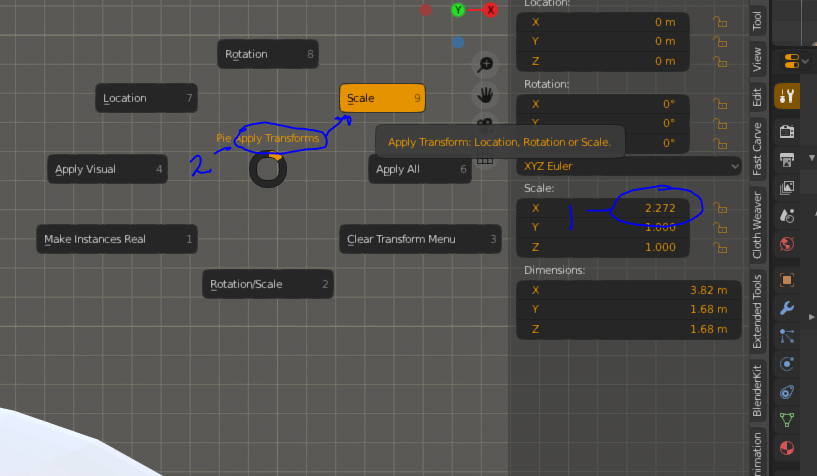
1. with the n panel open check to see if rotation values are all at zero and scale values are all at one…
2. if they are not then (with the fin object selected) using ctrl + a open the pie menu to apply these values…
an alternate to this is to pull down the object menu in the header and find apply and select location rotation or scale…
September 19, 2019 at 9:26 pm #50964Oh.. yea sorry I’m not that well versed in blender yet. But I tried to apply scale and rotation before joining but it didn’t work.
September 20, 2019 at 3:07 am #50965Hi Mark!
I am not sure about this, but to me it looks like all five fins are deformed and it seems to be a Normals issue. My guess is also that this deformation was already there before joining the fins…
Try this: select the fins, go into Edit Mode, press Shift-N (Recalculate Normals).
If this doesn’t help, please provide a link to your .blend file.
September 26, 2019 at 1:10 am #50966It still doesn’t work, but thanks for the advice plus how do you provide a link? I’m really new to Blender, apologies for my lack of knowledge.
September 26, 2019 at 2:53 am #50967@marku you don’t have to apologize for being new to Blender;)
Anyway providing a link has nothing to do with Blender…
Upload your .blend file to Dropbox or Google drive or cloud service you prefer and that will allow you to make a share link, which you can then paste here.
January 18, 2020 at 7:12 pm #50968Hey marku,
I know it’s been a while since you posted this question, but I ran into the same issue. I realized I had extra vertices selected when extruding toward the RocketFuselage. Because of this an additional vertex was formed in the first Rocketfin, which I believe causes the additional copies to look deformed as one object. Hope this helps!January 18, 2020 at 8:22 pm #50969If you have extra verticies why would it look any different?
January 18, 2020 at 11:39 pm #50970Hey @concrescence,
I think this is in response to my comment. (Sorry new to commenting/responding on the forums) When I selected and extruded extra vertices, instead of the 2 that were shown in the video, then hit CTRL+J that’s when the deformation appeared. I didn’t even realize I selected additional vertices because my fin looked perfectly fine. It’s only when I joined everything I noticed the deformation. Not sure why that is once you hit join…
Sorry for the confusion on my original comment.January 19, 2020 at 4:32 pm #50971I don’t use join that much, I seem to remember some it not working intuitively, If you have the old blend file with the extra verts could you upload it? I’m going to experiment with joining primitive objects (like cube, cone, etc…)
January 19, 2020 at 4:36 pm #50972Have you tried using the fill function in your projects I think you will like it. Lets say you join two cubes you can select the 2 verts from the sides of each then press ‘f’ to make a plane.
August 5, 2020 at 6:46 am #50973Hi there. im stucking at this deforming fins too. Here is the Blender file. Please help me to solve this problem.
August 5, 2020 at 9:25 am #50974Hi stawpeed, thanks for the .blend file.
You have double vertices in you fins:
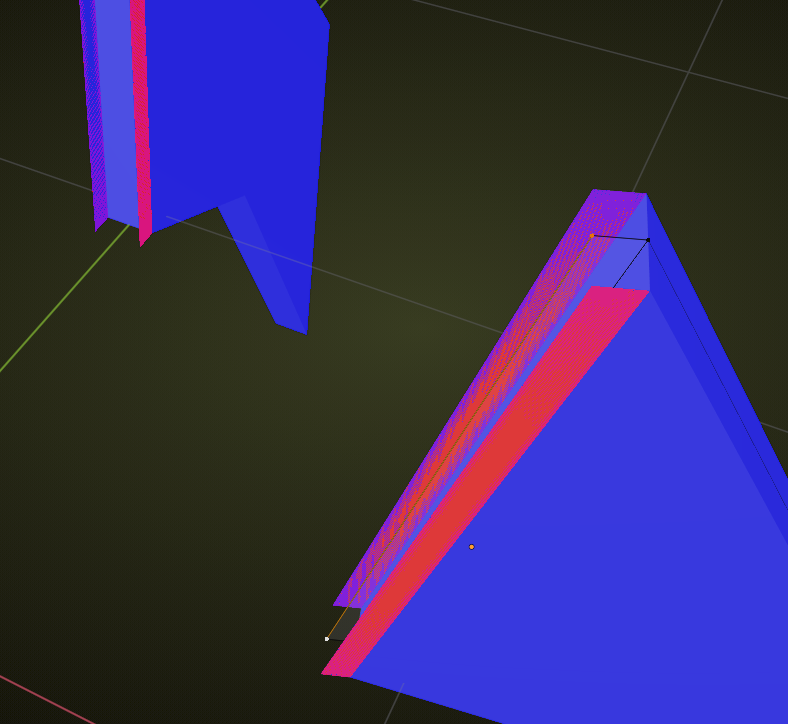
Remove doubles solves that:
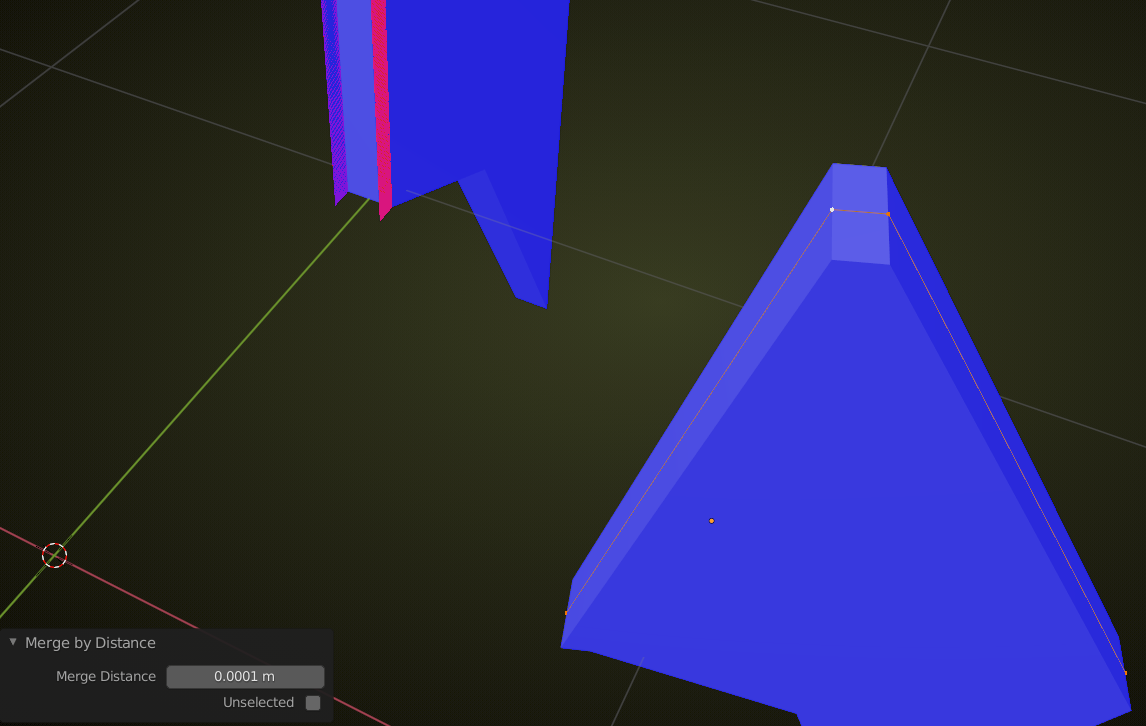
Easiest solution is to select all the five fins in Object Mode, then go into Edit Mode, select everything with A and then press M > Merge by Distance when using 2.83+ or press ALT+M > Merge by Distance if you are using 2.82 or before.
Then you can join them.
-
AuthorPosts


- The topic ‘Fins deform after joining.’ is closed to new replies.