How do you show your measurements in Blender 2.8?

Forum Archive How do you show your measurements in Blender 2.8?

Viewing 5 posts - 1 through 5 (of 5 total)
  • Author
    Posts
  • #10594
    wutang96
    Participant

      How to enable the active measurements you have in the tutorial in 2.8?

      #50538
      Shawn Blanch
      Participant

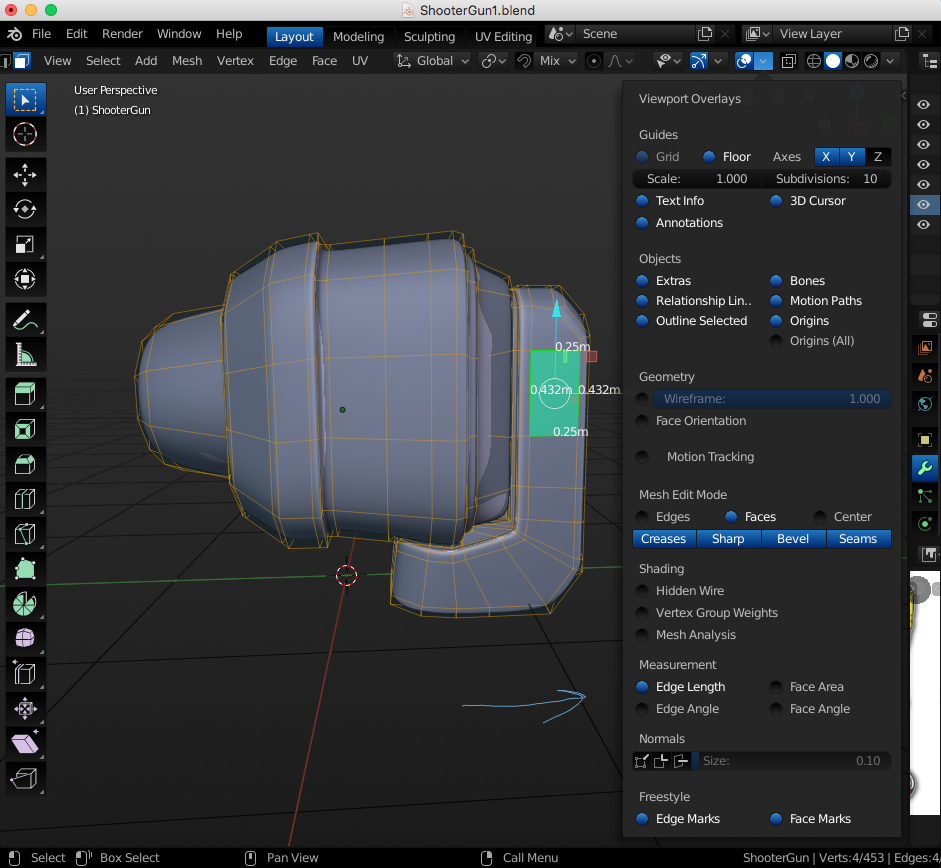
        Not sure if this is what you are looking for but you can turn on Measurements as shown below:

        It is in the Viewport Overlays Menu (in the Header on the right side, The Double Circle Icon)

        #50539
        wutang96
        Participant

          Thanks!

          #50540
          François Cros
          Participant

            Isn’t Blender 2.8 using metric system by default ?

            #50541
            Matthew Fricker
            Participant

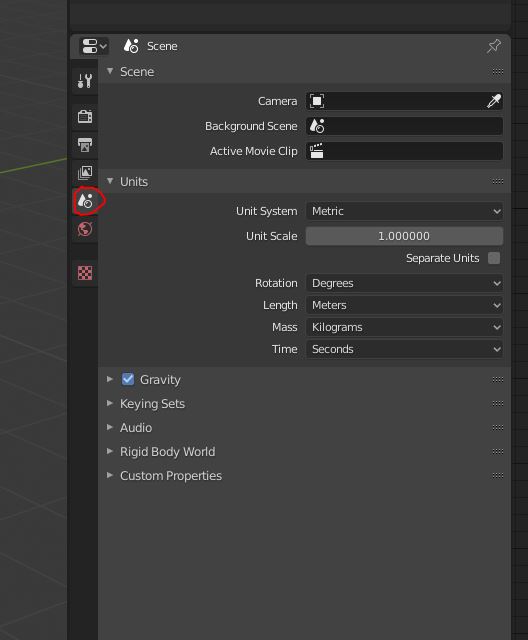
              @advancre  , you can change all the settings for metric , imperial . rotation , length etc here : 

            Viewing 5 posts - 1 through 5 (of 5 total)
            • The topic ‘How do you show your measurements in Blender 2.8?’ is closed to new replies.