Make Light Affect one object but not another

Forum Archive Make Light Affect one object but not another

Viewing 13 posts - 1 through 13 (of 13 total)
  • Author
    Posts
  • #10289
    Chris Heuer
    Participant

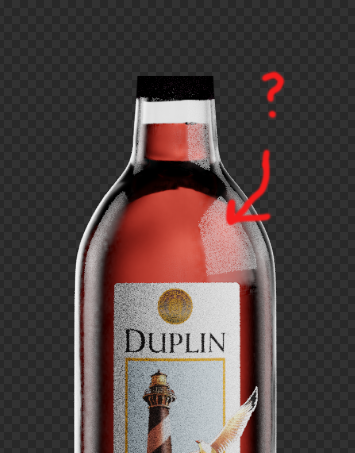
      I am trying to make a Photo-real wine bottle and am having one issue with lighting it.  The foil on the top pf the bottle is dark, when I add a special light to bring it up, it reflects in the bottle.

      I can’t turn off “Glossy” in the Cycles settings under the Object tab because glossy is what is lighting the foil.

      Is there a way to have the light illuminate the foil but not affect the bottle at all?

      Sorry for the inaccurate Sub Category choice.  None seemed to fit

      #45527
      Palo Piktor
      Participant

        Is your goal to create a photoreal image ?

        If so, you can separate the foil from the bottle to separate render layer. You can than join those two layers in compositor.

        #45528
        Chris Heuer
        Participant

          @thepainter Yes, Photo-real is the goal.  I have shied away from render layers in the past but this may be the time to commit to learn.

          Thanks

          #45529
          Chris Heuer
          Participant

            @thepainter And here’s why I skip render layers:

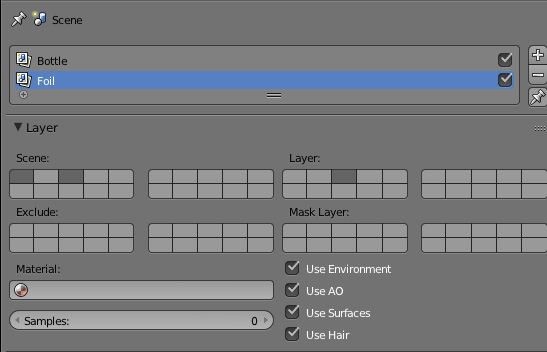
            I put the bottle on layer 1 and created a render layer called “Bottle”.

            I put the Foil and the foil light on layer 3 and created a second render layer called “Foil”.

            In the Scene tab I set the Bottle “Layer” button to square 1 and the Foil button to square 3 (Pic attached)

            Then I Selected both 1 & 3 under Scene.

            When I render, That foil light is showing up in the bottle reflection.

            #45530
            Chris Heuer
            Participant

              @jonas The Blender Wiki says this should happen, the reflection from another layer still showing up.  Is there a way to kill this?

              #45531
              Palo Piktor
              Participant

                @jonas How about excluding it ? Or create separate scenes in your view. Not render layer.

                #45532
                spikeyxxx
                Participant

                  Hello Chris, realistically, if there is a light, it should reflect in the bottle. What I would do is change the material of the foil, because it shouldn’t be so dark in the first place. 

                  What you ask for CAN be done with Render Layers, like Palo said, but it will look unrealistic.

                  #45533
                  Chris Heuer
                  Participant

                    @spikeyxxx I thought about that but I am working off of actual bottles & photos from the winery.  The material is behaving very closely to the actual foil under various lighting conditions, so that part is good.  If I pump up the side lights, the foil looks perfect but the highlight on the bottle is stronger than the client wants.

                    CG lighting cheats so many actual laws of lighting, I was hoping I could easily turn off the reflection in this instance.

                    Would Object Identifiers help?  Can I make a light that only effects the object it’s assigned?

                    C

                    #45534
                    Chris Heuer
                    Participant

                      @thepainter Can you elaborate a bit on excluding?  If I make a second scene, can I composite it back together like Render Layers?

                      Thanks,

                      Chris

                      #45535
                      spikeyxxx
                      Participant

                        Hi Chris, I’ve tried to reproduce your problem, but I couldn’t (see bad picture). 

                        I still say that the problem lies in your foil material.(Maybe just increase the value?) 

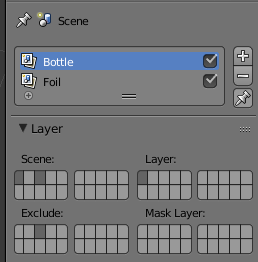
                        What Palo was saying is that you should exclude the foil and light layer from the bottle layer (see screenshot).

                        #45536
                        Chris Heuer
                        Participant

                          @spikeyxxx Hey!  Thanks for putting in the extra effort!  I have never used Exclude.  I will give that a shot!  Thanks again.

                          #45537
                          Chris Heuer
                          Participant

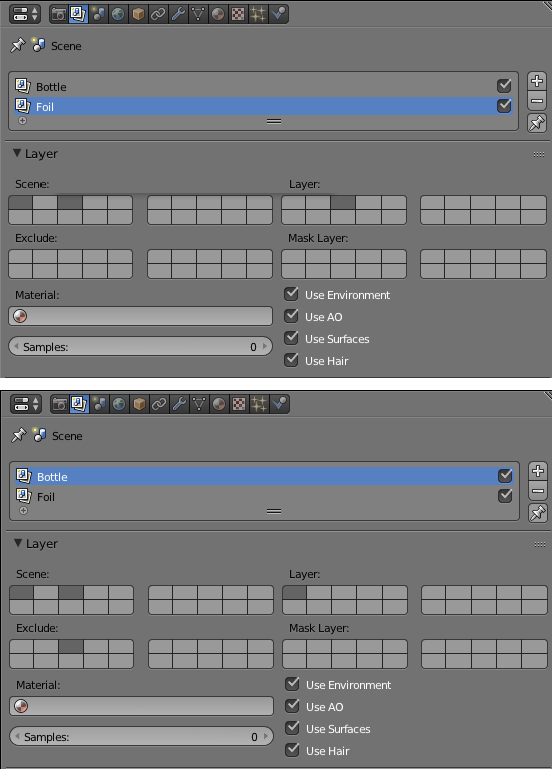
                            @spikeyxxx That did it!  Below are my settings for the two render layers.

                              No light reflection in the bottle anymore!

                            #45538
                            spikeyxxx
                            Participant

                              @jonas Glad you got it working!

                            Viewing 13 posts - 1 through 13 (of 13 total)
                            • The topic ‘Make Light Affect one object but not another’ is closed to new replies.