Huion pro 13 – can´t bind shift to button on tablet

Forum Archive Huion pro 13 – can´t bind shift to button on tablet

Viewing 3 posts - 1 through 3 (of 3 total)
  • Author
    Posts
  • #10288
    snowingname
    Participant

      Hey there,  I bought myself the 

      huion

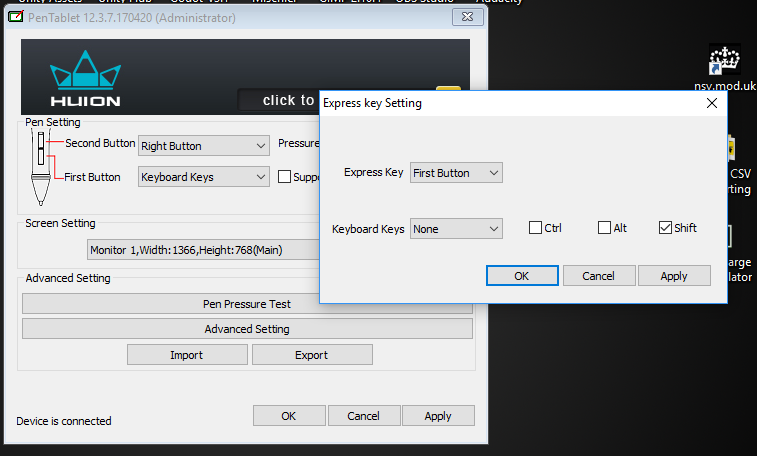
      pro 13 and I am fairly happy with it.  Normally I use the tablet in combination with the keyboard from my PC.  But now I am traveling now and just have the laptop, where I feel uncomfortable with the keyboard. So I wanted to change the primary used buttons to the tablet.

       I could bind for example the alt-button and use it with the combination from my pen as middle mouse button very well. The shift-button instead don’t work, so I can’t move well in the viewport.  I also downloaded the latest updates etc. do you have the same problems or have some tips to fix it? Big thanks in advance  Snow 

      #45525
      Darren McBain
      Participant

        ive got the Huion 610 Pro, using the Express Key Settings on the software and bind a button to keyboard keys, selecting ‘none’ for the key and popping the checkbox for ‘shift’

        not sure if yours is the same or not from a software perspective.  but hopefully get the ball rolling 🙂

        hope you get a workaround or fix for it..

        #45526
        snowingname
        Participant

          @oboshape Thank you for the reply. Sadly i have a slight different view. But the options are the same. I choose the same options as you but its not working. 

        Viewing 3 posts - 1 through 3 (of 3 total)
        • The topic ‘Huion pro 13 – can´t bind shift to button on tablet’ is closed to new replies.